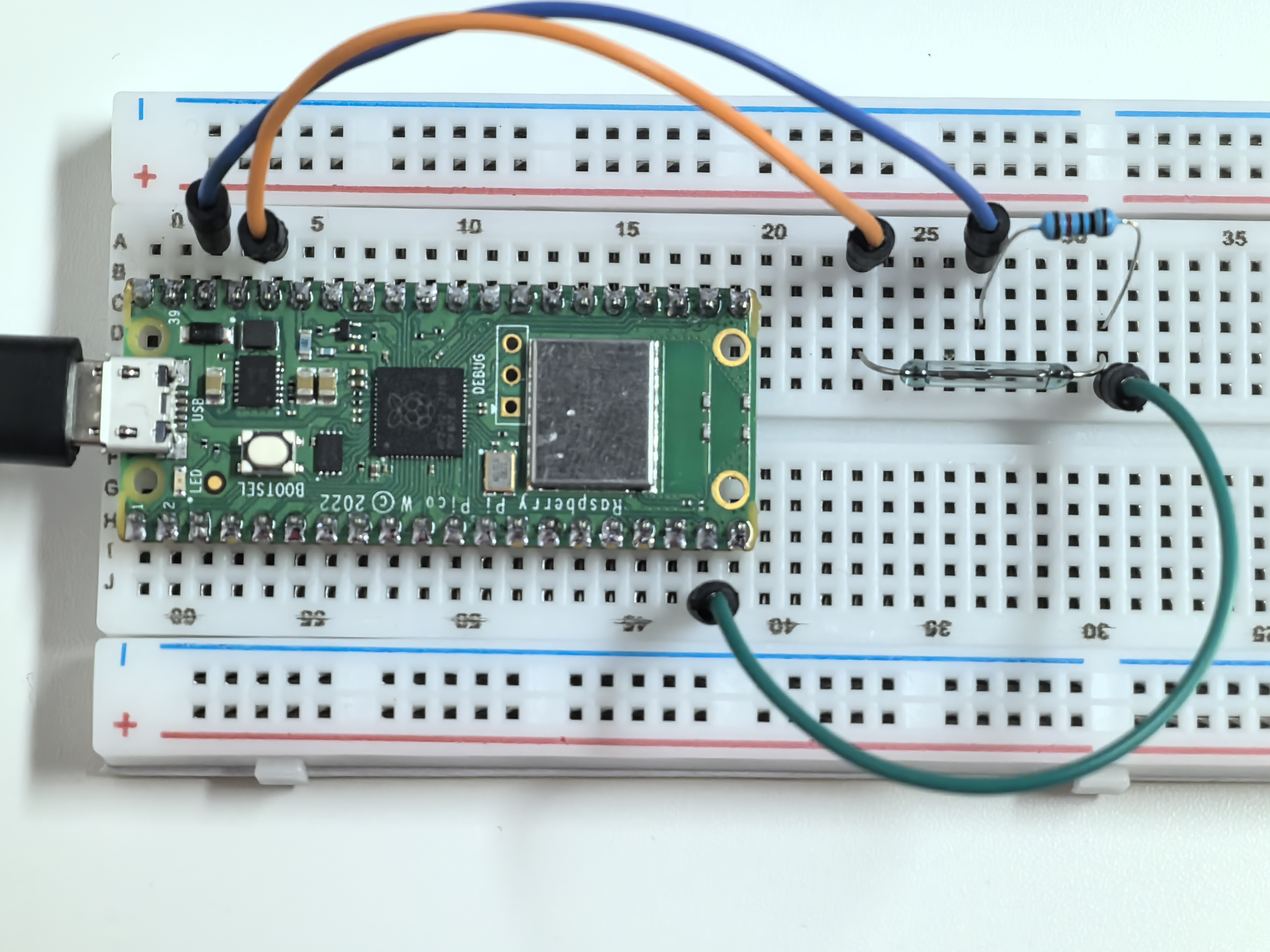
1.9 Magnetic Trigger
A reed switch is a magical “invisible touch” sensor that responds to magnetism! It contains two thin metal strips (reeds) sealed in a glass tube. When you bring a magnet close, these strips are attracted to each other and touch, completing an electrical circuit.
Remove the magnet, and the strips spring apart, breaking the connection. It’s like having a wireless switch that activates through glass, plastic, or wood! You’ll find these in door alarms, laptop lid sensors, and bike speedometers.
Component List
Raspberry Pi Pico W x1
MicroUSB cable x1
830 Tie-Points Breadboard x1
Jumper Wire Several
Resistor 10KΩ x1
Reed Switch x1
Component knowledge
Reed Switch
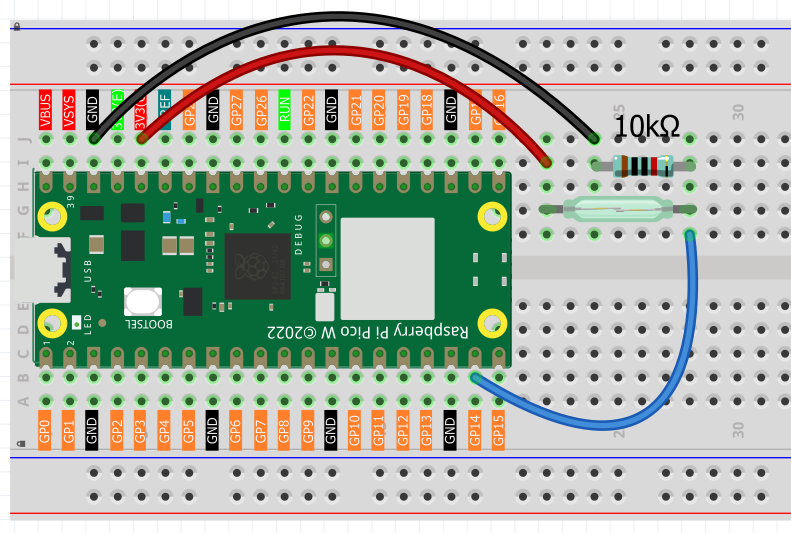
How magnetic detection works: - No magnet nearby: Reed strips are apart → GP14 reads LOW (0V) - Magnet approaches: Reed strips touch → GP14 reads HIGH (3.3V)
The 10KΩ pull-down resistor ensures GP14 stays at a stable LOW when no magnetic field is detected, preventing false readings.
Connect
Code
Note
Open the
1.9_magnetic_trigger.inofile under the path ofUltimate-Starter-Kit-for-Pico-W\Arduino\1.Projector copy this code into Thonny, then click “Run Current Script” or simply press F5 to run it.Or copy this code into Arduino IDE.
Don’t forget to select the board(Raspberry Pi Pico) and the correct port before clicking the Upload button.
After running the code, bring a magnet close to the reed switch and move it away. You’ll see “MAGNET DETECTED!” messages with detection counters and timestamps, plus continuous monitoring that shows how long the magnet stays near the sensor.
The following is the program code:
/*
  Magnetic Presence Detector

  Detects when a magnet is near using a reed switch.
  Provides user-friendly feedback and tracks detection events.

  Note: Reed switches detect presence/absence, not magnetic strength.
*/

// Pin definition for the reed switch
const int REED_SWITCH = 14;         // reed switch connected to pin 14

// Variables to track magnetic presence
bool magnetPresent = false;         // current state (true = magnet detected)
bool lastMagnetState = false;       // previous state for change detection
unsigned long detectionTime = 0;    // when magnet was first detected
unsigned long totalDetections = 0;  // count of total detections

void setup() {
  // Set up the reed switch pin as input
  pinMode(REED_SWITCH, INPUT);

  // Start serial communication
  Serial.begin(115200);

  // Initialize the detector with welcome message
  initializeDetector();
}

void loop() {
  // Check for magnetic presence
  scanMagneticField();

  // Update continuous presence monitoring
  updatePresenceMonitor();

  // Small delay for stability
  delay(100);
}

// Function to display welcome message and initialize system
void initializeDetector() {
  Serial.println("=== Magnetic Presence Detector ===");
  Serial.println("Bring a magnet close to the sensor");
  Serial.println("System ready for detection...");
  Serial.println("==================================");
  Serial.println();
}

// Function to check for magnetic field presence and detect changes
void scanMagneticField() {
  // Read current reed switch state
  magnetPresent = digitalRead(REED_SWITCH);

  // Check if magnet was just detected (state change from absent to present)
  if (magnetPresent && !lastMagnetState) {
    // Record detection time and increment counter
    detectionTime = millis();
    totalDetections++;

    // Announce detection
    triggerDetectionAlert();
  }

  // Check if magnet was removed (state change from present to absent)
  if (!magnetPresent && lastMagnetState) {
    Serial.println("--- Magnet removed ---");
    Serial.println("Field cleared");
    Serial.println();
  }

  // Remember current state for next comparison
  lastMagnetState = magnetPresent;
}

// Function to announce when a magnet is detected
void triggerDetectionAlert() {
  Serial.println("*** MAGNET DETECTED! ***");

  // Show detection details
  Serial.print("Detection #");
  Serial.println(totalDetections);

  Serial.print("Time: ");
  Serial.print(detectionTime);
  Serial.println(" ms");

  Serial.println("Status: ACTIVE");
  Serial.println();
}

// Function to monitor continuous magnetic presence
void updatePresenceMonitor() {
  // If magnet has been present for more than 5 seconds, show duration
  if (magnetPresent && (millis() - detectionTime > 5000)) {
    // Only show message every 3 seconds to avoid spam
    if ((millis() - detectionTime) % 3000 < 100) {
      Serial.println(">> Magnet still present <<");
      Serial.print("Duration: ");
      Serial.print((millis() - detectionTime) / 1000);
      Serial.println(" seconds");
      Serial.println();
    }
  }
}
Phenomenon