1.3 Chaser Light
Now let’s create a fun visual effect using multiple LEDs! We’ll use an LED Bar Graph, which contains 10 LEDs in a single package. This creates a “chaser light” effect where LEDs light up one after another, like you see on old TV shows or electronic displays.
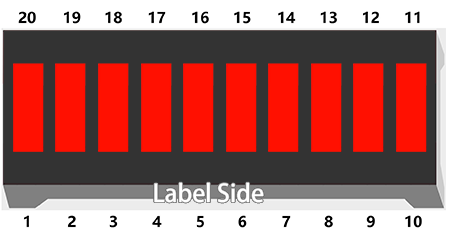
Component List
Raspberry Pi Pico W x1
MicroUSB cable x1
830 Tie-Points Breadboard x1
Resistor 220Ω x10
Jumper Wire Several
LED Bar Graph x1
Component knowledge
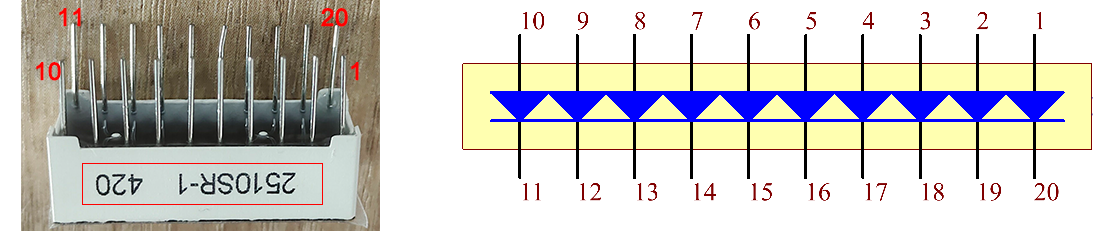
LED Bar Graph
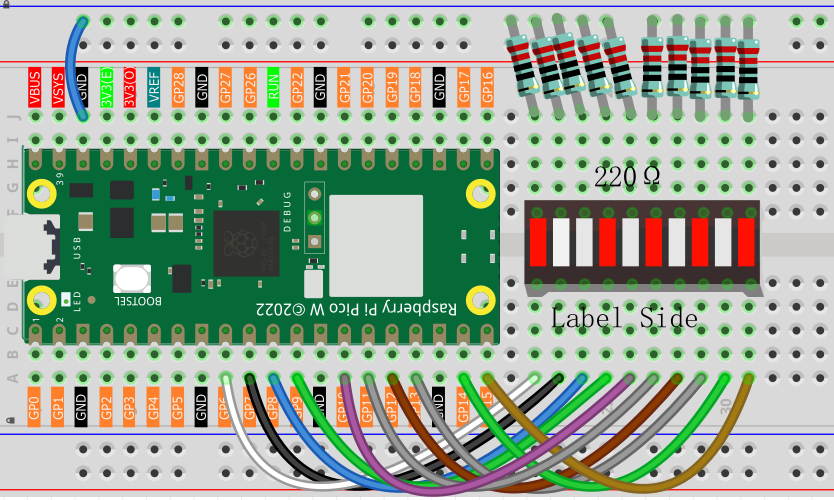
In the LED Bar Graph, there are 10 LEDs, each of which can be controlled individually. Each LED’s anode is connected to GPIO pins 6-15, and its cathode is connected through a 220Ω resistor to GND.
Connect
Code
Note
Open the
1.3_chaser_light.inofile under the path ofUltimate-Starter-Kit-for-Pico-W\Arduino\1.Projector copy this code into Thonny, then click “Run Current Script” or simply press F5 to run it.Or copy this code into Arduino IDE.
Don’t forget to select the board(Raspberry Pi Pico) and the correct port before clicking the Upload button.
After running the code, you’ll see three different light patterns: first odd LEDs (1st, 3rd, 5th…), then even LEDs (2nd, 4th, 6th…), and finally all LEDs lighting up in sequence from left to right.
The following is the program code:
/*
  Chaser Light

  Controls 10 LEDs in sequence with different animation patterns:
  - Odd positioned LEDs (0, 2, 4, 6, 8)
  - Even positioned LEDs (1, 3, 5, 7, 9)
  - All LEDs in sequence (0 to 9)
*/

// LED pins array - using pins 6 through 15
const int ledPins[] = {6, 7, 8, 9, 10, 11, 12, 13, 14, 15};
const int numLeds = 10;
const int delayTime = 300;  // delay between LED changes

void setup() {
  // initialize all LED pins as outputs
  for (int i = 0; i < numLeds; i++) {
    pinMode(ledPins[i], OUTPUT);
    digitalWrite(ledPins[i], LOW);  // turn off all LEDs initially
  }
}

void loop() {
  // Pattern 1: Light odd positioned LEDs (0, 2, 4, 6, 8)
  lightOddLeds();
  delay(delayTime);

  // Pattern 2: Light even positioned LEDs (1, 3, 5, 7, 9)
  lightEvenLeds();
  delay(delayTime);

  // Pattern 3: Light all LEDs in sequence
  lightAllLeds();
  delay(delayTime);
}

void lightOddLeds() {
  for (int i = 0; i < numLeds; i += 2) {  // 0, 2, 4, 6, 8
    digitalWrite(ledPins[i], HIGH);   // turn LED on
    delay(delayTime);
    digitalWrite(ledPins[i], LOW);    // turn LED off
  }
}

void lightEvenLeds() {
  for (int i = 1; i < numLeds; i += 2) {  // 1, 3, 5, 7, 9
    digitalWrite(ledPins[i], HIGH);   // turn LED on
    delay(delayTime);
    digitalWrite(ledPins[i], LOW);    // turn LED off
  }
}

void lightAllLeds() {
  for (int i = 0; i < numLeds; i++) {  // 0 to 9
    digitalWrite(ledPins[i], HIGH);   // turn LED on
    delay(delayTime);
    digitalWrite(ledPins[i], LOW);    // turn LED off
  }
}