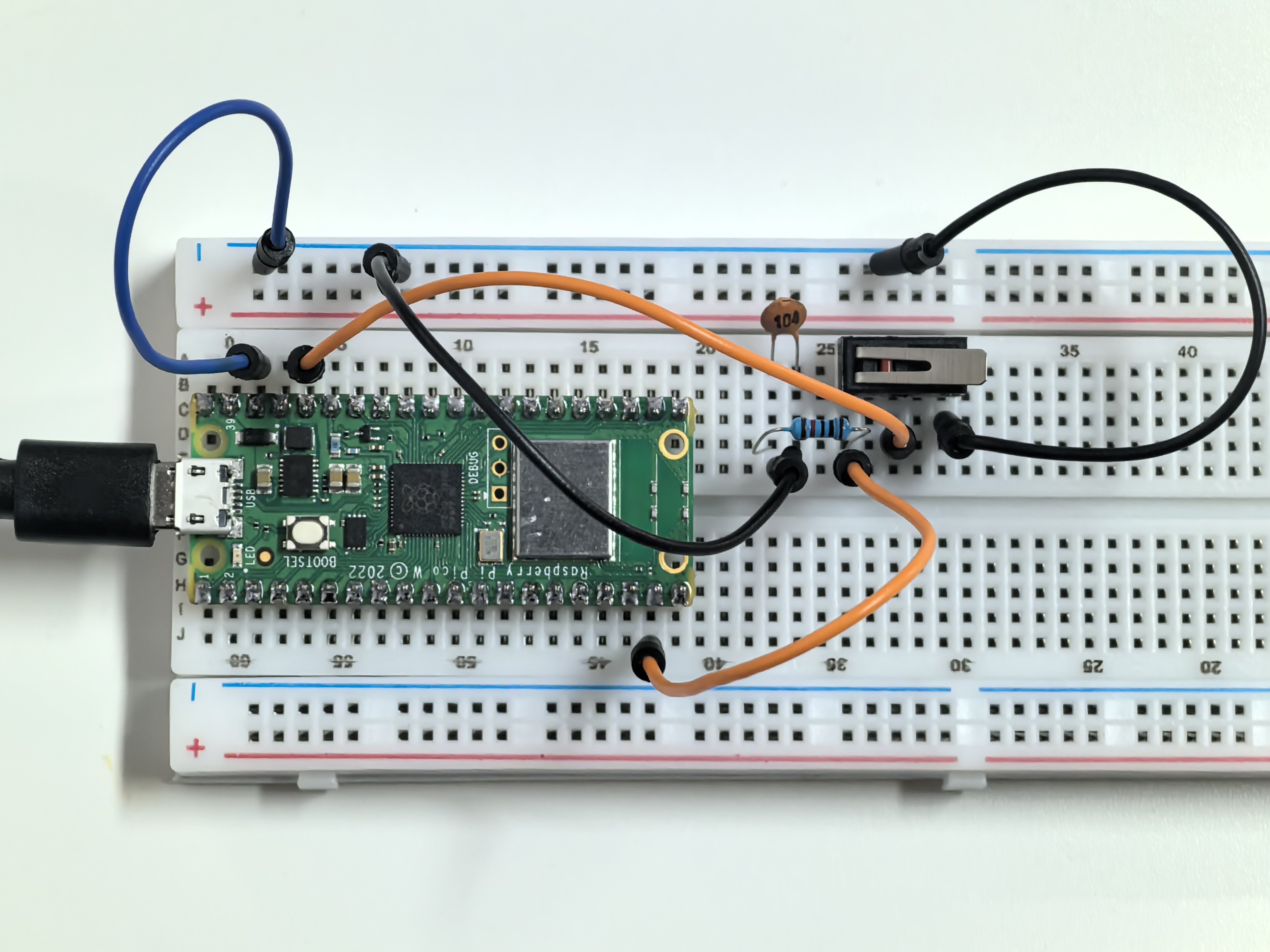
1.8 Gentle Press
A micro switch is a precision button designed for detecting gentle touches! Unlike regular buttons, it has three pins: C (Common), NO (Normally Open), and NC (Normally Closed).
Think of it like a see-saw: when not pressed, C connects to NC. When pressed, C flips to connect to NO instead. This makes it perfect for applications requiring precise, reliable switching.
Component List
Raspberry Pi Pico W x1
MicroUSB cable x1
830 Tie-Points Breadboard x1
Jumper Wire Several
Resistor 10KΩx1
Capacitor 104 x1
Micro Switch x1
Component knowledge
Micro Switch
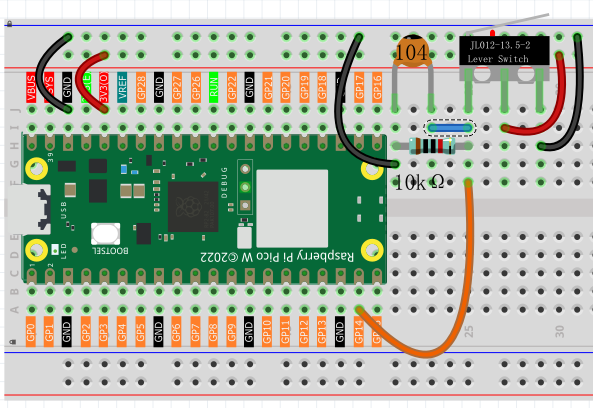
How our circuit works: - Not pressed: C connects to NC → GP14 reads LOW (0V) - Pressed: C connects to NO → GP14 reads HIGH (3.3V)
The 10KΩ pull-down resistor ensures GP14 stays LOW when unpressed, and the 104 capacitor eliminates button bounce (rapid on/off signals when pressing).
Connect
Code
Note
Open the
1.8_gentle_press.inofile under the path ofUltimate-Starter-Kit-for-Pico-W\Arduino\1.Projector copy this code into Thonny, then click “Run Current Script” or simply press F5 to run it.Or copy this code into Arduino IDE.
Don’t forget to select the board(Raspberry Pi Pico) and the correct port before clicking the Upload button.
After running the code, try pressing the micro switch for different durations. The program will measure how long you press and give different responses: “QUICK TAP” for short presses, “MEDIUM PRESS” for moderate holds, and “LONG HOLD” for extended presses, complete with sound effects!
The following is the program code:
/*
  Press Duration Counter

  Measures how long a button is pressed and provides
  different responses based on press duration.
  Shows statistics about button usage.
*/

// Pin definition for the button
const int BUTTON_PIN = 14;          // button connected to pin 14

// Variables to track button state
bool isPressed = false;             // current button state (true = pressed)
bool wasPressed = false;            // previous button state for comparison
unsigned long pressStartTime = 0;   // when the button was first pressed
unsigned long pressDuration = 0;    // how long the button was held
int totalPresses = 0;               // count of total button presses

void setup() {
  // Set up the button pin as input
  pinMode(BUTTON_PIN, INPUT);

  // Start serial communication
  Serial.begin(115200);

  // Show instructions to user
  showInstructions();
}

void loop() {
  // Check button state and handle press events
  handleButtonPress();

  // Small delay for stability
  delay(10);
}

// Function to display instructions at startup
void showInstructions() {
  Serial.println("*** Press Duration Counter ***");
  Serial.println("Press and hold the button for different durations:");
  Serial.println("- Quick press (< 500ms): Short beep");
  Serial.println("- Medium press (500-2000ms): Medium beep");
  Serial.println("- Long press (> 2000ms): Long beep");
  Serial.println("===============================");
}

// Function to monitor button state and detect press/release events
void handleButtonPress() {
  // Read current button state
  isPressed = digitalRead(BUTTON_PIN);

  // Check if button was just pressed (transition from not pressed to pressed)
  if (isPressed && !wasPressed) {
    // Record the time when button was pressed
    pressStartTime = millis();
    Serial.print("Button pressed... ");
  }

  // Check if button was just released (transition from pressed to not pressed)
  if (!isPressed && wasPressed) {
    // Calculate how long the button was held
    pressDuration = millis() - pressStartTime;
    totalPresses++;  // increment total press counter

    // Show the duration
    Serial.print("Released! Duration: ");
    Serial.print(pressDuration);
    Serial.println("ms");

    // Analyze the press type based on duration
    categorizePressType();

    // Show current statistics
    showStatistics();
  }

  // Remember current state for next loop comparison
  wasPressed = isPressed;
}

// Function to categorize press type based on duration
void categorizePressType() {
  Serial.print("Press type: ");

  // Check duration and provide appropriate feedback
  if (pressDuration < 500) {
    Serial.println("QUICK TAP");
    Serial.println("♪ Beep!");           // short sound effect
  } else if (pressDuration < 2000) {
    Serial.println("MEDIUM PRESS");
    Serial.println("♪♪ Beep-Beep!");     // medium sound effect
  } else {
    Serial.println("LONG HOLD");
    Serial.println("♪♪♪ Beep-Beep-Beep!"); // long sound effect
  }
}

// Function to display usage statistics
void showStatistics() {
  Serial.print("Total presses: ");
  Serial.println(totalPresses);
  Serial.println("---");  // separator line for readability
}
Phenomenon