6.6 Traffic Light System
Build your own smart traffic light controller with authentic timing and professional display! Ever wondered how real traffic lights work? Now you can create a miniature version that follows actual traffic light patterns.
🚦 What You’ll Create: A fully functional traffic light system that automatically cycles through all three phases - just like the ones controlling traffic at intersections! Plus, it includes a digital countdown timer showing exactly how much time is left in each phase.
🎯 Real Traffic Light Rules: - 🔴 Red Light (30 seconds): STOP! All traffic must wait - 🟡 Yellow Light (5 seconds): CAUTION! Prepare to stop - 🟢 Green Light (30 seconds): GO! Safe to proceed
⏰ Smart Features: - Automatic Timing: Follows real-world traffic light timing patterns - Digital Countdown: 4-digit display shows remaining seconds for each phase - Authentic Colors: Uses actual red, yellow, and green LEDs - Continuous Operation: Runs indefinitely just like real traffic lights - Professional Display: 7-segment display for clear time visibility
🏗️ Why This is Cool: Learn about traffic management systems, timing circuits, and multi-component coordination while building something that actually resembles real infrastructure!
Component List
Raspberry Pi Pico W x1
MicroUSB cable x1
830 Tie-Points Breadboard x1
Resistor 220Ω x7
4-Digit 7-Segment Display x1
74HC595 x1
LED x3
Jumper Wire Several
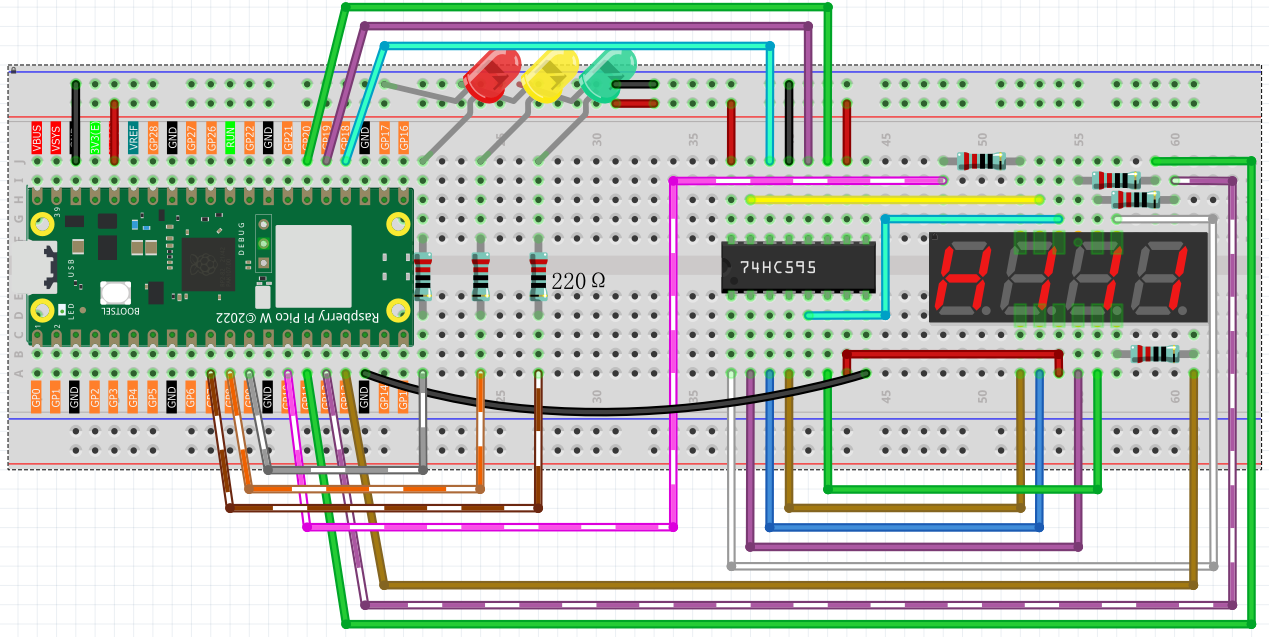
🔧 How It Works: This project combines two powerful systems: - 4-digit 7-segment display (from project 4.3) shows the countdown timer - 3 traffic light LEDs connected to GP7, GP8, and GP9 for red, yellow, and green
🎛️ The Smart Control System: The Pico acts as a traffic controller, automatically managing both the LED states and countdown display. When one light phase ends, it immediately switches to the next phase and resets the timer - just like real traffic management systems!
Connect
Code
Note
Open the
6.6_traffic_light.pyfile under the path ofUltimate-Starter-Kit-for-Pico-W\Python\1.Projector copy this code into Thonny, then click “Run Current Script” or simply press F5 to run it.Don’t forget to click on the “MicroPython (Raspberry Pi Pico)” interpreter in the bottom right corner.
After running the code, watch your professional traffic light system come alive!
🚦 What You’ll See: 1. Green Phase: Green LED lights up, display counts down from 30 to 1 2. Yellow Phase: Yellow LED lights up, display counts down from 5 to 1 3. Red Phase: Red LED lights up, display counts down from 30 to 1 4. Cycle Repeats: System automatically returns to green and continues forever
🎮 Interactive Experience: - Watch the countdown timer tick down in real-time - See the smooth transitions between each traffic phase - Observe how the LED and display sync perfectly - Experience the authentic timing used in real traffic systems
🧪 Fun Experiments: - Time how long each full cycle takes (65 seconds total!) - Compare with real traffic lights in your area - Imagine controlling toy cars or model trains with this system - Think about how traffic engineers use these timing patterns to manage city traffic
This is exactly how real traffic lights work - with precise timing, automatic cycling, and clear visual indicators!
The following is the program code:
import machine
import time
from machine import Timer

# Traffic light timing constants (seconds)
GREEN_TIME = 30
YELLOW_TIME = 5
RED_TIME = 30
LIGHT_DURATIONS = [GREEN_TIME, YELLOW_TIME, RED_TIME]

# Traffic light states
STATE_GREEN = 0
STATE_YELLOW = 1
STATE_RED = 2
STATE_NAMES = ["GREEN", "YELLOW", "RED"]

# 7-segment display constants
SEGMENT_CODES = [0x3f, 0x06, 0x5b, 0x4f, 0x66, 0x6d, 0x7d, 0x07, 0x7f, 0x6f]
DISPLAY_CLEAR = 0x00
TIMING_DELAY_US = 200
MAX_DIGITS = 4

# Pin definitions
# 74HC595 shift register pins
SDI_PIN = 18    # Serial Data Input
RCLK_PIN = 19   # Register Clock (Latch)
SRCLK_PIN = 20  # Shift Register Clock

# 7-segment display digit control pins
DIGIT_PINS = [10, 13, 12, 11]

# Traffic light LED pins
LED_RED_PIN = 7
LED_YELLOW_PIN = 8
LED_GREEN_PIN = 9
LED_PINS = [LED_RED_PIN, LED_YELLOW_PIN, LED_GREEN_PIN]


# Initialize hardware pins
sdi = machine.Pin(SDI_PIN, machine.Pin.OUT)
rclk = machine.Pin(RCLK_PIN, machine.Pin.OUT)
srclk = machine.Pin(SRCLK_PIN, machine.Pin.OUT)

# Initialize digit control pins
digit_pins = []
for pin_num in DIGIT_PINS:
    digit_pins.append(machine.Pin(pin_num, machine.Pin.OUT))

# === 7-Segment Display Functions (Core - Keep Original Logic) ===

def select_digit(digit):
    """Select which digit (0-3) to display"""
    for i in range(MAX_DIGITS):
        digit_pins[i].value(1)  # Turn off all digits
    digit_pins[digit].value(0)  # Turn on selected digit

def clear_display():
    """Clear the display by sending clear code to shift register"""
    shift_register_send(DISPLAY_CLEAR)

def shift_register_send(data):
    """Send data to 74HC595 shift register"""
    rclk.low()
    time.sleep_us(TIMING_DELAY_US)
    for bit in range(7, -1, -1):
        srclk.low()
        time.sleep_us(TIMING_DELAY_US)
        bit_value = 1 & (data >> bit)
        sdi.value(bit_value)
        time.sleep_us(TIMING_DELAY_US)
        srclk.high()
        time.sleep_us(TIMING_DELAY_US)
    time.sleep_us(TIMING_DELAY_US)
    rclk.high()

# === Traffic Light LED Functions (Core - Keep Original Logic) ===

# Initialize LED pins
led_pins = []
for pin_num in LED_PINS:
    led_pins.append(machine.Pin(pin_num, machine.Pin.OUT))

def set_traffic_light(state):
    """Turn on the specified traffic light LED"""
    for i in range(3):
        led_pins[i].value(0)  # Turn off all LEDs
    led_pins[state].value(1)  # Turn on selected LED


# === System State Variables ===
counter = LIGHT_DURATIONS[STATE_GREEN]
current_state = STATE_GREEN

def timer_callback(timer):
    """Timer interrupt handler for traffic light state management"""
    global counter, current_state

    counter -= 1
    if counter <= 0:
        current_state = (current_state + 1) % 3
        counter = LIGHT_DURATIONS[current_state]

# Initialize timer for 1-second intervals
timer = Timer(period=1000, mode=Timer.PERIODIC, callback=timer_callback)

def display_number(number):
    """Display complete number on 7-segment display (original working logic)"""
    select_digit(0)
    shift_register_send(SEGMENT_CODES[number % 10])

    select_digit(1)
    shift_register_send(SEGMENT_CODES[number % 100 // 10])

    select_digit(2)
    shift_register_send(SEGMENT_CODES[number % 1000 // 100])

    select_digit(3)
    shift_register_send(SEGMENT_CODES[number % 10000 // 1000])

# === Main Control Loop ===
while True:
    display_number(counter)
    set_traffic_light(current_state)