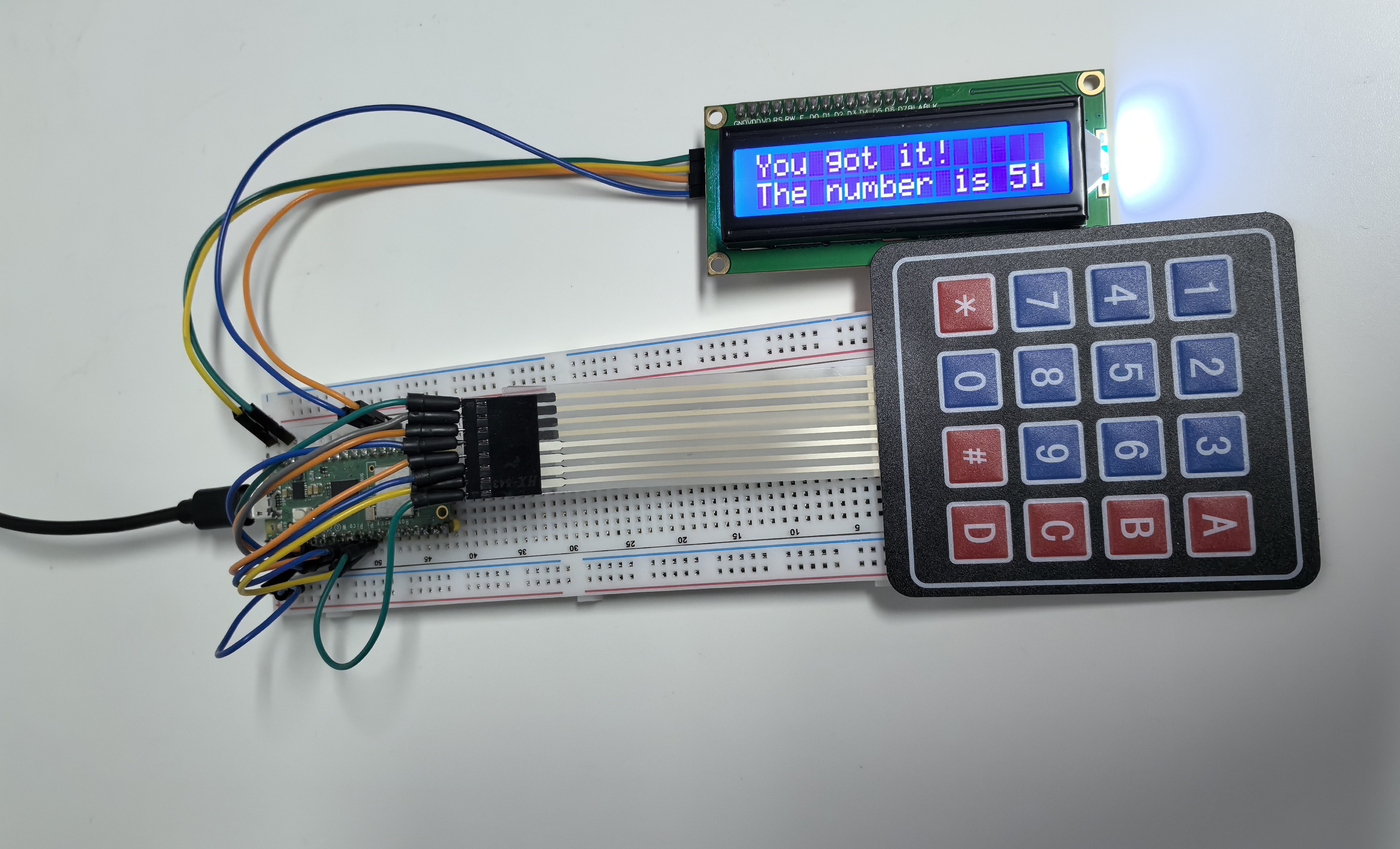
6.11 Game - Guess Number
Create the ultimate interactive guessing game with professional LCD display and physical keypad input! This isn’t just any number game - it’s a fully interactive experience that brings digital gaming into the physical world.
🎯 Game Concept: The system secretly picks a number between 0-99. Your job? Find it using the fewest guesses possible! But here’s the twist - with each guess, the system gives you clues and narrows down the range, making it a strategic puzzle rather than pure luck.
🎮 How The Game Works: Imagine the secret number is 42 (but you can’t see this): 1. You guess 60 → System says “60 is too high” → New range: 0-60 2. You guess 30 → System says “30 is too low” → New range: 30-60 3. You guess 45 → System says “45 is too high” → New range: 30-45 4. You guess 42 → System says “You got it!” → Victory! 🎉
✨ Professional Gaming Features: - Real LCD display shows all game information clearly - Physical keypad input for authentic arcade-style interaction - Smart range tracking helps you strategize your next move - Instant feedback tells you if you’re too high or too low - Automatic reset for endless rounds of fun - Professional debouncing ensures every keypress is registered perfectly
🏆 Why This is Special: - Learn binary search strategy - the most efficient guessing method - Experience physical computing - real buttons and real display - Understand game state management and user interface design - Create a party game that everyone can enjoy together!
Component List
Raspberry Pi Pico W x1
MicroUSB cable x1
830 Tie-Points Breadboard x1
Resistor 10KΩ x4
4x4 Keypad x1
I2C LCD1602 x1
Jumper Wire Several
🎛️ The Gaming Interface:
🔤 4x4 Keypad Layout:
`
[1] [2] [3] [A] ← Start New Game
[4] [5] [6] [B]
[7] [8] [9] [C]
[*] [0] [#] [D] ← Confirm Guess
`
📺 LCD Display Magic: The LCD shows everything you need: - Line 1: Current game status and your input - Line 2: The current guessing range or results - Real-time updates as you type and play
⚡ Smart Input System: This isn’t just a simple keypad connection - it uses advanced techniques: - Internal pull-down resistors eliminate the need for external resistors - Professional debouncing prevents double-clicks and missed inputs - State management tracks exactly what you’re doing at each moment
Connect
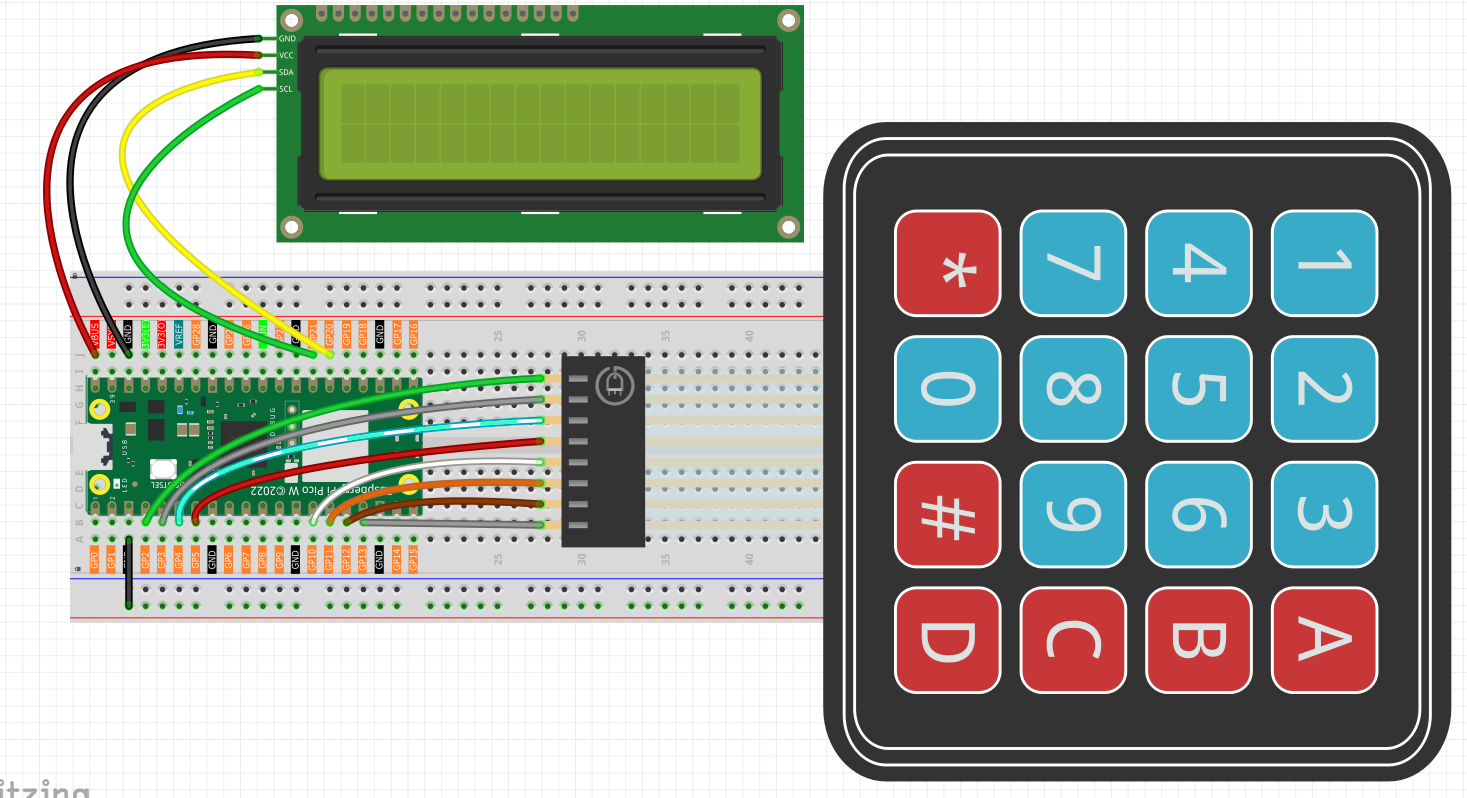
🔧 Simplified Wiring: Thanks to the internal pull-down resistors in the improved code, the wiring is much cleaner than traditional keypad circuits. No external resistors needed - just direct connections!
Code
Note
Open the
6.11_game_guess_number.pyfile under the path ofUltimate-Starter-Kit-for-Pico-W\Python\1.Projector copy this code into Thonny, then click “Run Current Script” or simply press F5 to run it.Don’t forget to click on the “MicroPython (Raspberry Pi Pico)” interpreter in the bottom right corner.
After running the code, get ready for an exciting interactive gaming experience!
🚀 Getting Started: 1. Welcome screen appears: “Guess The Number” / “Press ‘A’ to start” 2. Press ‘A’ to begin your first game 3. Secret number generated: The system picks a random number (0-99) but keeps it hidden 4. Start guessing: LCD shows “Guess the number!” / “0 < ? < 99”
🎮 How to Play: 1. Enter your guess: Use number keys (0-9) - your input appears on screen 2. Confirm with ‘D’: Press D to submit your guess 3. Get instant feedback:
“42 is too high” → Range updates to show new limits
“35 is too low” → Range narrows to guide your next guess
“You got it!” → Victory! The secret number is revealed
Game resets automatically → Ready for another round!
🎯 Pro Gaming Tips: - Use binary search: Always guess the middle of the current range - Watch the range: LCD line 2 shows “25 < ? < 75” to guide you - Clear mistakes: Press ‘#’ to clear your current input - Start over: Press ‘A’ anytime to begin a fresh game
🧠 Strategic Gameplay: - Best strategy: Start with 50, then use the middle of each new range - Maximum guesses needed: Only 7 guesses if you play optimally! - Learning opportunity: Understand how efficient searching algorithms work
🎪 Party Mode: Take turns with friends and see who can guess the number in the fewest tries. The LCD makes it perfect for group play - everyone can see the action!
The following is the program code:
# 6.11_game_guess_number_pro.py
# A professionally refactored version of the Number Guessing Game.
#
# Key Improvements:
# - Uses internal pull-down resistors for the keypad, removing the need for external ones.
# - Implements proper debouncing and state management for reliable key presses.
# - Features a more robust and responsive game loop.
# - Provides a clearer and more interactive user experience on the LCD.

from lcd1602 import LCD
from machine import I2C, Pin
import time
import urandom

# --- Hardware & Game Configuration ---
# LCD Display (I2C bus 0)
LCD_SDA_PIN = 20
LCD_SCL_PIN = 21

# 4x4 Keypad Pins
ROW_PINS = [2, 3, 4, 5]
COL_PINS = [6, 7, 8, 9]

# Keypad Layout
KEYPAD_LAYOUT = [
    ["1", "2", "3", "A"],
    ["4", "5", "6", "B"],
    ["7", "8", "9", "C"],
    ["*", "0", "#", "D"]
]

class GuessTheNumberGame:
    """
    Encapsulates all logic for the number guessing game.
    """
    def __init__(self):
        """Initializes hardware and game state."""
        print("Initializing Guess The Number Game...")
        # Hardware
        self.i2c = I2C(0, sda=Pin(LCD_SDA_PIN), scl=Pin(LCD_SCL_PIN), freq=400000)
        self.lcd = LCD(self.i2c)
        self.row_pins = [Pin(p, Pin.OUT) for p in ROW_PINS]
        # **CRITICAL FIX**: Initialize column pins with internal pull-down resistors.
        self.col_pins = [Pin(p, Pin.IN, Pin.PULL_DOWN) for p in COL_PINS]

        # Game State
        self.target_number = 0
        self.upper_bound = 99
        self.lower_bound = 0
        self.current_guess_str = ""

        # Keypad State Management
        self.last_key_pressed = None
        self.last_key_time = 0
        self.debounce_delay_ms = 200 # Debounce delay to prevent multiple presses

    def reset_game(self):
        """Resets the game to a new round."""
        self.target_number = urandom.randint(0, 99)
        self.upper_bound = 99
        self.lower_bound = 0
        self.current_guess_str = ""
        print(f"New game started. Secret number is: {self.target_number}") # For debugging
        self.update_lcd_display("Guess the number!", f"{self.lower_bound} < ? < {self.upper_bound}")

    def scan_keypad(self):
        """
        Scans the keypad for a single key press.
        Returns the character of the pressed key or None.
        """
        for r, row_pin in enumerate(self.row_pins):
            row_pin.high()
            for c, col_pin in enumerate(self.col_pins):
                if col_pin.value() == 1:
                    row_pin.low() # Reset the row pin
                    return KEYPAD_LAYOUT[r][c]
            row_pin.low()
        return None

    def get_key_press(self):
        """
        Gets a single, debounced key press from the keypad.
        Returns the key character or None if no new key is pressed.
        """
        key = self.scan_keypad()
        current_time = time.ticks_ms()

        if key is not None:
            # Check if this key is different from the last one OR if enough time has passed
            if key != self.last_key_pressed or time.ticks_diff(current_time, self.last_key_time) > self.debounce_delay_ms:
                self.last_key_pressed = key
                self.last_key_time = current_time
                return key
        else:
            # If no key is pressed, reset the last key state
            self.last_key_pressed = None

        return None

    def process_guess(self):
        """Processes the player's guess and updates the game state."""
        if not self.current_guess_str:
            return # Do nothing if guess is empty

        guess = int(self.current_guess_str)

        if guess == self.target_number:
            self.update_lcd_display("You got it!", f"The number is   {self.target_number}")
            time.sleep(3) # Show success message
            self.reset_game()
        elif guess < self.target_number:
            self.lower_bound = max(self.lower_bound, guess)
            self.update_lcd_display(f"{guess} is too low", f"{self.lower_bound} < ? < {self.upper_bound}")
            self.current_guess_str = "" # Clear guess for next try
        else: # guess > self.target_number
            self.upper_bound = min(self.upper_bound, guess)
            self.update_lcd_display(f"{guess} is too high", f"{self.lower_bound} < ? < {self.upper_bound}")
            self.current_guess_str = "" # Clear guess for next try

    def update_lcd_display(self, line1, line2=""):
        """Clears and updates the LCD with two lines of text."""
        self.lcd.clear()
        self.lcd.message(f"{line1}\n{line2}")

    def handle_input(self, key):
        """Handles user input from the keypad."""
        if key.isdigit():
            # Append number to the guess string, with a limit of 2 digits
            if len(self.current_guess_str) < 2:
                self.current_guess_str += key
                self.update_lcd_display("Your guess:", self.current_guess_str)

        elif key == 'D': # 'D' is the confirm/enter key
            self.process_guess()

        elif key == 'A': # 'A' is the new game key
            self.reset_game()

        elif key == '#': # '#' can be used as a backspace/clear key
            self.current_guess_str = ""
            self.update_lcd_display("Guess cleared", "Enter new number")

    def run(self):
        """The main game loop."""
        self.update_lcd_display("Guess The Number", "Press 'A' to start")

        # Wait for 'A' to start the first game
        while self.get_key_press() != 'A':
            time.sleep_ms(50)

        self.reset_game()

        while True:
            key = self.get_key_press()
            if key:
                print(f"Key Pressed: {key}") # For debugging
                self.handle_input(key)

            # A small delay to keep the loop from running too fast
            time.sleep_ms(20)

def main():
    """Main entry point of the program."""
    try:
        game = GuessTheNumberGame()
        game.run()
    except Exception as e:
        print(f"\nAn unexpected error occurred: {e}")
        # Attempt to clear LCD on error
        try:
            lcd = LCD(I2C(0, sda=Pin(20), scl=Pin(21)))
            lcd.clear()
            lcd.message("System Error.\nPlease Reboot.")
        except:
            pass # Ignore if LCD also fails
    finally:
        print("Shutting down.")

if __name__ == "__main__":
    main()
Phenomenon