6.12 RFID Music Jukebox
Build your own magical music player where each RFID card becomes a musical album! Simply tap a card, and watch as your system transforms stored musical notes into beautiful melodies with synchronized LED light shows.
🎵 What You’ll Create: A professional-grade contactless music player that reads musical scores from RFID cards and plays them with stunning visual effects. It’s like having a futuristic jukebox where each card contains a different song!
✨ The Magic Experience: 1. Write music to cards: Store musical notation (like “EEFGGFEDCCDEEDD”) on RFID cards using project 5.5 2. Tap to play: Simply bring a card near the reader - no buttons needed! 3. Instant playback: Your melody plays automatically with buzzer tones 4. Light show: WS2812 LED strip creates a VU meter effect that dances with the music 5. Share music: Give cards to friends with your favorite melodies stored on them
🎼 Musical Features: - 8-note scale: Supports C, D, E, F, G, A, B, and high C notes - Custom melodies: Write your own songs or find sheet music online - Visual feedback: LED strip lights up like a professional audio equalizer - Seamless playback: Smooth note transitions with perfect timing - Error handling: Gracefully handles invalid notes or empty cards
🌈 LED Light Show: Each note triggers a corresponding LED pattern - low notes light up fewer LEDs (green), high notes light up more LEDs (red). It’s like watching your music come alive in color!
💡 Perfect For: - Creating a personal music library on RFID cards - Learning about musical notation and frequencies - Understanding contactless technology and audio synthesis - Impressing friends with a futuristic music player - Building the foundation for more complex RFID applications
Component List
Raspberry Pi Pico W x1
MicroUSB cable x1
830 Tie-Points Breadboard x1
Resistor 1kΩ x1
Transistor S8050 x1
Passive Buzzer x1
MFRC522 Module x1
WS2812 RGB LED Strip x1 (8 LEDs)
Jumper Wire Several
🔧 How the System Works:
📡 RFID Magic: The MFRC522 module reads data from cards using radio waves - no physical contact needed! Each card can store up to 48 characters of musical notation that becomes your personal song library.
🎵 Audio Engine: The passive buzzer uses PWM (Pulse Width Modulation) to generate precise musical frequencies. Each letter (C, D, E, F, G, A, B, N) corresponds to a specific musical note frequency.
🌈 Visual Synthesizer: The WS2812 LED strip acts like a professional VU meter - each note lights up LEDs based on its pitch: - Low notes (C, D): Light up 1-2 LEDs in green - Mid notes (E, F, G): Light up 3-5 LEDs in yellow - High notes (A, B, N): Light up 6-8 LEDs in red - Invalid notes: Flash all LEDs red as an error indicator
Connect
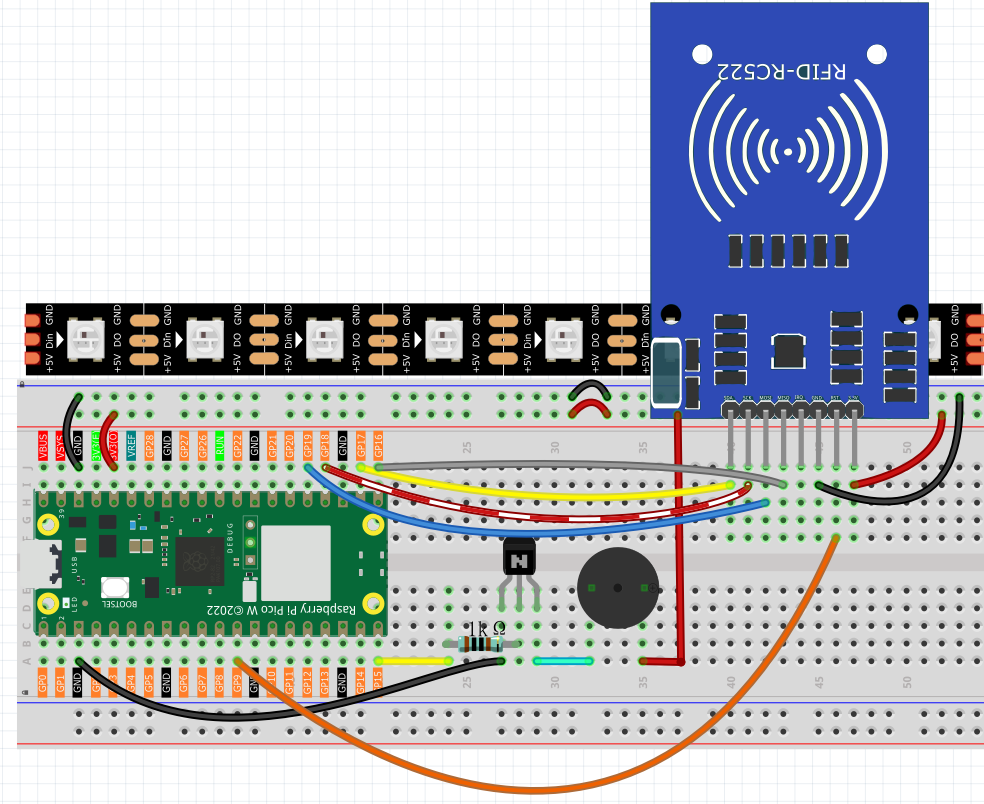
Code
Note
Open the
6.12_rfid_jukebox.pyfile under the path ofUltimate-Starter-Kit-for-Pico-W\Python\1.Projector copy this code into Thonny, then click “Run Current Script” or simply press F5 to run it.Don’t forget to click on the “MicroPython (Raspberry Pi Pico)” interpreter in the bottom right corner.
After running the code, prepare for your magical music experience! Here’s how to use your RFID jukebox:
🎪 Getting Started: 1. System initializes: “✅ Jukebox Ready! Please scan a card.” appears in terminal 2. Prepare your music cards: Use cards programmed with project 5.5 (RFID write/read)
Bring card close: Hold any programmed RFID card near the reader module
Instant magic: Music starts playing automatically with synchronized light show!
🎵 What You’ll Experience: - Card detection: “💳 Card Scanned! ID: 123456789” shows which card was read - Music playback: Each note plays through the buzzer with perfect timing (250ms per note) - Light show: LED strip creates a beautiful VU meter effect synchronized with each note - Visual feedback: Watch the LEDs light up from green (low notes) to red (high notes) - Seamless operation: After one song finishes, system waits for the next card
🎼 Example Musical Experience: If your card contains “EEFGGFEDCCDEEDD”: - E notes → LEDs 1-3 light up in yellow-green - F and G notes → LEDs 1-4 light up in yellow - C and D notes → LEDs 1-2 light up in green - Complete melody plays with perfect timing and visual accompaniment
🎯 Pro Tips: - Multiple cards: Program different cards with different songs for variety - Song sharing: Share programmed cards with friends to exchange music - Visual learning: Watch the LED patterns to understand note relationships - Error handling: Invalid notes flash all LEDs red - system keeps playing
🎨 Creative Ideas: - Create a musical greeting card system - Build a song library with labeled cards - Use for music education - visualize note patterns - Make interactive exhibits or art installations
Ready to become a digital DJ? Your contactless music collection awaits! 🎧✨
The following is the program code:
# 6.12_rfid_jukebox.py
# A professional, feature-rich RFID Music Player for MicroPython.
#
# This system continuously waits for an RFID card and plays a musical score
# stored on it. It provides interactive visual feedback on a WS2812 LED strip,
# handles errors gracefully, and is structured for easy maintenance.

from mfrc522 import SimpleMFRC522
from ws2812 import WS2812
import machine
import time
import urandom

# --- Configuration ---
# Hardware Pins
WS2812_PIN = 0
BUZZER_PIN = 15
RFID_SCK_PIN = 18
RFID_MISO_PIN = 16
RFID_MOSI_PIN = 19
RFID_CS_PIN = 17
RFID_RST_PIN = 9

# LED & Sound Config
NUM_LEDS = 8
NOTE_DURATION_MS = 250
# A nice color palette for the VU meter effect (in GRB format for WS2812)
VU_METER_COLORS = [
    0x00FF00, 0x33FF00, 0x66FF00, 0x99FF00,
    0xFFFF00, 0xFF9900, 0xFF6600, 0xFF0000
]

# Note Frequencies (in Hz)
NOTES = {
    'C': 262, 'D': 294, 'E': 330, 'F': 349,
    'G': 392, 'A': 440, 'B': 494, 'N': 523 # 'N' for next octave C
}
NOTE_SEQUENCE = ['C', 'D', 'E', 'F', 'G', 'A', 'B', 'N']

class RFIDJukebox:
    """
    Manages all functionality for the RFID Jukebox system.
    """
    def __init__(self):
        """Initializes all hardware components."""
        print("🔧 Initializing RFID Jukebox...")

        # WS2812 LED Strip
        self.led_strip = WS2812(machine.Pin(WS2812_PIN), NUM_LEDS)

        # MFRC522 RFID Reader
        self.reader = SimpleMFRC522(
            spi_id=0, sck=RFID_SCK_PIN, miso=RFID_MISO_PIN,
            mosi=RFID_MOSI_PIN, cs=RFID_CS_PIN, rst=RFID_RST_PIN
        )

        # Buzzer (PWM)
        self.buzzer = machine.PWM(machine.Pin(BUZZER_PIN))

        self.cleanup() # Ensure all outputs are off
        print("✅ Jukebox Ready! Please scan a card.")

    def play_note(self, note_char):
        """Plays a single note with corresponding visual feedback."""
        try:
            # Find the note's frequency and its position for the VU meter
            note_index = NOTE_SEQUENCE.index(note_char)
            frequency = NOTES[note_char]

            # --- Visual Feedback (VU Meter) ---
            for i in range(NUM_LEDS):
                if i <= note_index:
                    self.led_strip[i] = VU_METER_COLORS[i]
                else:
                    self.led_strip[i] = 0 # Off
            self.led_strip.write()

            # --- Audio Feedback ---
            self.buzzer.freq(frequency)
            self.buzzer.duty_u16(30000) # 50% duty cycle
            time.sleep_ms(NOTE_DURATION_MS)
            self.buzzer.duty_u16(0) # Stop sound

        except (ValueError, KeyError):
            print(f"⚠️ Warning: Character '{note_char}' is not a valid note. Skipping.")
            # Flash all LEDs red for an error
            for i in range(NUM_LEDS):
                self.led_strip[i] = 0xFF0000 # Red
            self.led_strip.write()
            time.sleep_ms(NOTE_DURATION_MS)


    def play_score(self, text):
        """Plays an entire musical score from a text string."""
        if not text:
            print("Card is empty. Nothing to play.")
            return

        print(f"🎵 Playing score: \"{text}\"")
        clean_text = text.replace(' ', '').upper()

        for note_char in clean_text:
            self.play_note(note_char)
            time.sleep_ms(50) # Short pause between notes

        print("✅ Score finished.")

    def cleanup(self):
        """Turns off all hardware outputs for a safe state."""
        self.buzzer.duty_u16(0)
        for i in range(NUM_LEDS):
            self.led_strip[i] = 0
        self.led_strip.write()

    def run(self):
        """The main continuous loop to read cards and play music."""
        while True:
            self.cleanup()
            print("\nWaiting for a card...")

            # This read() call will block until a card is present
            card_id, text = self.reader.read()

            print("-" * 30)
            print(f"💳 Card Scanned! ID: {card_id}")
            self.play_score(text)

def main():
    """Main function to start the application."""
    jukebox = RFIDJukebox()

    try:
        jukebox.run()
    except KeyboardInterrupt:
        print("\n🛑 Program interrupted by user.")
    finally:
        jukebox.cleanup()
        print("🧹 System shut down cleanly.")

if __name__ == '__main__':
    main()