6.5 Somatosensory Game
Get ready for the ultimate motion-controlled space adventure! This isn’t just any game - it’s a real-time flight simulator where YOU are the pilot, controlling your starship by simply tilting the GY-521 sensor with your hand!
🚀 The Game Experience: Imagine flying through a dangerous asteroid field where your survival depends on quick reflexes and smooth movements. Tilt the sensor left and right to navigate your starship ✈ through obstacles ◈ while trying to achieve the highest score possible!
🎮 What Makes This Special: - Physical Motion Control: No buttons or joysticks - just natural hand movements - Real-time Response: The starship follows your every move instantly - Challenging Gameplay: Dodge obstacles, collect points, manage your 3 lives - Immersive ASCII Graphics: Classic terminal-style gaming with smooth animations - Progressive Difficulty: The longer you survive, the more challenging it becomes!
🎯 Game Objective: Pilot your starship through an endless obstacle course. Tilt the GY-521 sensor to move up and down, avoid collisions, and see how long you can survive!
🎮 How Motion Control Works:
The GY-521 (MPU6050) sensor acts as your flight controller: - Tilt sensor left/right → Starship moves up/down on screen - Hold level → Starship stays in center position - Smooth movements → Precise flight control for dodging obstacles
🧠 The Smart Technology: The MPU6050 measures acceleration in all directions and calculates your hand’s tilt angle. The game maps this angle (-45° to +45°) to your starship’s vertical position on the screen, creating incredibly responsive and intuitive controls!
Component List
Raspberry Pi Pico W x1
MicroUSB cable x1
830 Tie-Points Breadboard x1
MPU6050 Module x1
Jumper Wire Several
Note: This project only needs the GY-521 sensor - no servo required! The game runs entirely on your computer screen with motion-controlled input
Connect
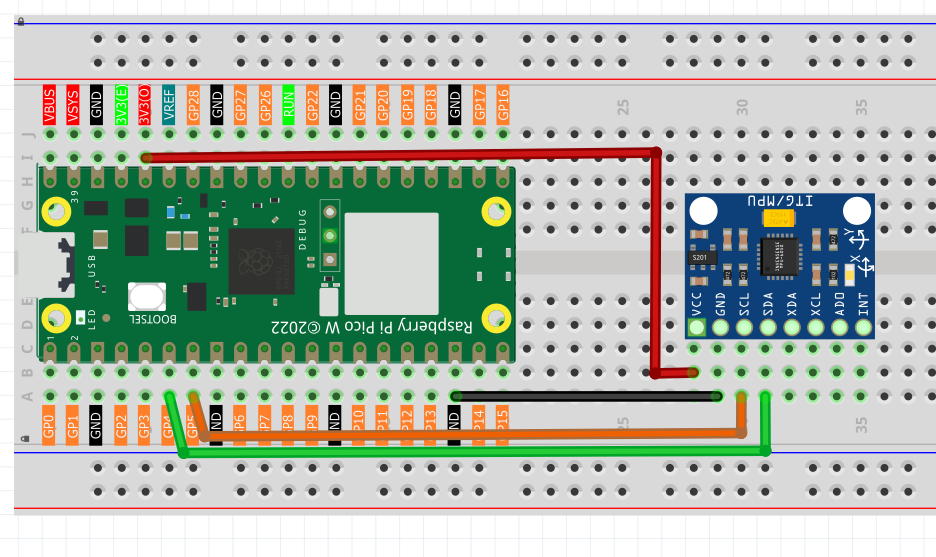
Code
Note
Open the
6.5_somatosensory_game.pyfile under the path ofUltimate-Starter-Kit-for-Pico-W\Python\1.Projector copy this code into Thonny, then click “Run Current Script” or simply press F5 to run it.Don’t forget to click on the “MicroPython (Raspberry Pi Pico)” interpreter in the bottom right corner.
After running the code, prepare for an epic space adventure! Here’s how to play your motion-controlled starship game:
🚀 Game Setup: 1. Game starts automatically - you’ll see your starship ✈ on the left side of the screen 2. Obstacles ◈ appear from the right side, moving toward your ship 3. Your mission: Survive as long as possible and rack up points!
🎮 How to Play: - Hold the GY-521 sensor in your hand like a flight controller - Tilt LEFT → Starship moves UP on screen - Tilt RIGHT → Starship moves DOWN on screen - Hold LEVEL → Starship stays in center position - Dodge obstacles by tilting the sensor smoothly
📊 Game Features: - Score System: +1 point for each obstacle you successfully dodge - Life System: You start with 3 lives (♥♥♥), lose one for each collision - Real-time Display: See your current score and remaining lives - Smooth Animation: 60fps-style terminal graphics for fluid gameplay - Game Over: When all lives are lost, see your final score!
🎯 Pro Gaming Tips: - Make smooth, gentle movements - jerky motions make control harder - Anticipate obstacles - they move from right to left continuously - Stay calm - the game gets more challenging the longer you survive - Find your sweet spot - discover the tilt angles that work best for you
Ready to become a starship pilot? Your high score awaits! 🌟
The following is the program code:
from imu import MPU6050
from machine import I2C, Pin
import time
import math
import random

# --- Hardware & Game Constants ---

# 1. MPU6050 (GY-521) Setup
i2c = I2C(0, sda=Pin(4), scl=Pin(5), freq=400000)
mpu = MPU6050(i2c)

# 2. Game Configuration
SCREEN_WIDTH = 25
SCREEN_HEIGHT = 7
PLANE_X_POS = 3
INITIAL_LIVES = 3
OBSTACLE_DENSITY = 0.12  # Slightly lower obstacle density
FRAME_DELAY = 0.1  # Reduce frame delay for better responsiveness

# 3. Game Characters
PLANE_CHAR = "✈"
OBSTACLE_CHAR = "◈"
EMPTY_CHAR = " "

# --- Optimized Helper Functions ---

def interval_mapping(x, in_min, in_max, out_min, out_max):
  """Maps a value from one range to another."""
  # Add boundary checks to prevent out-of-range calculations.
  if x <= in_min:
      return out_min
  if x >= in_max:
      return out_max
  return int((x - in_min) * (out_max - out_min) / (in_max - in_min) + out_min)

def get_y_rotation_fast(x, y, z):
  """Calculates the rotation angle around the Y-axis."""
  return -math.degrees(math.atan2(x, math.sqrt(y*y + z*z)))

# --- Optimized Game Logic ---

def play_game():
  """Main function to run the starship pilot game."""

  player_y = SCREEN_HEIGHT // 2
  obstacles = []  # List to store [x, y] for each obstacle
  score = 0
  lives = INITIAL_LIVES
  game_over = False

  # Pre-allocate the screen array to avoid recreating it in the loop.
  screen = [[EMPTY_CHAR for _ in range(SCREEN_WIDTH)] for _ in range(SCREEN_HEIGHT)]

  # Pre-calculate border strings to avoid repeated string concatenation.
  top_border = "+" + "-" * SCREEN_WIDTH + "+"
  bottom_border = top_border

  print("--- GY-521 Starship Pilot (Optimized) ---")
  print(f"Survive as long as you can! You have {lives} lives.")
  print("Get ready...")
  time.sleep(1)  # Reduce the initial waiting time.

  while not game_over:
      # --- 1. Update Player Position from MPU6050 ---
      angle = get_y_rotation_fast(mpu.accel.x, mpu.accel.y, mpu.accel.z)
      player_y = interval_mapping(angle, -45, 45, 0, SCREEN_HEIGHT - 1)

      # --- 2. Optimized Obstacle Management ---
      # This section moves existing obstacles and filters out ones that have left the screen.
      new_obstacles = []
      passed_count = 0

      for obs in obstacles:
          obs[0] -= 1
          if obs[0] >= 0:
              new_obstacles.append(obs)
          else:
              passed_count += 1

      obstacles = new_obstacles

      # Update the score based on how many obstacles were passed.
      if passed_count > 0:
          score += passed_count

      # Randomly add new obstacles.
      if random.random() < OBSTACLE_DENSITY:
          obs_y = random.randint(0, SCREEN_HEIGHT - 1)
          # Add a new obstacle at the far right of the screen.
          obstacles.append([SCREEN_WIDTH - 1, obs_y])

      # --- 3. Optimized Collision Detection ---
      collided = False
      obstacles_after_collision = []

      for obs in obstacles:
          if obs[0] == PLANE_X_POS and obs[1] == player_y:
              lives -= 1
              collided = True
              # If a collision happens, don't add the obstacle to the new list.
              # This effectively removes it from the game.
          else:
              obstacles_after_collision.append(obs)

      obstacles = obstacles_after_collision

      if collided and lives <= 0:
          game_over = True

      # --- 4. Optimized Screen Drawing ---
      # First, quickly fill the entire screen buffer with empty spaces.
      for row in screen:
          for i in range(SCREEN_WIDTH):
              row[i] = EMPTY_CHAR

      # Place the plane on the screen.
      if not game_over:
          screen[player_y][PLANE_X_POS] = PLANE_CHAR

      # Place all current obstacles on the screen.
      for x, y in obstacles:
          if 0 <= x < SCREEN_WIDTH:
              screen[y][x] = OBSTACLE_CHAR

      # Print the whole frame at once for smoother animation.
      print("\033[H\033[J", end="")  # This special code clears the console screen.
      print(top_border)
      for row in screen:
          print("|" + "".join(row) + "|")
      print(bottom_border)

      # Display the current score and lives.
      hearts = "♥" * lives + "♡" * (INITIAL_LIVES - lives)
      print(f"Score: {score} | Lives: {hearts}")

      # --- 5. Optimized Frame Rate ---
      time.sleep(FRAME_DELAY)

  # --- Game Over Sequence ---
  print("\n--- GAME OVER ---")
  print(f"Final Score: {score}")

# --- Run the game ---
if __name__ == "__main__":
  play_game()