6.3 Interactive Alarm System
Build your own professional emergency siren with flashing lights and authentic alarm sounds! Ever wondered how police cars, ambulances, and fire trucks create those attention-grabbing warning signals? Now you can create your own mini version!
What makes this special? This isn’t just a simple beeper - it’s a sophisticated alarm system with 3 different professional modes: - 🌊 Sweep Mode: Like a tornado siren with gradually rising pitch - 💓 Pulse Mode: Like a heartbeat monitor with rhythmic beeps - ⚡ Rapid Mode: Like emergency vehicle flashers with quick bursts
Real-world applications: Perfect for security projects, emergency simulations, attention-getting devices, or just impressing friends with realistic sound effects!
🎯 Project Highlights: - 🎵 3 Professional Sound Modes: Choose from Sweep, Pulse, or Rapid alarm patterns - 💡 Synchronized Light Show: LED brightness changes match the sound patterns - 🎛️ Easy Control: Simple slide switch to activate/deactivate the alarm - 🔊 Authentic Effects: Uses PWM to create realistic emergency vehicle sounds - ⚙️ Smart Programming: Interactive mode selection at startup
🔧 How the Magic Works:
🎚️ The Control System: - Slide Switch (GP17): Your on/off control with stable switching (thanks to the capacitor filter) - Sound Generator (GP15): Controls the transistor that powers the buzzer - Light Controller (GP16): Makes the LED flash and dim in sync with sounds
🎵 The Sound Science: The passive buzzer can play different frequencies - like a tiny musical instrument! By changing the frequency rapidly, we create: - Rising Sirens: Start low, sweep high (like tornado warnings) - Pulse Beats: Quick on-off patterns (like medical monitors) - Rapid Alerts: Fast flashing patterns (like emergency vehicles)
💡 The Light Show: The LED brightness is controlled by PWM (Pulse Width Modulation) - think of it as a digital dimmer switch that can change brightness hundreds of times per second to create smooth effects!
Component List
Raspberry Pi Pico W x1
MicroUSB cable x1
830 Tie-Points Breadboard x1
LED x1
Transistor S8050 x1
Resistor 220Ω, 1kΩ, 10kΩ x1
Passive Buzzer x1
Capacitor 104 x1
Slide Switch x1
Jumper Wire Several
Connect
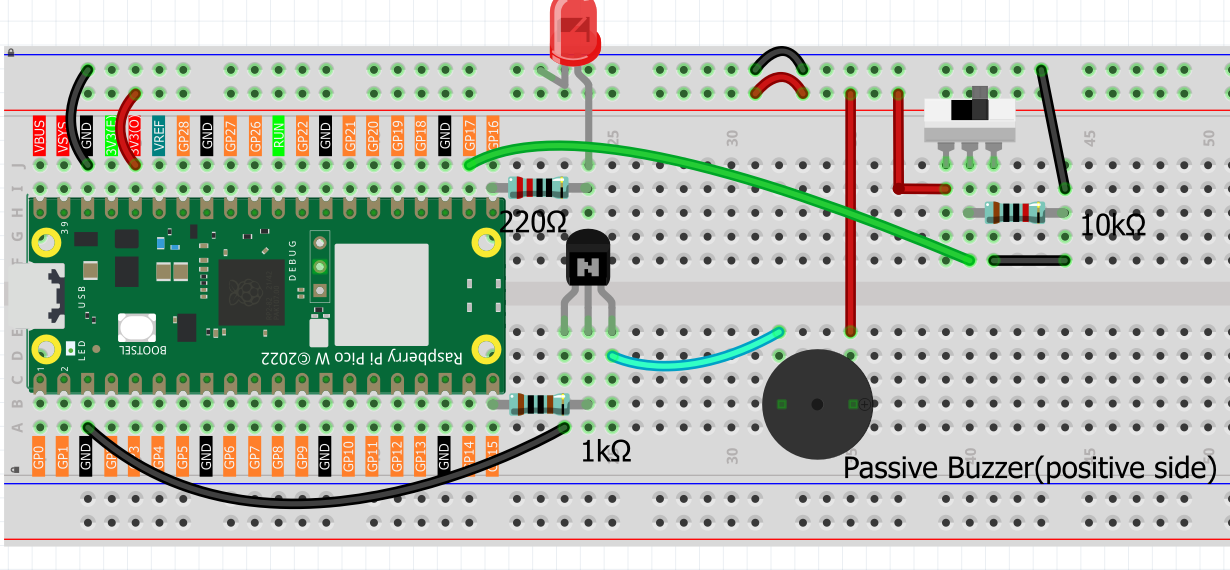
Code
Note
Open the
6.3_interactive_alarm_system.pyfile under the path ofUltimate-Starter-Kit-for-Pico-W\Python\1.Projector copy this code into Thonny, then click “Run Current Script” or simply press F5 to run it.Don’t forget to click on the “MicroPython (Raspberry Pi Pico)” interpreter in the bottom right corner.
Get ready for an exciting interactive alarm experience! Here’s your step-by-step guide:
🚀 Step 1: Choose Your Alarm Style When you run the program, you’ll see a professional menu asking you to select an alarm mode. Simply type 0, 1, or 2 and press Enter:
Type 0 for Sweep Mode (gradual frequency sweep)
Type 1 for Pulse Mode (on/off pulsing)
Type 2 for Rapid Mode (fast flashing)
You’ll hear a confirmation beep after making your selection!
🎵 Step 2: Test Each Mode (Try them all!) - Mode 0 (Sweep): Like a tornado siren - starts low and sweeps to high pitch 🌪️ - Mode 1 (Pulse): Like a medical monitor - rhythmic beeps with flashing 💓 - Mode 2 (Rapid): Like police flashers - quick bursts of sound and light ⚡
🎛️ Step 3: Control Your Alarm - Slide switch LEFT = Alarm ON (sirens blaring, lights flashing!) - Slide switch RIGHT = Alarm OFF (peaceful silence) - Note: Your switch might be wired opposite - just try both directions!
🎪 Step 4: Enjoy the Show! Watch how the LED brightness perfectly synchronizes with the sound patterns. Each mode creates a completely different audio-visual experience!
💡 Pro Tips: - Try switching modes and comparing the different effects - Show friends and let them guess which emergency vehicle each mode sounds like - Use in a dark room for the best visual effect - The system remembers your mode until you restart the program
The following is the program code:
import machine
import time

# Hardware Pin Constants
BUZZER_PIN = 15
LED_PIN = 16
SWITCH_PIN = 17

# PWM and Frequency Constants
LED_PWM_FREQUENCY = 1000
BUZZER_DUTY_CYCLE = 30000

# Alarm Effect Constants
EFFECT_STEPS = 100
EFFECT_INCREMENT = 2
EFFECT_DELAY_MS = 10

# Sound Frequency Range
MIN_FREQUENCY = 130
MAX_FREQUENCY = 800

# LED Brightness Range
MIN_BRIGHTNESS = 0
MAX_BRIGHTNESS = 65535

# Alarm Modes
MODE_SWEEP = 0
MODE_PULSE = 1
MODE_RAPID = 2

# Initialize hardware components
buzzer = machine.PWM(machine.Pin(BUZZER_PIN))
led = machine.PWM(machine.Pin(LED_PIN))
led.freq(LED_PWM_FREQUENCY)
switch = machine.Pin(SWITCH_PIN, machine.Pin.IN)

# Global variables
alarm_active = False
alarm_mode = MODE_SWEEP

def stop_buzzer(pwm_pin):
    """Turn off the buzzer by setting duty cycle to zero"""
    pwm_pin.duty_u16(0)

def play_tone(pwm_pin, frequency):
    """Play a tone at specified frequency on the buzzer"""
    pwm_pin.freq(frequency)
    pwm_pin.duty_u16(BUZZER_DUTY_CYCLE)

def map_value(x, in_min, in_max, out_min, out_max):
    """Map a value from one range to another"""
    return (x - in_min) * (out_max - out_min) / (in_max - in_min) + out_min

def sweep_alarm_effect():
    """Create a sweeping alarm effect with gradual frequency and brightness change"""
    for step in range(0, EFFECT_STEPS, EFFECT_INCREMENT):
        if not alarm_active:
            break

        # Calculate LED brightness and buzzer frequency
        brightness = int(map_value(step, 0, EFFECT_STEPS, MIN_BRIGHTNESS, MAX_BRIGHTNESS))
        frequency = int(map_value(step, 0, EFFECT_STEPS, MIN_FREQUENCY, MAX_FREQUENCY))

        # Apply effects
        led.duty_u16(brightness)
        play_tone(buzzer, frequency)
        time.sleep_ms(EFFECT_DELAY_MS)

def pulse_alarm_effect():
    """Create a pulsing alarm effect with on/off cycles"""
    # High intensity pulse
    led.duty_u16(MAX_BRIGHTNESS)
    play_tone(buzzer, MAX_FREQUENCY)
    time.sleep_ms(200)

    # Off period
    led.duty_u16(MIN_BRIGHTNESS)
    stop_buzzer(buzzer)
    time.sleep_ms(100)

def rapid_alarm_effect():
    """Create a rapid flashing alarm effect"""
    # Quick flash sequence
    for _ in range(5):
        if not alarm_active:
            break
        led.duty_u16(MAX_BRIGHTNESS)
        play_tone(buzzer, MIN_FREQUENCY + MAX_FREQUENCY // 2)
        time.sleep_ms(50)

        led.duty_u16(MIN_BRIGHTNESS)
        stop_buzzer(buzzer)
        time.sleep_ms(50)

def run_alarm_effect():
    """Execute the appropriate alarm effect based on current mode"""
    if alarm_mode == MODE_SWEEP:
        sweep_alarm_effect()
    elif alarm_mode == MODE_PULSE:
        pulse_alarm_effect()
    elif alarm_mode == MODE_RAPID:
        rapid_alarm_effect()

def turn_off_alarm():
    """Turn off both buzzer and LED"""
    stop_buzzer(buzzer)
    led.duty_u16(MIN_BRIGHTNESS)

def display_mode_selection():
    """Display mode selection menu"""
    print("\n" + "="*50)
    print("        ALARM SIREN LAMP - MODE SELECTION")
    print("="*50)
    print("Available alarm modes:")
    print("  0 - Sweep Mode   (Gradual frequency sweep)")
    print("  1 - Pulse Mode   (On/off pulsing)")
    print("  2 - Rapid Mode   (Fast flashing)")
    print("-"*50)

def select_alarm_mode():
    """Allow user to select alarm mode at startup"""
    global alarm_mode

    mode_names = ["Sweep", "Pulse", "Rapid"]

    while True:
        display_mode_selection()
        try:
            user_input = input("Please select mode (0-2): ").strip()
            mode = int(user_input)

            if 0 <= mode <= 2:
                alarm_mode = mode
                print(f"\n✓ Mode selected: {mode} ({mode_names[mode]})")

                # Mode confirmation beep
                play_tone(buzzer, 500 + mode * 200)
                time.sleep_ms(200)
                stop_buzzer(buzzer)

                print(f"Alarm system is ready in {mode_names[mode]} mode!")
                print("Toggle the switch to activate the alarm.")
                print("To change mode, restart the program.\n")
                return
            else:
                print("❌ Invalid mode! Please enter 0, 1, or 2\n")

        except ValueError:
            print("❌ Invalid input! Please enter a number (0-2)\n")
        except KeyboardInterrupt:
            print("\n\nProgram interrupted by user. Goodbye!")
            turn_off_alarm()  # Ensure everything is turned off
            raise SystemExit

def switch_interrupt_handler(pin):
    """Handle switch state changes for alarm on/off control"""
    global alarm_active

    alarm_active = pin.value()
    mode_names = ["Sweep", "Pulse", "Rapid"]

    if alarm_active:
        print(f"🚨 Alarm activated - Mode: {mode_names[alarm_mode]}")

        # Startup confirmation beep
        play_tone(buzzer, 1000)
        led.duty_u16(MAX_BRIGHTNESS // 2)
        time.sleep_ms(100)
        turn_off_alarm()
        time.sleep_ms(50)
    else:
        print("✅ Alarm deactivated")
        turn_off_alarm()

# Main program starts here
def main():
    """Main program function"""
    print("\n🚨 ALARM SIREN LAMP SYSTEM 🚨")
    print("Copyright 2024 - IoT Alarm Project")

    # Let user select the alarm mode
    select_alarm_mode()

    # Configure switch interrupt for both rising and falling edges
    switch.irq(trigger=machine.Pin.IRQ_RISING | machine.Pin.IRQ_FALLING,
              handler=switch_interrupt_handler)

    print("🔄 System running... (Press Ctrl+C to exit)")

    try:
        # Main program loop
        while True:
            if alarm_active:
                run_alarm_effect()
            else:
                turn_off_alarm()
                time.sleep_ms(50)  # Small delay when inactive

    except KeyboardInterrupt:
        print("\n\n👋 Program stopped by user")
        turn_off_alarm()
        print("All devices turned off. Goodbye!")

# Run the main program
if __name__ == "__main__":
    main()