6.4 LCD Moti Motion Counter
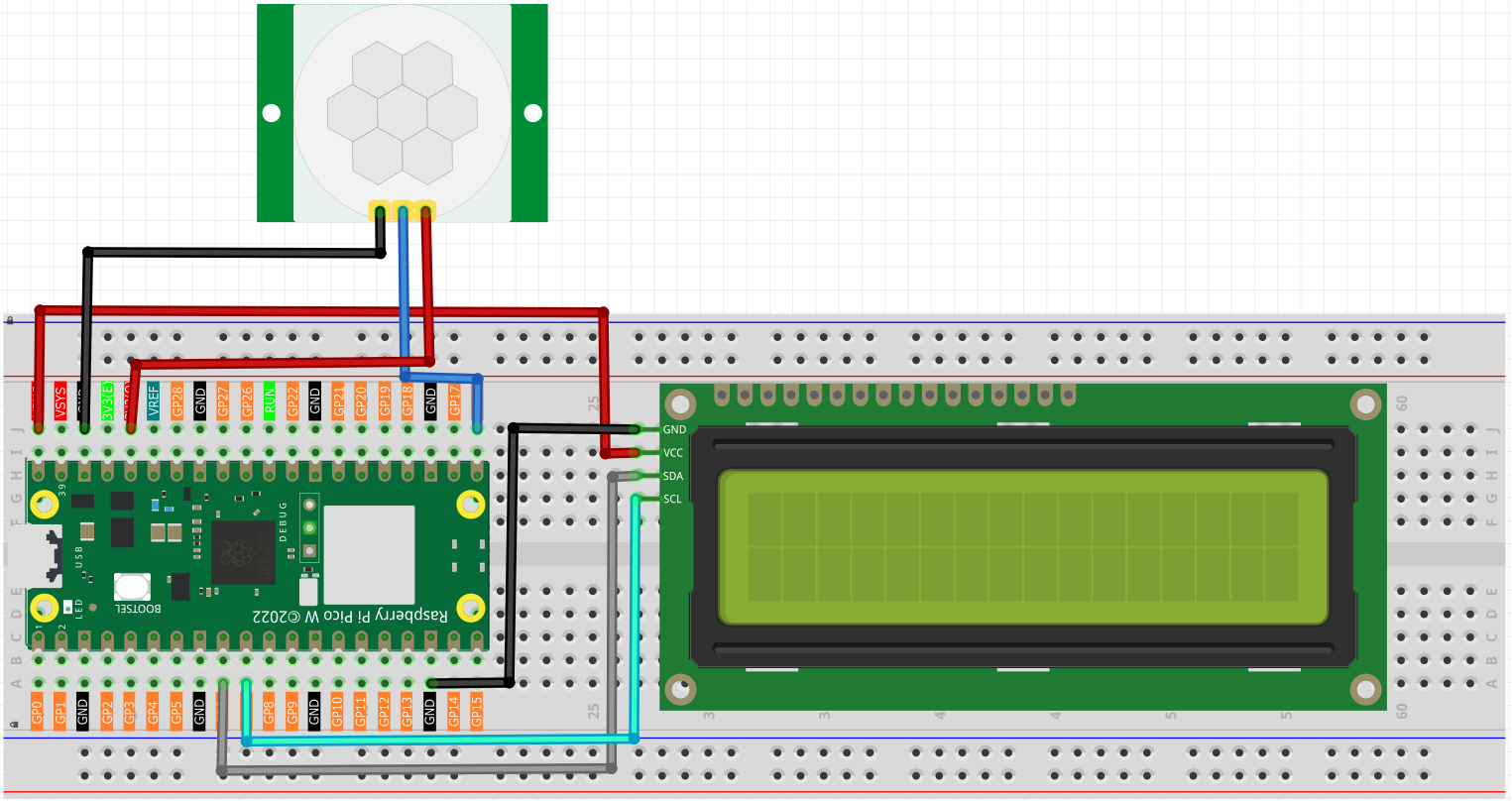
Here we will make a number-displaying counter system, consisting of a PIR sensor and a LCD1602 Display. When the PIR detects that someone is passing by, the number on the LCD1602 Display will add 1. You can use this counter to count the number of people walking through the passageway.
Component List
Raspberry Pi Pico W x1
MicroUSB cable x1
830 Tie-Points Breadboard x1
Resistor 220Ω x4
LCD1602 Display x1
74HC595 x1
PIR Motion Sensor Module x1
Jumper Wire Several
The circuit consists of an LCD1602 and a PIR module.
The PIR will send a high signal of about 2.8s long when someone passes by.

Connect
Note
The PIR sensor will have a one-minute initialization time after powering on. During this period, infrared signals should be avoided, otherwise the measurement may be inaccurate.
There are two potentiometers on the PIR module: one is to adjust sensitivity and the other is to adjust the detection distance. To make the PIR module work better, you You need to turn both of them counterclockwise to the end.
Code
Note
Open the
6.4_lcd_motion_counter.pyfile under the path ofUltimate-Starter-Kit-for-Pico-W\Python\1.Projector copy this code into Thonny, then click “Run Current Script” or simply press F5 to run it.Don’t forget to click on the “MicroPython (Raspberry Pi Pico)” interpreter in the bottom right corner.
Click “Run current script”, the number on the LCD1602 Display will be added by one if someone passes in front of the PIR module.
The following is the program code:
from lcd1602 import LCD
from machine import I2C, Pin
import utime as time

pir = Pin(16, Pin.IN)
i2c = I2C(1, sda=Pin(6), scl=Pin(7), freq=400000)
lcd = LCD(i2c)

motion_count = 0
last_detection_time = 0

def display_status(motion_detected, count):
    lcd.clear()
    if motion_detected:
        lcd.message("Motion Detected!\nCount: {}".format(count))
    else:
        lcd.message("Monitoring...\nCount: {}".format(count))

# Main loop
print("PIR Sensor initializing...")
time.sleep(2)  # Wait for the PIR sensor to stabilize
lcd.message("System Ready\nStarting...")
time.sleep(2)

while True:
    try:
        current_time = time.ticks_ms()

        if pir.value() == 1:  # Motion detected
            # Check if this is a new motion (at least 2 seconds since the last detection)
            if time.ticks_diff(current_time, last_detection_time) > 2000:
                motion_count += 1
                last_detection_time = current_time
                display_status(True, motion_count)
                print("Motion detected! Count:", motion_count)
                time.sleep(1)
        else:
            # No motion detected
            if time.ticks_diff(current_time, last_detection_time) > 2000:
                display_status(False, motion_count)

        time.sleep_ms(100)  # Short delay to avoid excessive detection frequency

    except Exception as e:
        print("Error:", e)
        lcd.clear()
        lcd.message("Error occurred\nRestarting...")
        time.sleep(2)
        continue