2.5 Electronic Percussion Kit
This project creates a digital drum set using three push buttons to trigger three distinct buzzer tones, simulating percussion instrument functionality.
Required Components
Raspberry Pi Pico W x1
MicroUSB cable x1
830 Tie-Points Breadboard x1
Button x3
Active Buzzer x3
Transistor S8050 x3
Resistor 1KΩ x3
Resistor 10KΩ x3
Capacitor 104 x3
Jumper Wire Several
Circuit Configuration
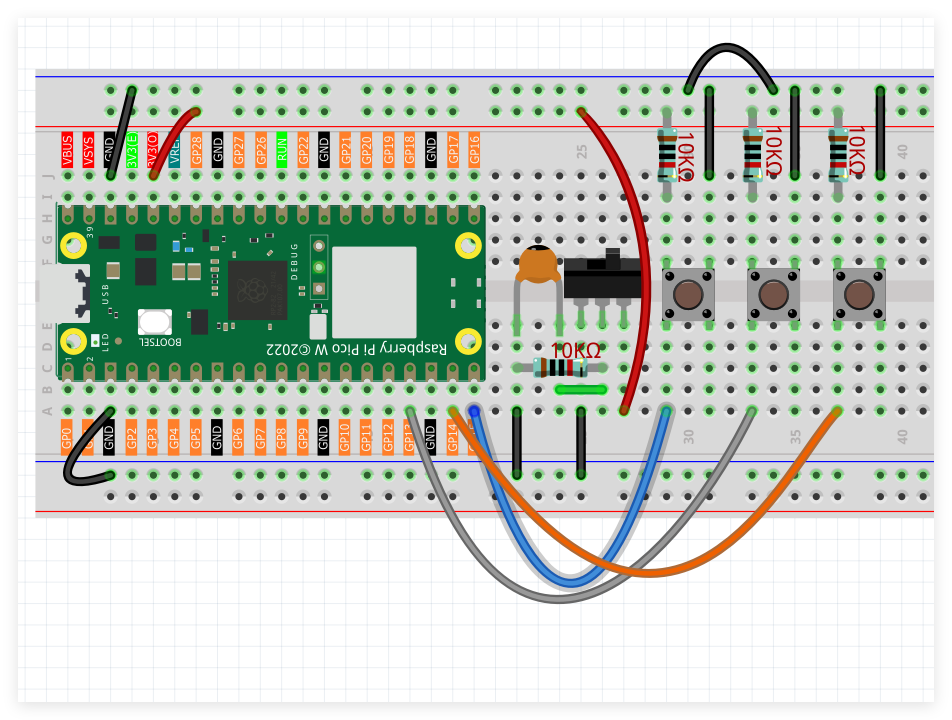
Three push buttons interface with GPIO pins GP14, GP15, and GP16 respectively.
Three active buzzers connect to GPIO pins GP13, GP12, and GP11 correspondingly.
Programming Code
Note
Follow the visual programming guide below using drag-and-drop techniques.
Load
2.5_Drummer.pngfrom the directoryUltimate-Starter-Kit-for-Pico-W\Piper_Make. For comprehensive guidance, see Loading Existing Projects.
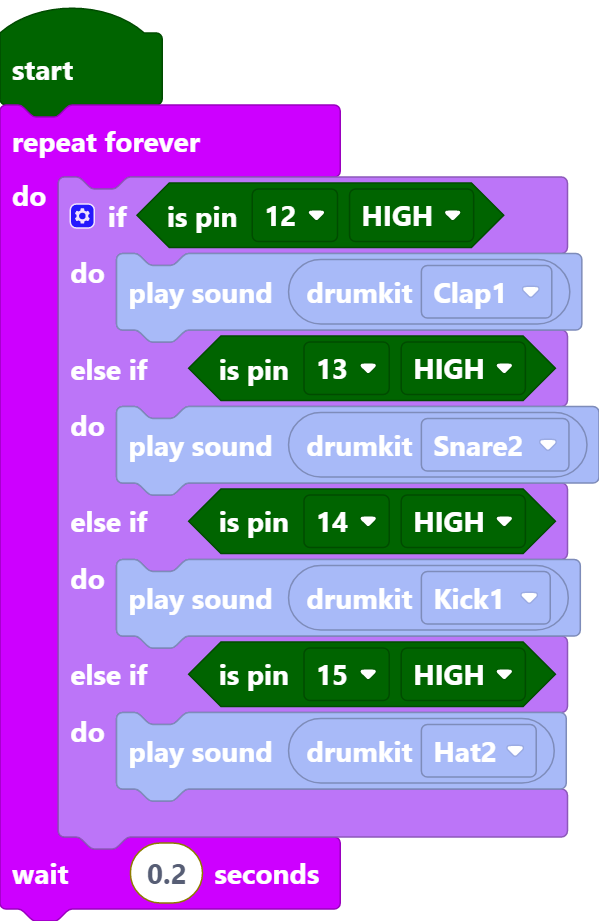
Upon Pico W connection, press the Start button to begin program execution. Activate the three buttons to trigger corresponding buzzer sounds, creating percussion-like audio effects.