7.5 MQTT Jukebox
🎵 Build Your Own IoT Jukebox!
Create a smart music player that responds to commands from anywhere in the world! This project demonstrates the power of MQTT (Message Queuing Telemetry Transport) - the backbone protocol of modern IoT systems.
🌐 What is MQTT? MQTT is a lightweight messaging protocol designed for IoT devices. It uses a Publisher-Subscriber model where devices communicate through Topics:
Publisher: Sends messages to a specific topic
Subscriber: Receives messages from topics they’re interested in
Broker: Central server that routes messages between publishers and subscribers
Topics: Named channels for organizing different types of messages
✨ What You’re Building: - IoT Music Player: Remote-controlled buzzer that plays melodies on command - MQTT Integration: Real-time communication using industry-standard protocol - Global Accessibility: Control your device from anywhere with internet - Song Library: Pre-programmed melodies including Nokia, Star Wars, and more - Professional Error Handling: Robust connection management and graceful shutdown - Resource Management: Proper cleanup of MQTT connections and hardware
🎼 Available Songs: - “nokia” - Classic Nokia ringtone - “starwars” - Star Wars main theme - “nevergonnagiveyouup” - Rick Astley classic - “imperialmarch” - Darth Vader’s theme
🎯 Perfect For: - Learning MQTT protocol and IoT messaging - Understanding publish-subscribe architecture - Building remote control systems - Creating IoT entertainment devices - Exploring global device communication
Component List
Raspberry Pi Pico W x1
MicroUSB cable x1
830 Tie-Points Breadboard x1
Resistor 1kΩ x1
Transistor S8050 x1
Passive Buzzer x1
Li-po Charger Module x1
Battery Holder x1
Jumper Wire Several
Connect
Warning
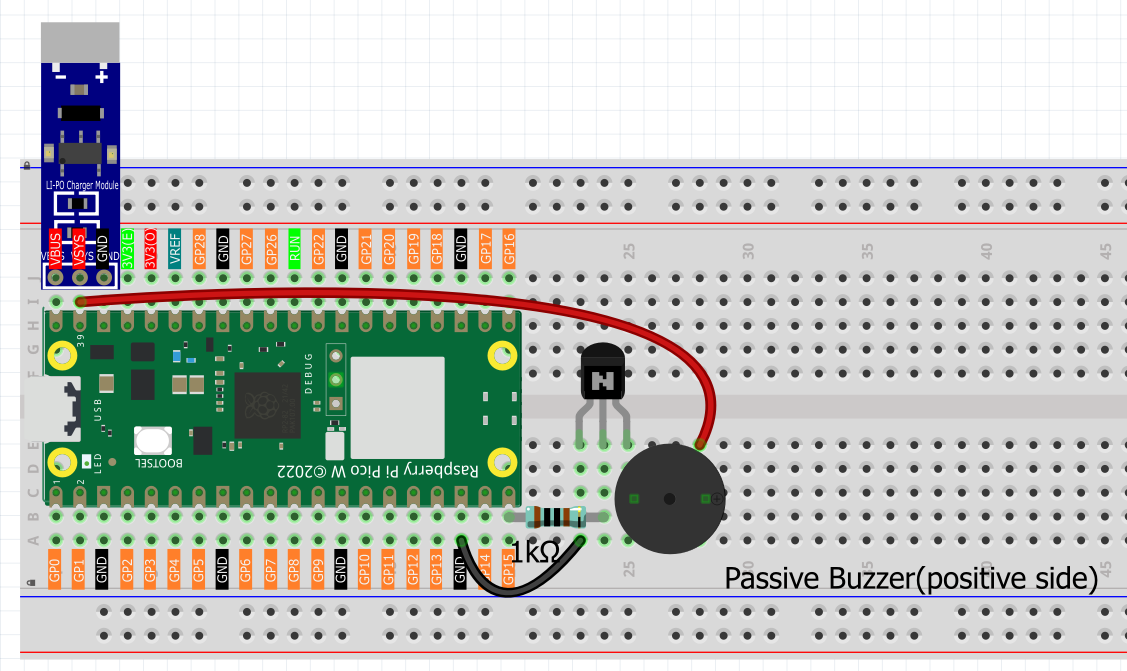
Make sure your Li-po Charger Module is connected as shown in the diagram. Otherwise, a short circuit will likely damage your battery and circuitry.
Setting Up MQTT Broker
HiveMQ is an MQTT broker and client-based messaging platform that enables fast, efficient and reliable data transfer to IoT devices.
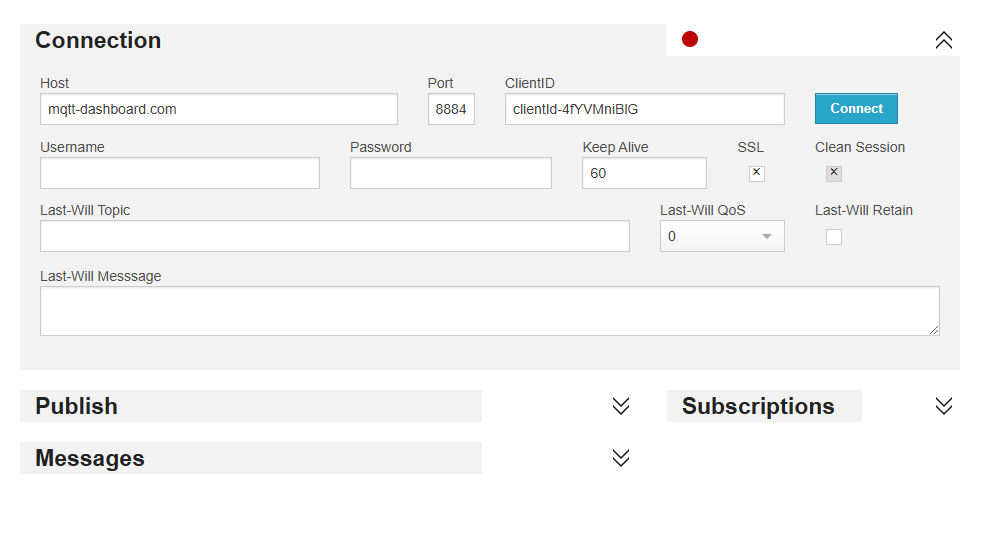
Open HiveMQ Web Client in your browser.
Connects the client to the default public proxy.
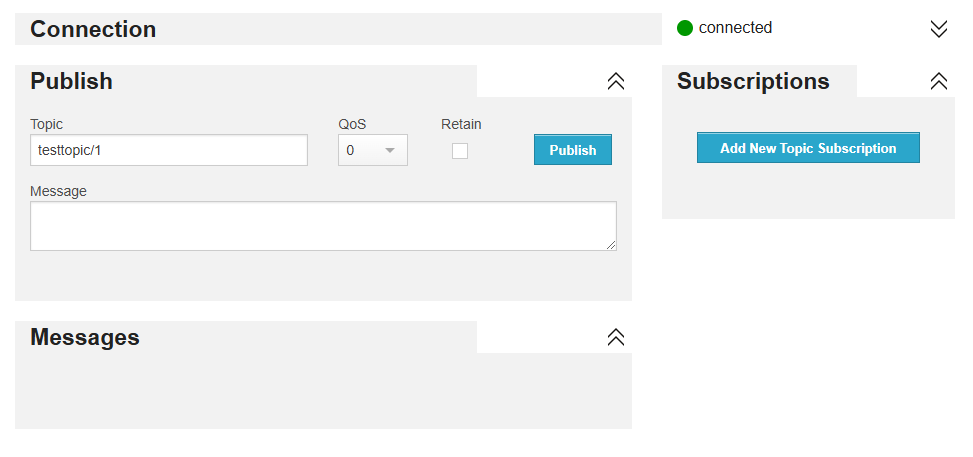
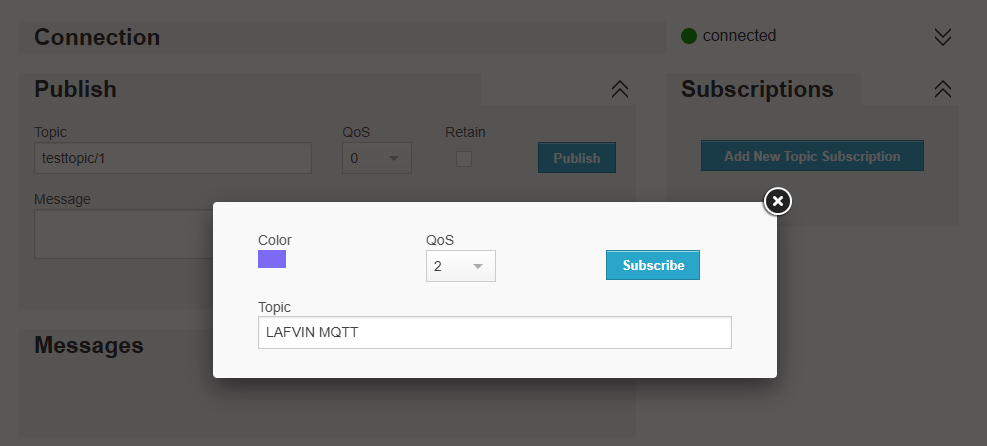
Click on Add New Topic Subscription.
Fill in the topics you want to follow and click Subscribe. The topics set here should be more personal to avoid getting messages from other users, and pay attention to case sensitive.
Code
Upload the play_music.py file under the path of Ultimate-Starter-Kit-for-Pico-W/Python/iot to the Raspberry Pi Pico W.
Note
Open the
5_mqtt_jukebox.pyfile under the path ofUltimate-Starter-Kit-for-Pico-W/Python/iotor copy this code into Thonny, then click “Run Current Script” or simply press F5 to run it.Don’t forget to click on the “MicroPython (Raspberry Pi Pico)” interpreter in the bottom right corner.
Before running the code, you need to make sure you have
do_connect.pyandsecrets.pyscripts in your Pico W, if not please refer to 7.1 Access to the Network to create them.
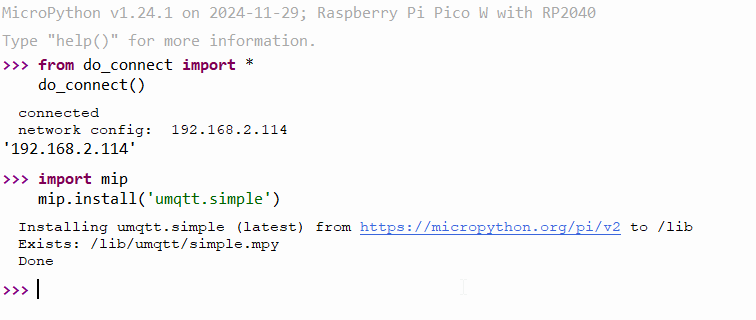
Before running the project, we need to connect to the network to download the
umqttmodule. Ensure that yourdo_connect.pyandsecrets.pyscripts are in your Pico W.Then run the following code in the shell, and your IP address will be displayed: .. code-block:: python
from do_connect import * do_connect()
After a successful network connection, import the
mipmodule in the shell and usemipto install theumqtt.simplemodule, which is a simplified MQTT client for MicroPython. .. code-block:: pythonimport mip mip.install(‘umqtt.simple’)
You will see that the
umqttmodule is installed under the/lib/path of Pico W after completion.
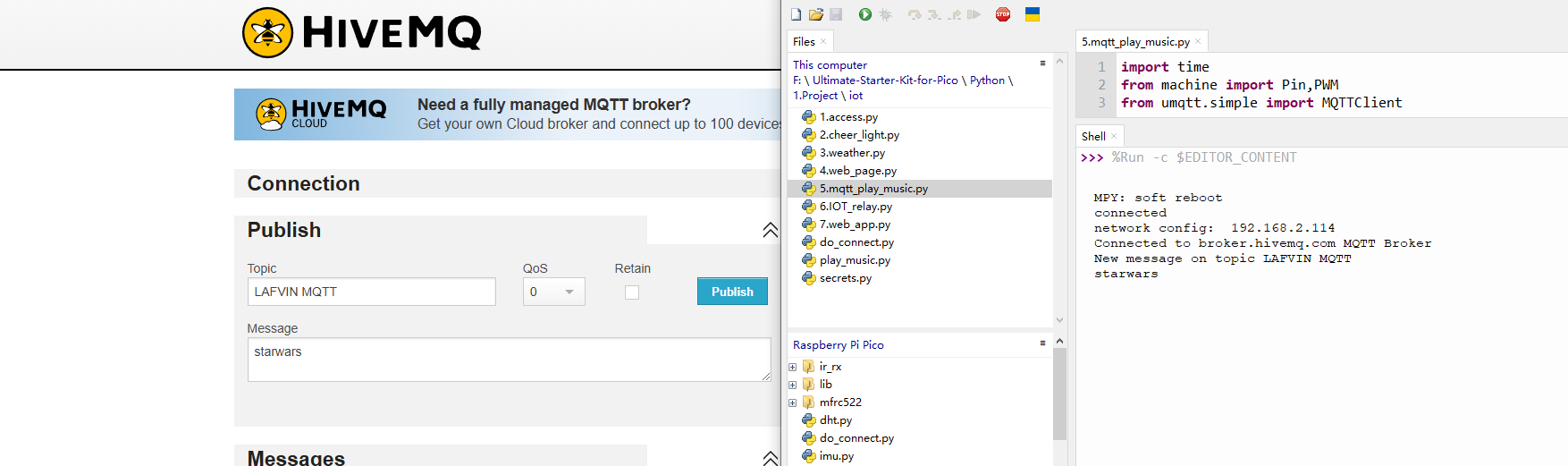
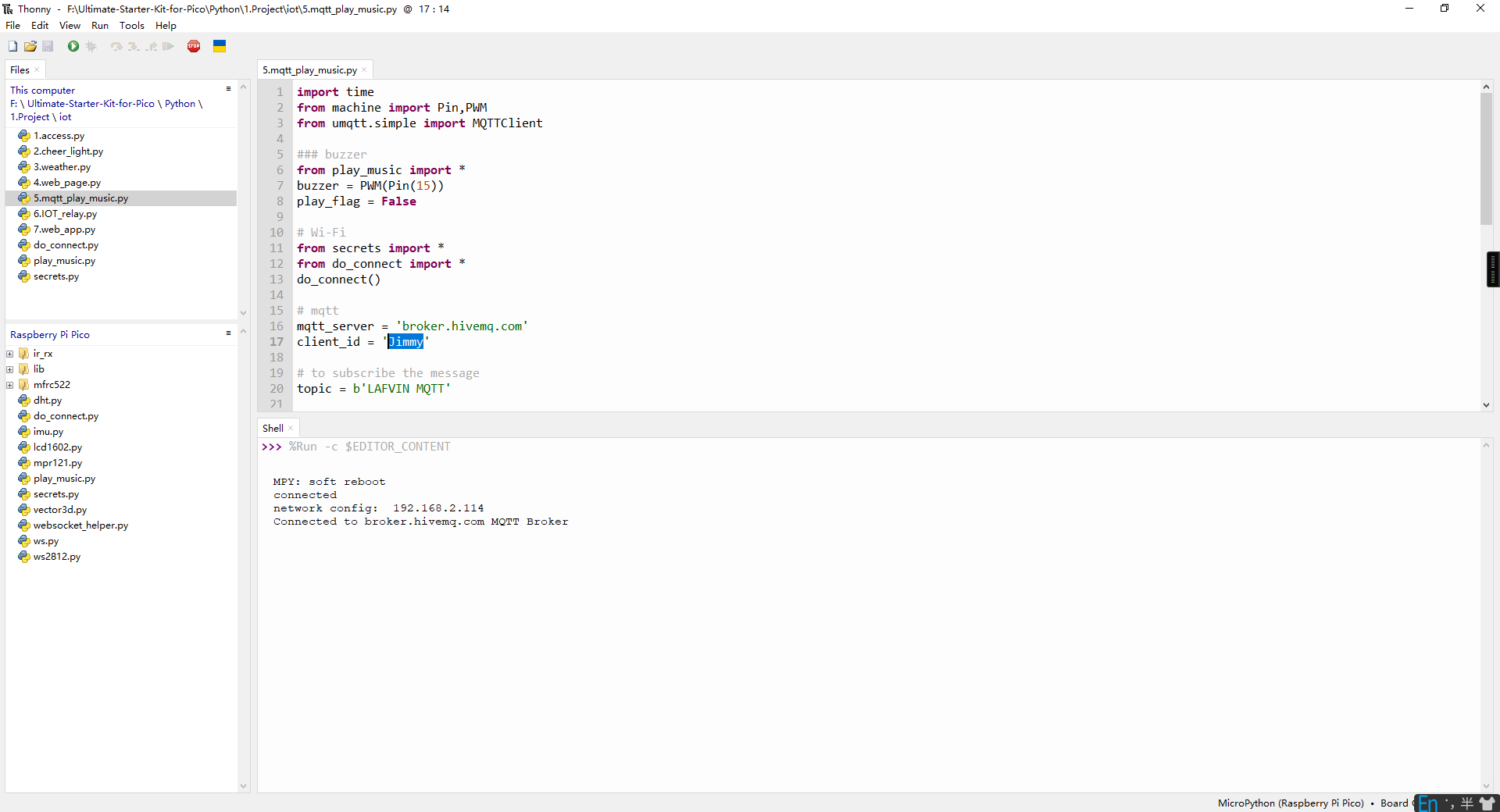
Click “Run current script” and the shell will print information. You can connect the PICO W to an MQTT platform and then send a song name to make the PICO W play the corresponding song.
The following is the program code:
"""
MQTT Music Player with Keyboard Control

This program connects to an MQTT broker and plays predefined melodies
based on received messages. It includes graceful exit functionality
using keyboard interrupt (Ctrl+C).

Hardware Requirements:
- ESP32/ESP8266 with MicroPython
- Buzzer connected to GPIO 15

Supported Songs:
- "nokia" - Nokia ringtone
- "starwars" - Star Wars theme
- "nevergonnagiveyouup" - Rick Astley
- "imperialmarch" - Imperial March (Darth Vader theme)

Usage:
- Send song name to MQTT topic 'LAFVIN MQTT'
- Use Ctrl+C to exit gracefully
"""

import time
import sys
from machine import Pin, PWM
from umqtt.simple import MQTTClient

# Buzzer setup
from play_music import *
buzzer = PWM(Pin(15))
play_flag = False

# Wi-Fi connection
from secrets import *
from do_connect import *
do_connect()

# MQTT configuration
mqtt_server = 'broker.hivemq.com'
client_id = 'Jimmy'

# MQTT topic to subscribe for music commands
topic = b'LAFVIN MQTT'

# Global variables for resource management
client = None
running = True
melody = None

def cleanup_resources():
    """
    Clean up all resources including MQTT connection and buzzer
    """
    global client, buzzer
    print("\nCleaning up resources...")

    try:
        # Stop buzzer
        if buzzer:
            buzzer.duty_u16(0)  # Stop PWM output
            print("✓ Buzzer stopped")
    except Exception as e:
        print(f"Error cleaning buzzer: {e}")

    try:
        # Disconnect MQTT
        if client:
            client.disconnect()
            print("✓ MQTT connection closed")
    except Exception as e:
        print(f"Error disconnecting MQTT: {e}")

    print("✓ Resource cleanup completed")


def callback(topic, message):
    print("New message on topic {}".format(topic.decode('utf-8')))
    message = message.decode('utf-8')
    print(message)
    if message in song.keys():
        global melody,play_flag
        melody = song[message]
        play_flag = True


# Main program
def main():
    """
    Main program entry point with graceful exit handling
    """
    global client, running, play_flag, melody

    try:
        # Initialize MQTT client
        client = MQTTClient(client_id, mqtt_server, keepalive=60)
        client.set_callback(callback)
        client.connect()
        print(f'✓ Successfully connected to MQTT server: {mqtt_server}')
        print(f'✓ Client ID: {client_id}')
        print(f'✓ Subscribed topic: {topic.decode("utf-8")}')
        print("✓ Music player started - Press Ctrl+C to exit")
        print("-" * 50)

        # Main loop
        while running:
            try:
                client.subscribe(topic)
                client.check_msg()  # Check for new messages

                # Play music if requested
                if play_flag:
                    print(f"🎵 Starting music playback...")
                    play(buzzer, melody)
                    play_flag = False
                    print("🎵 Music playback completed")

                time.sleep(0.1)  # Reduce CPU usage

            except KeyboardInterrupt:
                # Catch Ctrl+C
                print("\nUser interrupt detected, shutting down...")
                break
            except Exception as e:
                print(f"Error in main loop: {e}")
                time.sleep(1)  # Brief delay after error

    except OSError as e:
        print(f'❌ Failed to connect to MQTT server: {e}')
        print('Try restarting device or check network connection...')
        cleanup_resources()
        return
    except Exception as e:
        print(f'❌ Program initialization failed: {e}')
        cleanup_resources()
        return
    finally:
        # Ensure resources are cleaned up
        running = False
        cleanup_resources()

# Run main program
if __name__ == "__main__":
    try:
        main()
    except Exception as e:
        print(f"Program terminated with exception: {e}")
        cleanup_resources()
🔧 How the Professional MQTT Music Player Works
🌐 Step 1: WiFi Connection and MQTT Dependencies The system starts by establishing internet connectivity and installing required libraries:
# WiFi connection using professional modules
from secrets import *
from do_connect import *
do_connect()

# Install MQTT library (run once)
import mip
mip.install('umqtt.simple')
Professional Setup: - Secure credentials: Uses secrets.py for WiFi credentials - Automated connection: Leverages do_connect.py for reliable WiFi setup - Package management: Uses MicroPython’s mip for library installation - Dependency isolation: MQTT library installed in /lib/ directory
🎵 Step 2: Hardware and Music System Initialization Professional hardware setup with imported music library:
# Buzzer setup with PWM control
from machine import Pin, PWM
from play_music import *  # Import song library
buzzer = PWM(Pin(15))
play_flag = False

# MQTT configuration constants
mqtt_server = 'broker.hivemq.com'
client_id = 'Jimmy'
topic = b'LAFVIN MQTT'
Smart Features: - PWM control: Precise frequency control for melody playback - Modular music: External play_music.py contains song definitions - Global flags: Thread-safe communication between MQTT and music systems - Standard broker: Uses HiveMQ’s free public MQTT broker
🔄 Step 3: Professional Resource Management Comprehensive cleanup system for safe shutdown:
def cleanup_resources():
    """Clean up all resources including MQTT connection and buzzer"""
    global client, buzzer
    print("\\nCleaning up resources...")

    try:
        # Stop buzzer
        if buzzer:
            buzzer.duty_u16(0)  # Stop PWM output
            print("✓ Buzzer stopped")
    except Exception as e:
        print(f"Error cleaning buzzer: {e}")

    try:
        # Disconnect MQTT
        if client:
            client.disconnect()
            print("✓ MQTT connection closed")
    except Exception as e:
        print(f"Error disconnecting MQTT: {e}")

    print("✓ Resource cleanup completed")
Professional Cleanup Features: - Safe PWM shutdown: Stops buzzer output to prevent noise - MQTT disconnection: Properly closes broker connection - Exception handling: Continues cleanup even if individual steps fail - Status reporting: Clear feedback on cleanup progress
📡 Step 4: MQTT Message Handling Smart callback function for processing incoming music commands:
def callback(topic, message):
    """Process incoming MQTT messages for music playback"""
    print("New message on topic {}".format(topic.decode('utf-8')))
    message = message.decode('utf-8')
    print(message)

    # Check if received song name exists in song library
    if message in song.keys():
        global melody, play_flag
        melody = song[message]
        play_flag = True  # Signal main loop to play music
Smart Message Processing: - UTF-8 decoding: Properly handles text messages - Song validation: Only plays songs that exist in the library - Thread-safe signaling: Uses global flags for inter-thread communication - Clear logging: Reports all received messages and actions
🎼 Step 5: Professional Main Program Loop Robust main loop with comprehensive error handling:
def main():
    """Main program with graceful exit handling"""
    global client, running, play_flag, melody

    try:
        # Initialize MQTT client with keepalive
        client = MQTTClient(client_id, mqtt_server, keepalive=60)
        client.set_callback(callback)
        client.connect()

        print(f'✓ Successfully connected to MQTT server: {mqtt_server}')
        print(f'✓ Client ID: {client_id}')
        print(f'✓ Subscribed topic: {topic.decode("utf-8")}')
        print("✓ Music player started - Press Ctrl+C to exit")

        # Main loop
        while running:
            try:
                client.subscribe(topic)
                client.check_msg()  # Check for new MQTT messages

                # Play music if requested
                if play_flag:
                    print(f"🎵 Starting music playback...")
                    play(buzzer, melody)  # Play the melody
                    play_flag = False
                    print("🎵 Music playback completed")

                time.sleep(0.1)  # Reduce CPU usage

            except KeyboardInterrupt:
                print("\\nUser interrupt detected, shutting down...")
                break
            except Exception as e:
                print(f"Error in main loop: {e}")
                time.sleep(1)
Professional Main Loop Features: - Keepalive mechanism: Maintains stable MQTT connection - Subscription management: Continuously maintains topic subscription - Non-blocking message check: Uses check_msg() for real-time responsiveness - Music playback control: Thread-safe music triggering system - CPU optimization: Sleep reduces processor load - Graceful interruption: Clean shutdown on Ctrl+C - Error recovery: Continues operation despite temporary errors
🛡️ Step 6: Comprehensive Error Handling and Program Entry Professional program structure with multiple error handling layers:
# Run main program with full error protection
if __name__ == "__main__":
    try:
        main()
    except Exception as e:
        print(f"Program terminated with exception: {e}")
        cleanup_resources()

# Alternative error handling in main()
except OSError as e:
    print(f'❌ Failed to connect to MQTT server: {e}')
    print('Try restarting device or check network connection...')
    cleanup_resources()
    return
except Exception as e:
    print(f'❌ Program initialization failed: {e}')
    cleanup_resources()
    return
finally:
    # Ensure resources are cleaned up
    running = False
    cleanup_resources()
✨ Key Improvements in This Professional Version:
🔧 Technical Improvements: - Resource management: Comprehensive cleanup of MQTT connections and PWM - Error categorization: Different handling for network vs. general errors - Graceful shutdown: Clean exit on Ctrl+C with proper resource cleanup - Status reporting: Detailed feedback on connection status and operations - CPU optimization: Efficient main loop with appropriate sleep timing
🎵 Music System Features: - Song library integration: Modular music system with external song definitions - Thread-safe playback: Safe communication between MQTT and music systems - Playback status: Clear feedback on music playback start and completion - Error resilience: Continues operation even if individual songs fail
📡 MQTT Features: - Stable connections: Keepalive mechanism maintains broker connection - Topic management: Proper subscription handling and message processing - Message validation: Only responds to valid song names - Global accessibility: Can be controlled from anywhere with MQTT client
🛡️ Reliability Features: - Multi-layer error handling: Handles initialization, runtime, and shutdown errors - Resource protection: Always cleans up hardware and network resources - Restart guidance: Clear instructions for troubleshooting connection issues - Professional logging: Detailed status messages for debugging
Phenomenon