7.3 Smart Weather Station with LCD Display
🌤️ Your Personal Weather Command Center!
Build a professional weather station that displays real-time weather information and local time on an LCD screen. This isn’t just a simple clock - it’s a sophisticated meteorological device that connects to global weather networks and brings the world’s weather data right to your desk!
✨ What You’re Building: - Smart Weather Display: Real-time temperature, humidity, and weather conditions - Auto-Time Sync: Automatically synchronizes with global time servers - Local Time Display: Shows accurate local time with timezone correction - Global Weather Access: Connects to OpenWeatherMap’s worldwide weather network - Professional Reliability: Built-in error recovery and WiFi reconnection - Portable Design: Battery-powered operation for placement anywhere
🎯 Perfect For: - Desktop weather monitoring - Learning IoT and API integration - Understanding time synchronization protocols - Building professional embedded systems - Creating useful everyday devices
Component List
Raspberry Pi Pico W x1
MicroUSB cable x1
LCD1602
Li-po Charger Module x1
Battery Holder x1
Jumper Wire Several
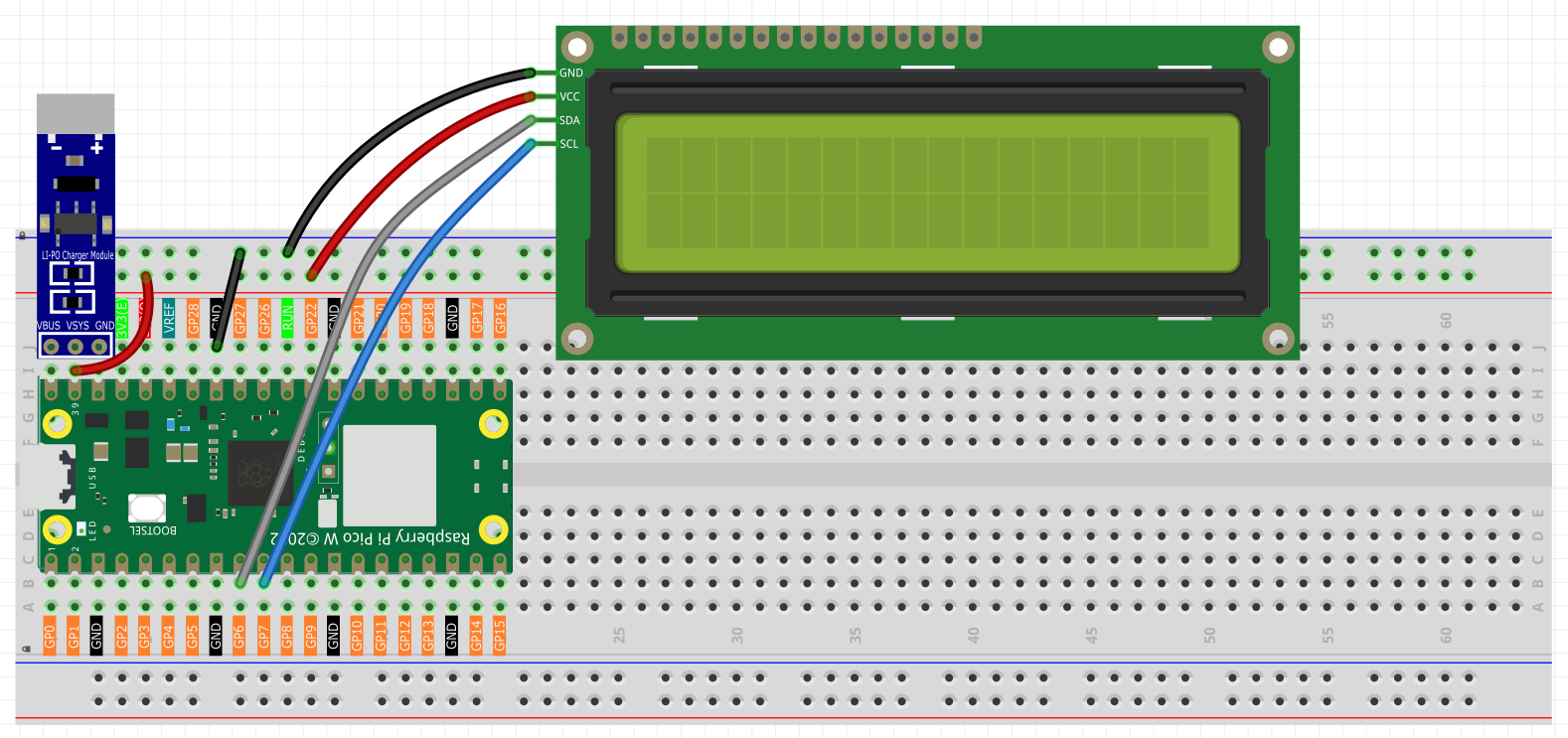
Connect
Warning
Make sure your Li-po Charger Module is connected as shown in the diagram. Otherwise, a short circuit will likely damage your battery and circuitry.
Code
OpenWeatherMap is an online service, owned by OpenWeather Ltd, that provides global weather data via API, including current weather data, forecasts, nowcasts and historical weather data for any geographical location.
Visit OpenWeatherMap website to log in/create an account.
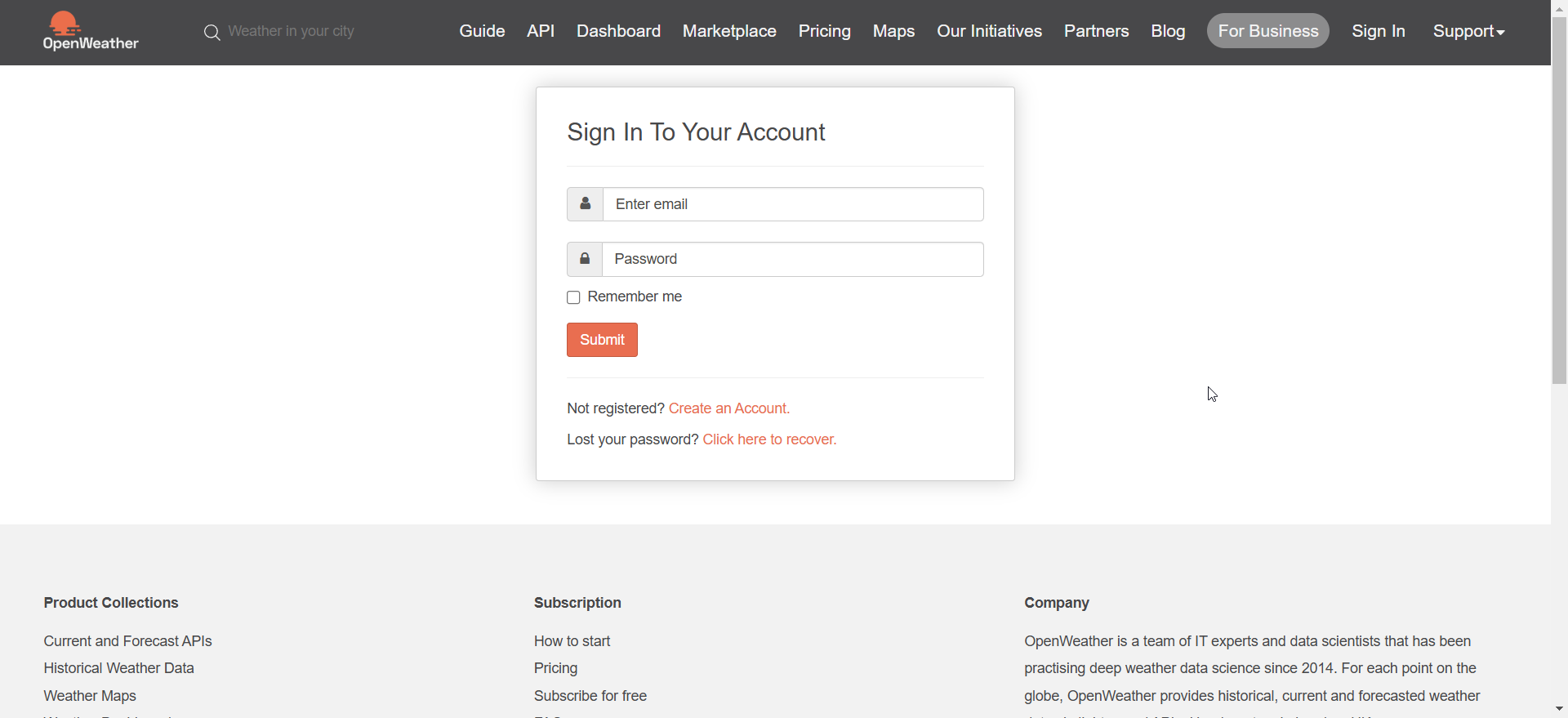
Click into the
APIpage from the navigation bar.
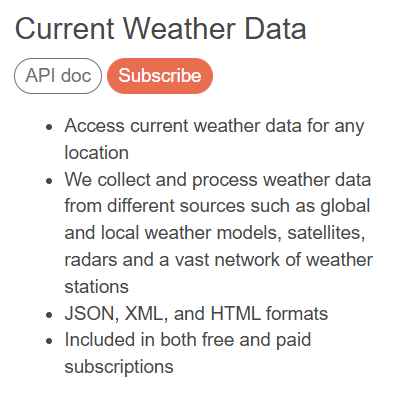
Scroll down to find Current Weather Data and click Subscribe.
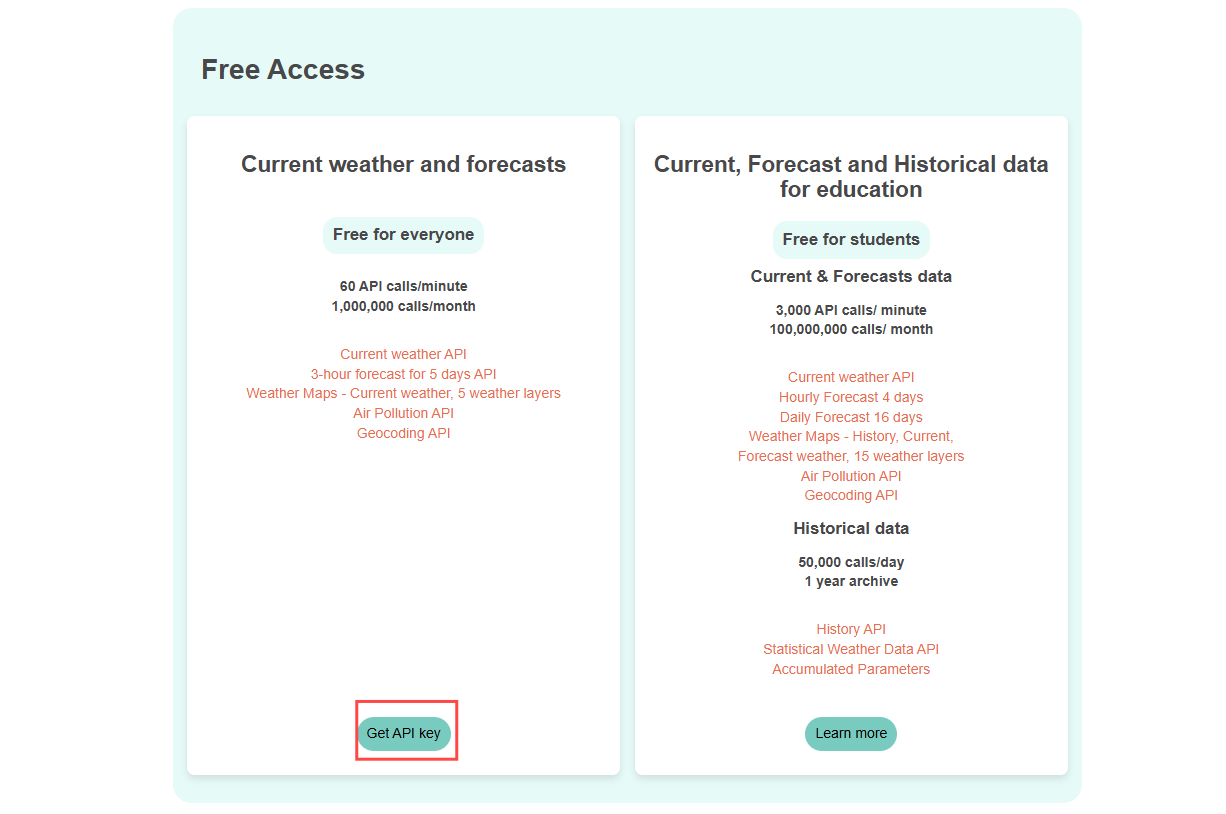
Scroll down to find Free Access and click Get API key. The free plan is perfect for our project.
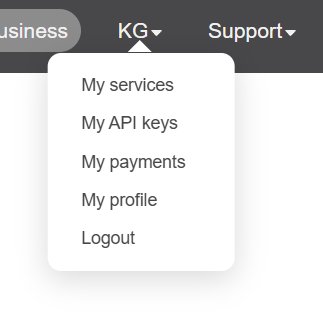
After clicking Get API key, click on My API keys from the dropdown menu in the top-right corner to view your API key.
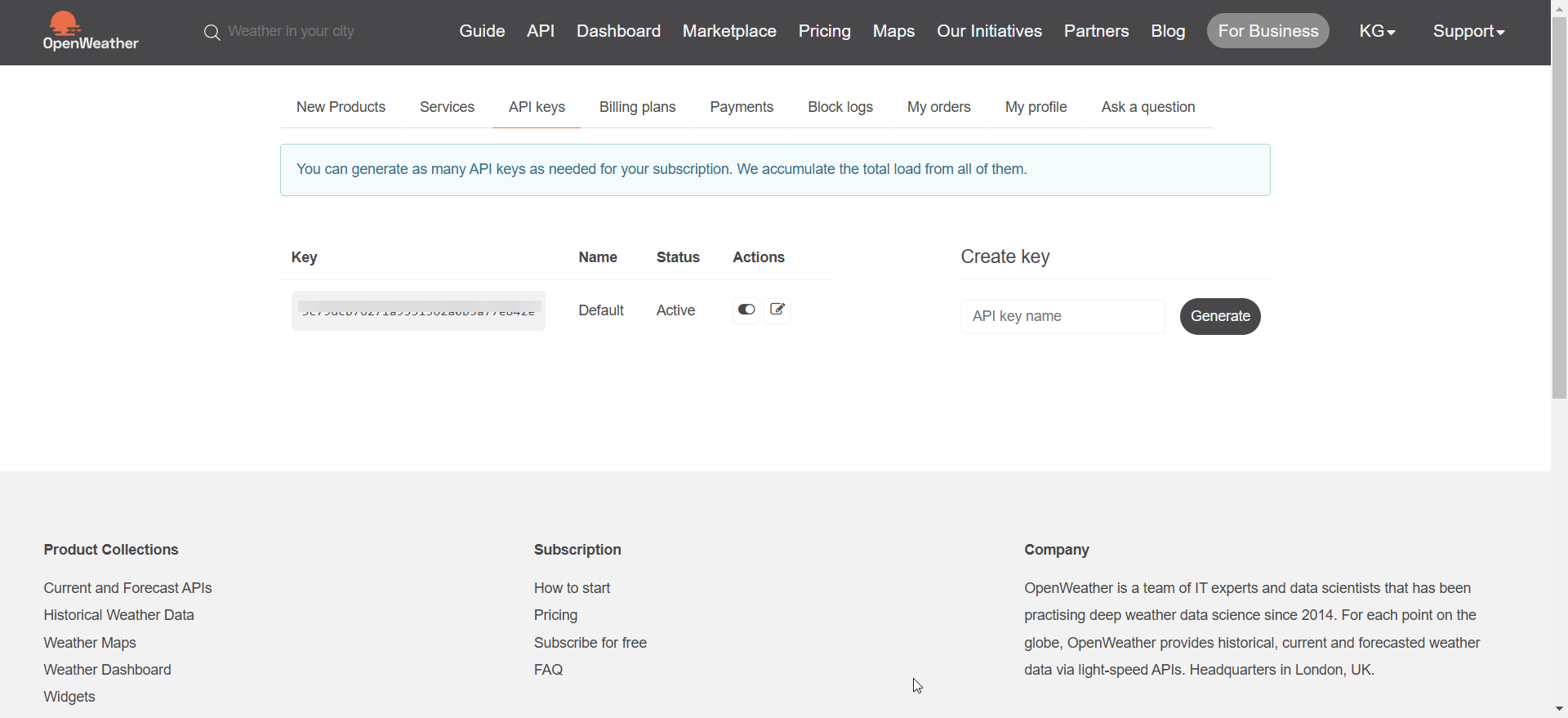
Copy it to the
secrets.pyscript in Raspberry Pi Pico W.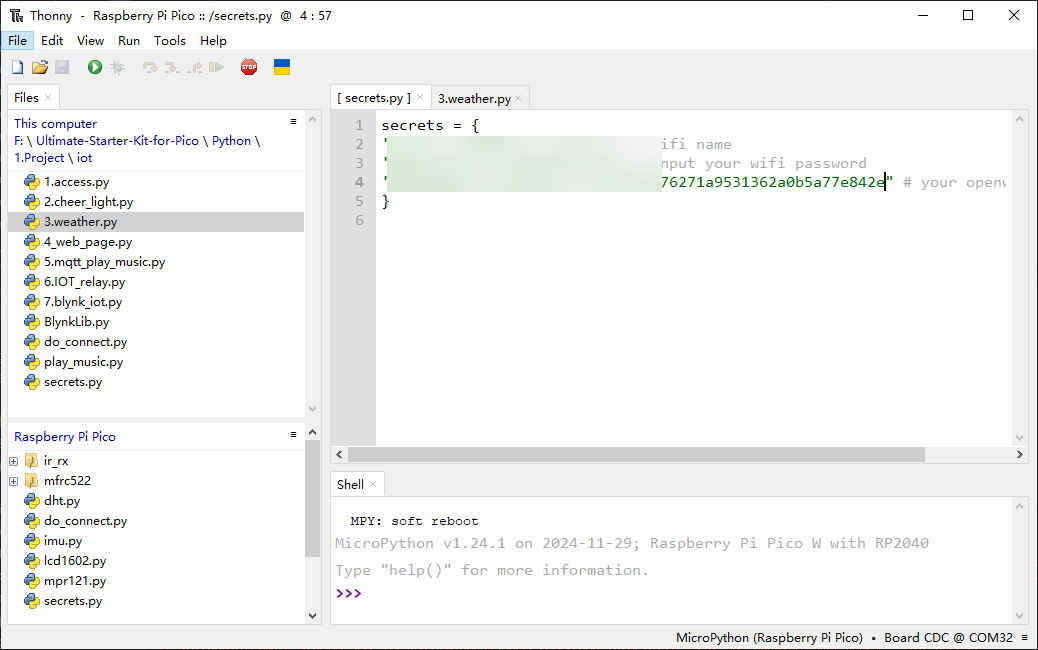
Note
If you don’t have
do_connect.pyandsecrets.pyscripts in your Pico W, please refer to 7.1 Access to the Network to create them.secrets = { 'ssid': 'SSID', 'password': 'PASSWORD', 'openweather_api_key':'OPENWEATHERMAP_API_KEY' }
4. Run the Script
Open the
3_weather.pyfile under the path ofUltimate-Starter-Kit-for-Pico-W/1.Python/iot, click the Run current script button or press F5 to run it.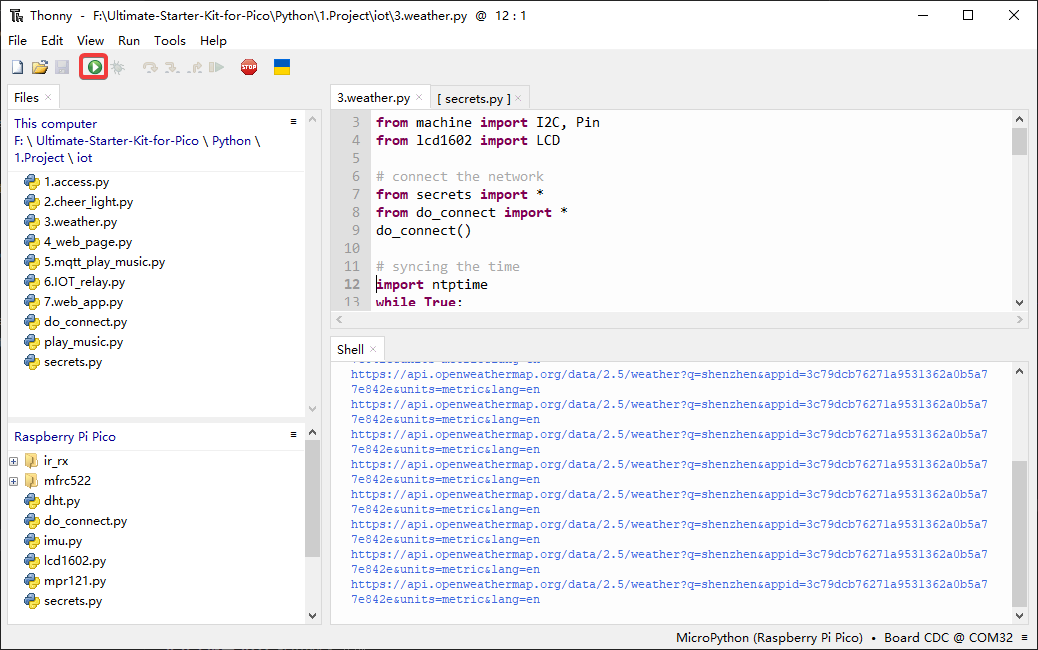
After the script runs, you will see the time and weather information of your location on the I2C LCD1602.
Note
When the code is running, if the screen is blank, you can turn the potentiometer on the back of the module to increase the contrast.
If you want this script to be able to boot up, you can save it to the Raspberry Pi Pico W as
main.py.
"""
Weather Station with LCD Display
Displays real-time weather information and local time on LCD screen
"""
import urequests
import time
import ntptime
from machine import I2C, Pin
from lcd1602 import LCD
from secrets import secrets
from do_connect import do_connect

# Hardware configuration constants
LCD_SDA_PIN = 6                # I2C SDA pin for LCD
LCD_SCL_PIN = 7                # I2C SCL pin for LCD
I2C_FREQUENCY = 400000         # I2C bus frequency
I2C_BUS = 1                    # I2C bus number

# Display timing constants
LCD_CLEAR_DELAY = 200          # LCD clear delay in milliseconds
UPDATE_INTERVAL = 30           # Weather update interval in seconds
NTP_RETRY_DELAY = 2            # Delay between NTP sync attempts

# Weather API constants
DEFAULT_CITY = "Shenzhen"        # Default city for weather
DEFAULT_UNITS = "metric"       # Default measurement units
API_TIMEOUT = 10               # HTTP request timeout in seconds

print("Starting Weather Station...")

# Connect to WiFi
print("Connecting to WiFi...")
do_connect()

# Sync time with NTP server
print("Synchronizing time...")
ntp_attempts = 0
MAX_NTP_ATTEMPTS = 5

while ntp_attempts < MAX_NTP_ATTEMPTS:
    try:
        ntptime.settime()
        print("Time synchronized successfully")
        break
    except OSError as e:
        ntp_attempts += 1
        print(f"Time sync attempt {ntp_attempts}/{MAX_NTP_ATTEMPTS}...")
        time.sleep(NTP_RETRY_DELAY)

if ntp_attempts >= MAX_NTP_ATTEMPTS:
    print("WARNING: Time sync failed, using local time")

# Initialize LCD display
print(f"Initializing LCD on I2C bus {I2C_BUS}")
try:
    i2c = I2C(I2C_BUS, sda=Pin(LCD_SDA_PIN), scl=Pin(LCD_SCL_PIN), freq=I2C_FREQUENCY)
    lcd = LCD(i2c)
    lcd.clear()
    time.sleep_ms(LCD_CLEAR_DELAY)
    lcd.message("Weather Station\nInitializing...")
    print("LCD initialized successfully")
except Exception as e:
    print(f"ERROR: LCD initialization failed - {e}")
    raise

# OpenWeather API unit definitions
TEMPERATURE_UNITS = {
    "standard": "K",      # Kelvin
    "metric": "°C",       # Celsius
    "imperial": "°F",     # Fahrenheit
}

SPEED_UNITS = {
    "standard": "m/s",    # Meters per second
    "metric": "m/s",      # Meters per second
    "imperial": "mph",    # Miles per hour
}

def get_weather_data(city=DEFAULT_CITY, api_key=None, units=DEFAULT_UNITS, lang='zh_cn'):
    """
    Fetch weather data from OpenWeatherMap API

    Args:
        city: City name for weather lookup
        api_key: OpenWeatherMap API key
        units: Measurement units (metric/imperial/standard)
        lang: Language for weather descriptions

    Returns:
        dict: Weather data or None if failed
    """
    if not api_key:
        print("ERROR: No API key provided")
        return None

    try:
        # Build API URL
        url = f"https://api.openweathermap.org/data/2.5/weather?q={city}&appid={api_key}&units={units}&lang={lang}"
        print(f"Fetching weather for {city}...")

        # Make HTTP GET request with timeout
        response = urequests.get(url, timeout=API_TIMEOUT)

        if response.status_code == 200:
            weather_data = response.json()
            response.close()
            print("Weather data retrieved successfully")
            return weather_data
        else:
            print(f"API error: HTTP {response.status_code}")
            response.close()
            return None

    except OSError as e:
        print(f"Network error: {e}")
        return None
    except Exception as e:
        print(f"Weather fetch error: {e}")
        return None

def display_weather_debug(weather_data, units=DEFAULT_UNITS):
    """Print detailed weather information for debugging"""
    if not weather_data:
        print("No weather data to display")
        return

    try:
        timezone_hours = int(weather_data["timezone"] / 3600)
        sunrise = time.localtime(weather_data['sys']['sunrise'] + weather_data["timezone"])
        sunset = time.localtime(weather_data['sys']['sunset'] + weather_data["timezone"])

        print(f'=== Weather Details ===')
        print(f'City: {weather_data["name"]}, {weather_data["sys"]["country"]}')
        print(f'Coordinates: [{weather_data["coord"]["lon"]}, {weather_data["coord"]["lat"]}]')
        print(f'Timezone: UTC{timezone_hours:+d}')
        print(f'Sunrise: {sunrise[3]:02d}:{sunrise[4]:02d}')
        print(f'Sunset: {sunset[3]:02d}:{sunset[4]:02d}')
        print(f'Weather: {weather_data["weather"][0]["main"]}')
        print(f'Temperature: {weather_data["main"]["temp"]:.1f}{TEMPERATURE_UNITS[units]}')
        print(f'Feels like: {weather_data["main"]["feels_like"]:.1f}{TEMPERATURE_UNITS[units]}')
        print(f'Humidity: {weather_data["main"]["humidity"]}%')
        print(f'Pressure: {weather_data["main"]["pressure"]}hPa')

        if "wind" in weather_data:
            print(f'Wind: {weather_data["wind"]["speed"]}{SPEED_UNITS[units]}')
        if "visibility" in weather_data:
            print(f'Visibility: {weather_data["visibility"]}m')

    except KeyError as e:
        print(f"Missing weather data field: {e}")
    except Exception as e:
        print(f"Error displaying weather: {e}")

def update_lcd_display(lcd, weather_data, units=DEFAULT_UNITS):
    """Update LCD with current time and weather information"""
    try:
        if not weather_data:
            lcd.clear()
            lcd.message("Weather Station\nNo Data")
            return

        # Extract weather information
        weather_condition = weather_data["weather"][0]["main"]
        temperature = weather_data["main"]["temp"]
        humidity = weather_data["main"]["humidity"]

        # Calculate local time with timezone offset
        timezone_offset = int(weather_data["timezone"] / 3600)
        local_time = time.localtime()
        hours = (local_time[3] + timezone_offset) % 24
        minutes = local_time[4]

        # Format display strings
        line1 = f"{hours:02d}:{minutes:02d} {weather_condition}"
        line2 = f"{temperature:.1f}{TEMPERATURE_UNITS[units]} {humidity}%rh"

        # Update LCD display
        lcd.clear()
        time.sleep_ms(LCD_CLEAR_DELAY)
        lcd.message(f"{line1}\n{line2}")

        print(f"Display updated: {line1} | {line2}")

    except Exception as e:
        print(f"LCD update error: {e}")
        lcd.clear()
        lcd.message("Display Error\nCheck Connection")


# Main weather monitoring loop
print("Starting weather monitoring...")
print(f"Update interval: {UPDATE_INTERVAL} seconds")

consecutive_errors = 0
MAX_ERRORS = 3

# Show loading message
lcd.clear()
lcd.message("Weather Station\nLoading...")

while True:
    try:
        # Fetch weather data
        weather_data = get_weather_data(
            city=DEFAULT_CITY,
            api_key=secrets['openweather_api_key'],
            units=DEFAULT_UNITS
        )

        if weather_data:
            # Update LCD display with weather info
            update_lcd_display(lcd, weather_data, DEFAULT_UNITS)

            # Reset error counter on success
            consecutive_errors = 0

            # Optional: Print detailed debug info (uncomment to enable)
            # display_weather_debug(weather_data, DEFAULT_UNITS)

        else:
            # Handle weather fetch failure
            consecutive_errors += 1
            print(f"Weather fetch failed ({consecutive_errors}/{MAX_ERRORS})")

            # Show error on LCD
            lcd.clear()
            lcd.message(f"Weather Error\nRetry {consecutive_errors}/{MAX_ERRORS}")

            # Try to reconnect WiFi after multiple failures
            if consecutive_errors >= MAX_ERRORS:
                print("Too many consecutive errors, attempting WiFi reconnect...")
                try:
                    do_connect()
                    consecutive_errors = 0
                    print("WiFi reconnected successfully")
                    lcd.clear()
                    lcd.message("WiFi Reconnected\nResuming...")
                    time.sleep(2)
                except Exception as e:
                    print(f"WiFi reconnect failed: {e}")

        # Wait before next update
        print(f"Next update in {UPDATE_INTERVAL} seconds...")
        time.sleep(UPDATE_INTERVAL)

    except KeyboardInterrupt:
        print("Weather station stopped by user")
        lcd.clear()
        lcd.message("Weather Station\nStopped")
        break

    except Exception as e:
        print(f"Unexpected error in main loop: {e}")
        consecutive_errors += 1
        lcd.clear()
        lcd.message("System Error\nCheck Console")
        time.sleep(UPDATE_INTERVAL)
🔧 How the Professional Weather Station Works
🌐 Step 1: Network Connection & Configuration The system uses professional configuration constants and establishes WiFi connectivity:
# Hardware configuration constants
LCD_SDA_PIN = 6                # I2C SDA pin for LCD
LCD_SCL_PIN = 7                # I2C SCL pin for LCD
UPDATE_INTERVAL = 30           # Weather update interval in seconds
DEFAULT_CITY = "Shenzhen"      # Default city for weather

# Connect to WiFi using professional modules
from do_connect import do_connect
do_connect()
Key Features: - Configurable constants: Easy customization of hardware pins and timing - Professional connection: Uses the robust WiFi connection modules from Chapter 7.1 - Error handling: Built-in connection retry mechanisms
⏰ Step 2: Intelligent Time Synchronization The system synchronizes with global NTP servers with retry logic:
# Sync time with NTP server with professional retry logic
ntp_attempts = 0
MAX_NTP_ATTEMPTS = 5

while ntp_attempts < MAX_NTP_ATTEMPTS:
    try:
        ntptime.settime()
        print("Time synchronized successfully")
        break
    except OSError as e:
        ntp_attempts += 1
        print(f"Time sync attempt {ntp_attempts}/{MAX_NTP_ATTEMPTS}...")
        time.sleep(2)

if ntp_attempts >= MAX_NTP_ATTEMPTS:
    print("WARNING: Time sync failed, using local time")
Smart Features: - Retry mechanism: Attempts up to 5 times with delays - Graceful degradation: Continues operation even if time sync fails - Clear status reporting: Detailed logging of sync attempts
📺 Step 3: Professional LCD Initialization The LCD display is configured with proper I2C settings and error handling:
# Initialize LCD with professional error handling
try:
    i2c = I2C(I2C_BUS, sda=Pin(LCD_SDA_PIN), scl=Pin(LCD_SCL_PIN), freq=400000)
    lcd = LCD(i2c)
    lcd.clear()
    lcd.message("Weather Station\nInitializing...")
    print("LCD initialized successfully")
except Exception as e:
    print(f"ERROR: LCD initialization failed - {e}")
    raise
Professional Features: - Hardware abstraction: Configurable pin assignments - Error detection: Immediate failure detection and reporting - User feedback: Clear initialization status messages
🌤️ Step 4: Advanced Weather Data Fetching The improved weather function includes comprehensive error handling and timeout protection:
def get_weather_data(city="Shenzhen", api_key=None, units="metric", lang='zh_cn'):
    """Fetch weather data with professional error handling"""
    if not api_key:
        print("ERROR: No API key provided")
        return None

    try:
        # Build API URL with all parameters
        url = f"https://api.openweathermap.org/data/2.5/weather?q={city}&appid={api_key}&units={units}&lang={lang}"

        # Make HTTP GET request with timeout protection
        response = urequests.get(url, timeout=10)

        if response.status_code == 200:
            weather_data = response.json()
            response.close()  # Always clean up resources
            return weather_data
        else:
            print(f"API error: HTTP {response.status_code}")
            response.close()
            return None

    except OSError as e:
        print(f"Network error: {e}")
        return None
    except Exception as e:
        print(f"Weather fetch error: {e}")
        return None
Advanced Features: - Timeout protection: Prevents hanging on slow networks - Resource management: Properly closes HTTP connections - Multiple error types: Handles network, API, and general errors - Flexible parameters: Configurable city, units, and language
📊 Step 5: Smart Display Management The LCD display system includes timezone calculations and professional formatting:
def update_lcd_display(lcd, weather_data, units="metric"):
    """Update LCD with time and weather using professional formatting"""
    try:
        # Extract weather information
        weather_condition = weather_data["weather"][0]["main"]
        temperature = weather_data["main"]["temp"]
        humidity = weather_data["main"]["humidity"]

        # Calculate local time with timezone offset
        timezone_offset = int(weather_data["timezone"] / 3600)
        local_time = time.localtime()
        hours = (local_time[3] + timezone_offset) % 24
        minutes = local_time[4]

        # Format display with professional layout
        line1 = f"{hours:02d}:{minutes:02d} {weather_condition}"
        line2 = f"{temperature:.1f}°C {humidity}%rh"

        # Update LCD with proper timing
        lcd.clear()
        time.sleep_ms(200)  # LCD clear delay
        lcd.message(f"{line1}\n{line2}")

    except Exception as e:
        print(f"LCD update error: {e}")
        lcd.message("Display Error\nCheck Connection")
Professional Features: - Timezone handling: Automatic local time calculation - Formatted output: Professional temperature and humidity display - Error recovery: Graceful handling of display errors - User-friendly layout: Optimized for 16x2 LCD format
🔄 Step 6: Intelligent Main Loop with Auto-Recovery The main monitoring loop includes smart error tracking and WiFi reconnection:
# Main loop with professional error recovery
consecutive_errors = 0
MAX_ERRORS = 3

while True:
    try:
        # Fetch weather data
        weather_data = get_weather_data(
            city="Shenzhen",
            api_key=secrets['openweather_api_key'],
            units="metric"
        )

        if weather_data:
            update_lcd_display(lcd, weather_data, "metric")
            consecutive_errors = 0  # Reset on success
        else:
            consecutive_errors += 1
            lcd.message(f"Weather Error\nRetry {consecutive_errors}/3")

            # Auto-reconnect WiFi after multiple failures
            if consecutive_errors >= MAX_ERRORS:
                print("Attempting WiFi reconnect...")
                do_connect()
                consecutive_errors = 0

        # Wait 30 seconds before next update
        time.sleep(30)

    except KeyboardInterrupt:
        lcd.message("Weather Station\nStopped")
        break
    except Exception as e:
        print(f"Unexpected error: {e}")
        lcd.message("System Error\nCheck Console")
Smart Recovery Features: - Error counting: Tracks consecutive failures - Auto-reconnection: Automatically reconnects WiFi after 3 failures - Status display: Shows error status on LCD - Graceful shutdown: Proper cleanup on user interruption - System monitoring: Logs all errors for debugging
✨ Key Improvements in This Professional Version: - 30-second updates: Regular weather monitoring - Timezone accuracy: Displays correct local time for any city - Resource management: Proper HTTP connection cleanup - Error resilience: Continues operation despite temporary failures - Professional logging: Detailed status and error reporting - Configurable parameters: Easy customization for different cities and units - Hardware abstraction: Clean separation of configuration and logic