2.7 Swinging Servo
Meet the servo motor - the “precision mover” of the electronics world! Unlike regular motors that just spin endlessly, servos can move to exact angles and hold their position. Think of it as a robotic arm joint that can point precisely where you tell it to.
Why servos are amazing: - Precise positioning: Move to exact angles (0° to 180°) - Position holding: Stays where you put it, even under load - PWM control: Simple 3-wire connection (power, ground, signal)
Perfect for robot arms, camera gimbals, steering mechanisms, or automatic doors. Let’s create a mesmerizing pendulum motion!
Component List
Raspberry Pi Pico W x1
MicroUSB cable x1
830 Tie-Points Breadboard x1
Servo x1
Jumper Wire Several
Component knowledge
Servo
How servo PWM control works:
PWM Signal Timing: - 0° position: 1ms pulse width → Servo turns fully left - 90° position: 1.5ms pulse width → Servo centers - 180° position: 2ms pulse width → Servo turns fully right
Smooth Movement: Our code moves 1 degree at a time with small delays, creating fluid motion instead of jerky jumps.
Connect
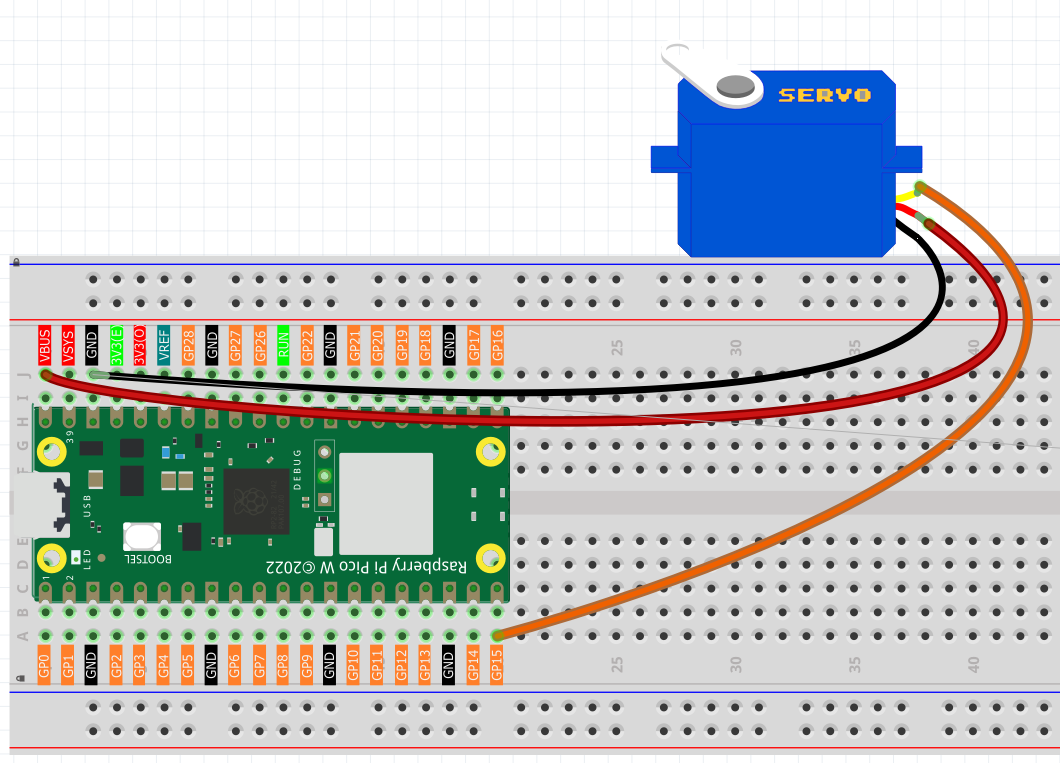
Orange wire is signal and connected to GP15.
Red wire is VCC and connected to VBUS(5V).
Brown wire is GND and connected to GND.
Code
Note
Open the
2.7_swinging_servo.pyfile under the path ofUltimate-Starter-Kit-for-Pico-W\Python\1.Projector copy this code into Thonny, then click “Run Current Script” or simply press F5 to run it.Don’t forget to click on the “MicroPython (Raspberry Pi Pico)” interpreter in the bottom right corner.
After running the code, watch the servo arm create a beautiful pendulum motion! It smoothly sweeps from 0° to 180° (taking 3 seconds), then back to 0° (another 3 seconds), creating a hypnotic back-and-forth rhythm. The movement is perfectly smooth thanks to the 15ms delay between each degree step.
The following is the program code:
"""
Servo Motor Swinging Project

This project demonstrates smooth servo motor control by creating
a continuous swinging motion from 0 to 180 degrees and back.
The servo sweeps back and forth in a pendulum-like motion.

Hardware Requirements:
- Raspberry Pi Pico or compatible board
- Standard servo motor (SG90 or similar)
- Appropriate power supply for servo
"""

# Import required libraries
import machine  # For hardware control (PWM, Pin)
import utime    # For time delays

# Hardware Configuration Constants
SERVO_CONTROL_PIN = 15      # Digital pin connected to servo signal wire
PWM_FREQUENCY = 50          # Standard servo PWM frequency (50Hz)

# Movement Constants
SERVO_MIN_ANGLE = 0         # Minimum servo angle (degrees)
SERVO_MAX_ANGLE = 180       # Maximum servo angle (degrees)
SERVO_STEP_DELAY_MS = 15    # Delay between each degree step (milliseconds)
STARTUP_DELAY_MS = 1000     # Initial delay after servo setup (milliseconds)

# PWM pulse width constants for servo control
MIN_PULSE_WIDTH_MS = 0.5    # Minimum pulse width for 0 degrees (milliseconds)
MAX_PULSE_WIDTH_MS = 2.5    # Maximum pulse width for 180 degrees (milliseconds)
PWM_PERIOD_MS = 20          # PWM period for 50Hz (milliseconds)

def interval_mapping(x, in_min, in_max, out_min, out_max):
    """
    Map a value from one range to another range

    Args:
        x: Input value to be mapped
        in_min: Minimum value of input range
        in_max: Maximum value of input range
        out_min: Minimum value of output range
        out_max: Maximum value of output range

    Returns:
        Mapped value in the output range
    """
    return (x - in_min) * (out_max - out_min) / (in_max - in_min) + out_min

def servo_write(servo_pwm, angle):
    """
    Set servo motor to specific angle

    Args:
        servo_pwm: PWM object controlling the servo
        angle: Target angle in degrees (0-180)
    """
    # Convert angle to pulse width (0.5ms to 2.5ms)
    pulse_width = interval_mapping(angle, SERVO_MIN_ANGLE, SERVO_MAX_ANGLE,
                                   MIN_PULSE_WIDTH_MS, MAX_PULSE_WIDTH_MS)

    # Convert pulse width to duty cycle (0-65535 for 16-bit PWM)
    duty_cycle = int(interval_mapping(pulse_width, 0, PWM_PERIOD_MS, 0, 65535))

    # Apply duty cycle to servo
    servo_pwm.duty_u16(duty_cycle)

def setup_servo():
    """
    Initialize and setup the servo motor

    Returns:
        PWM object configured for servo control
    """
    print("Setting up servo motor...")

    # Create PWM object on the servo control pin
    servo_motor = machine.PWM(machine.Pin(SERVO_CONTROL_PIN))

    # Set PWM frequency to standard servo frequency (50Hz)
    servo_motor.freq(PWM_FREQUENCY)

    # Move servo to starting position (0 degrees)
    servo_write(servo_motor, SERVO_MIN_ANGLE)
    print(f"Servo positioned at {SERVO_MIN_ANGLE} degrees")

    # Wait for servo to reach starting position
    print("Waiting for servo to reach starting position...")
    utime.sleep_ms(STARTUP_DELAY_MS)

    print("Servo setup complete!")
    return servo_motor

def swing_servo_forward(servo_motor):
    """
    Swing servo forward from minimum to maximum angle

    Args:
        servo_motor: PWM object controlling the servo
    """
    print(f"Swinging forward: {SERVO_MIN_ANGLE}° to {SERVO_MAX_ANGLE}°")

    for current_angle in range(SERVO_MIN_ANGLE, SERVO_MAX_ANGLE + 1):
        # Set servo to current angle position
        servo_write(servo_motor, current_angle)

        # Wait for servo to reach position before next step
        utime.sleep_ms(SERVO_STEP_DELAY_MS)

def swing_servo_backward(servo_motor):
    """
    Swing servo backward from maximum to minimum angle

    Args:
        servo_motor: PWM object controlling the servo
    """
    print(f"Swinging backward: {SERVO_MAX_ANGLE}° to {SERVO_MIN_ANGLE}°")

    for current_angle in range(SERVO_MAX_ANGLE, SERVO_MIN_ANGLE - 1, -1):
        # Set servo to current angle position
        servo_write(servo_motor, current_angle)

        # Wait for servo to reach position before next step
        utime.sleep_ms(SERVO_STEP_DELAY_MS)

def perform_swinging_motion(servo_motor):
    """
    Perform complete swinging motion

    Executes one full cycle of servo movement:
    1. Swing from minimum to maximum angle
    2. Swing back from maximum to minimum angle

    Args:
        servo_motor: PWM object controlling the servo
    """
    # Swing forward: from 0 to 180 degrees
    swing_servo_forward(servo_motor)

    # Swing backward: from 180 to 0 degrees
    swing_servo_backward(servo_motor)

def main():
    """
    Main function that runs the servo swinging demonstration
    """
    print("=== Servo Motor Swinging Project ===")
    print("Creating continuous pendulum-like motion")
    print("Press Ctrl+C to stop")
    print()

    # Step 1: Setup the servo motor
    servo_motor = setup_servo()

    try:
        cycle_count = 0
        print("Starting continuous swinging motion...")
        print()

        # Step 2: Continuous swinging loop
        while True:
            cycle_count += 1
            print(f"--- Swing Cycle #{cycle_count} ---")

            # Perform complete swinging motion
            perform_swinging_motion(servo_motor)

            print(f"Cycle #{cycle_count} completed")
            print()

    except KeyboardInterrupt:
        print("\nSwinging motion stopped by user")
        print(f"Total cycles completed: {cycle_count}")

        # Return servo to center position
        print("Returning servo to center position...")
        servo_write(servo_motor, 90)
        utime.sleep_ms(500)

        # Turn off PWM
        servo_motor.deinit()
        print("Servo motor deactivated")

# Run the program
if __name__ == "__main__":
    main()