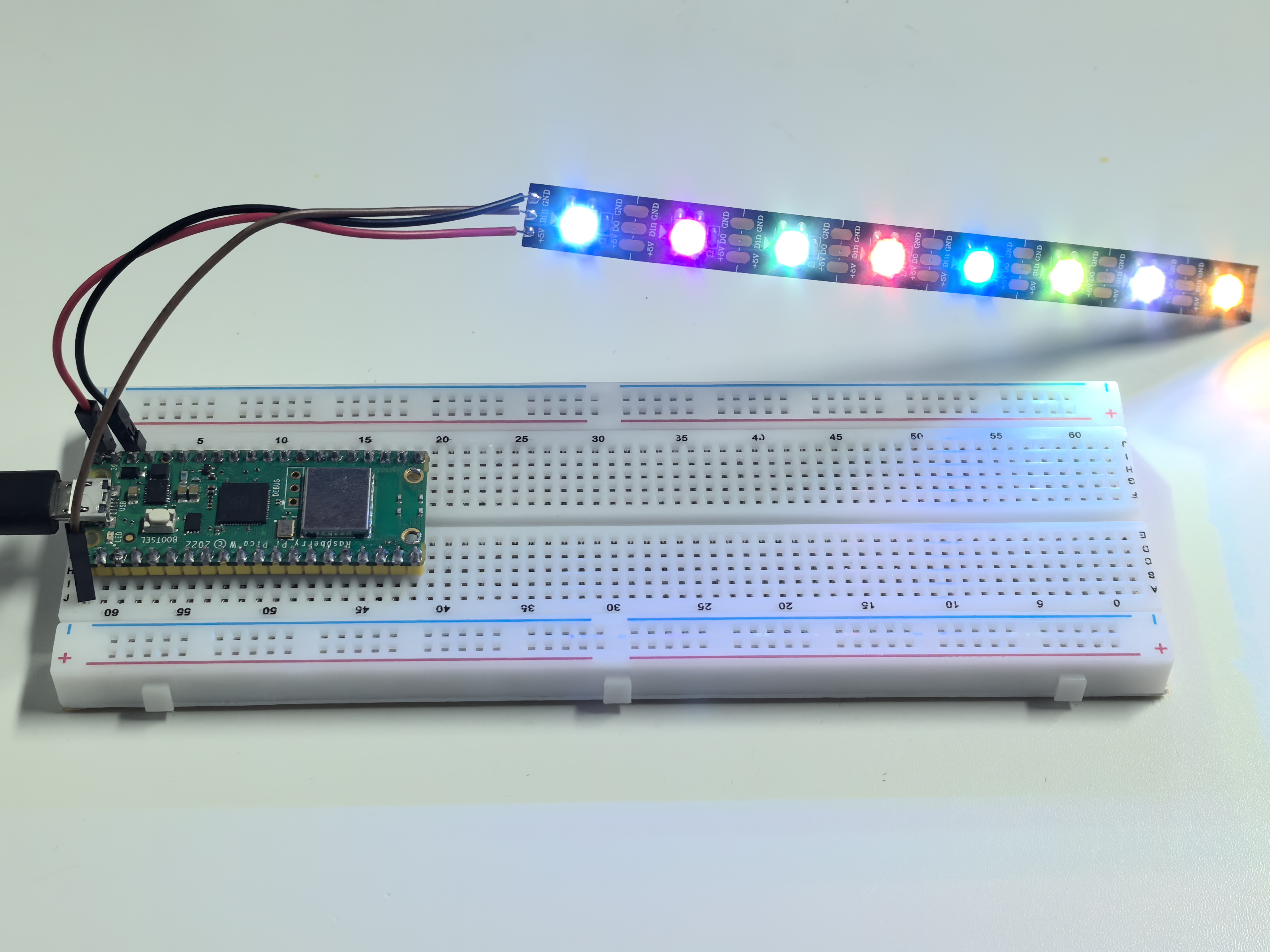
2.3 RGB LED Strip
Time to create amazing light shows! WS2812 RGB LED strips (also called NeoPixels) are like having a string of tiny, smart TVs - each LED can display any color independently and be controlled with just one data wire.
What makes them special: - Individually addressable: Control each LED’s color separately - Chainable: Connect hundreds in a row with just one signal wire - 16.7 million colors: Full RGB color mixing (256 levels × 3 colors) - Built-in intelligence: Each LED has its own tiny computer chip!
We’ll create a chaotic random color display where each LED independently changes to random colors at unpredictable intervals!
Component List
Raspberry Pi Pico W x1
MicroUSB cable x1
830 Tie-Points Breadboard x1
RGB 8 LED Strip x1
Jumper Wire Several
Component knowledge
RGB 8 LED Strip
How WS2812 LED strips work:
Smart Pixel Chain: - Each LED receives 24-bit color data (8 bits each for Red, Green, Blue) - First LED takes its color data, passes remaining data to next LED - This creates a “daisy chain” where one signal controls hundreds of LEDs
Single Wire Control: Unlike regular LEDs that need separate wires for each color, WS2812s use clever timing to send all data through one wire - like sending Morse code at super high speed!
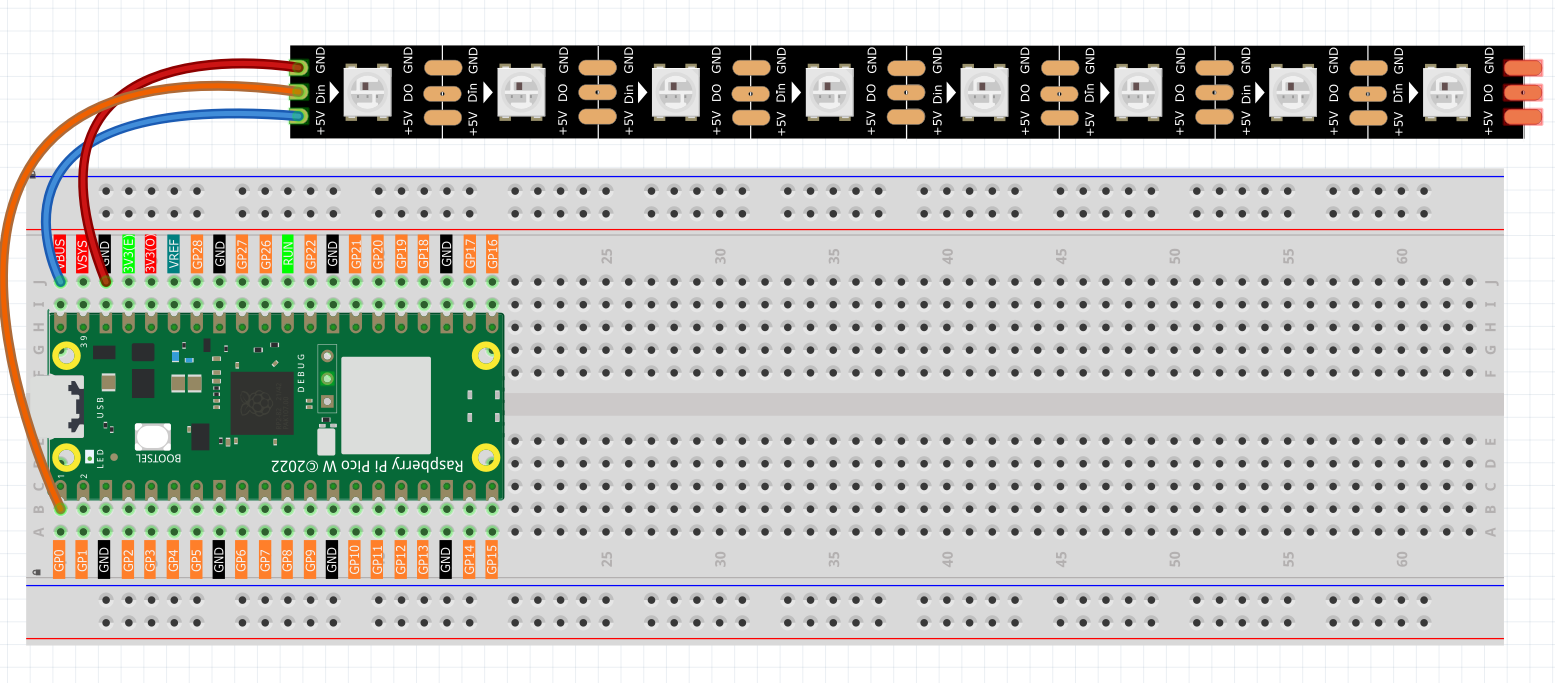
Connect
Warning
One thing you need to pay attention to is current.
Although the LED Strip with any number of LEDs can be used in Pico W, the power of its VBUS pin is limited. Here, we will use eight LEDs, which are safe. But if you want to use more LEDs, you need to add a separate power supply.
Code
Note
Open the
2.3_rgb_led_strip.pyfile under the path ofUltimate-Starter-Kit-for-Pico-W\Python\1.Projector copy this code into Thonny, then click “Run Current Script” or simply press F5 to run it.Don’t forget to click on the “MicroPython (Raspberry Pi Pico)” interpreter in the bottom right corner.
After running the code, watch the mesmerizing chaos! Each LED will start with a random color and change to new random colors at unpredictable intervals (0.5-3 seconds). The serial monitor shows real-time updates when each LED changes color, displaying RGB values and the next change countdown. It’s like having 8 independent disco lights creating a completely unpredictable light show!
The following is the program code:
"""
Chaotic Random LED Strip

Each LED changes to random colors at random intervals,
creating a completely unpredictable light display.
"""

import machine
import utime
import urandom
from ws2812 import WS2812

# Hardware configuration
PIXEL_PIN = 0                       # NeoPixel strip pin
PIXEL_COUNT = 8                     # Number of LEDs in strip

# Random timing ranges (milliseconds)
MIN_CHANGE_TIME = 500               # Minimum time before LED can change color
MAX_CHANGE_TIME = 3000              # Maximum time before LED can change color

# LED data structure to track each LED independently
class LEDData:
    def __init__(self):
        self.next_change_time = 0   # When this LED should change color next
        self.current_color = [0, 0, 0]  # Current color of this LED [R, G, B]

# Array to store data for each LED
leds = [LEDData() for _ in range(PIXEL_COUNT)]

# Initialize WS2812 strip
strip = WS2812(machine.Pin(PIXEL_PIN), PIXEL_COUNT)

def generate_random_color():
    """Generate a completely random RGB color"""
    # Generate random RGB values (0-255 each)
    red = urandom.randint(0, 255)
    green = urandom.randint(0, 255)
    blue = urandom.randint(0, 255)

    # Occasionally generate pure colors for variety
    if urandom.randint(0, 9) == 0:  # 10% chance
        pure_colors = [
            [255, 0, 0],     # Pure red
            [0, 255, 0],     # Pure green
            [0, 0, 255],     # Pure blue
            [255, 255, 0],   # Yellow
            [255, 0, 255],   # Magenta
            [0, 255, 255]    # Cyan
        ]
        return pure_colors[urandom.randint(0, 5)]

    return [red, green, blue]

def print_color_info(color):
    """Print color information in readable format"""
    print(f"RGB({color[0]},{color[1]},{color[2]})", end="")

def setup():
    """Initialize the chaotic LED system"""
    print("=== Chaotic Random LED Strip ===")
    print("Each LED changes color independently at random intervals")
    print("Creating completely unpredictable light patterns")
    print()

    # Initialize each LED with random color and random next change time
    current_time = utime.ticks_ms()

    for i in range(PIXEL_COUNT):
        leds[i].current_color = generate_random_color()
        leds[i].next_change_time = current_time + urandom.randint(MIN_CHANGE_TIME, MAX_CHANGE_TIME)
        strip[i] = leds[i].current_color

        # Show initial color info
        print(f"LED {i} initialized: ", end="")
        print_color_info(leds[i].current_color)
        next_change_seconds = (leds[i].next_change_time - current_time) / 1000.0
        print(f", next change in {next_change_seconds:.1f} seconds")

    # Display initial colors
    strip.write()
    print()
    print("Starting chaotic color changes...")
    print()

def main():
    """Main function"""
    setup()

    try:
        while True:
            current_time = utime.ticks_ms()
            any_led_changed = False

            # Check each LED independently
            for i in range(PIXEL_COUNT):
                # Check if this LED should change color now
                if utime.ticks_diff(current_time, leds[i].next_change_time) >= 0:
                    # Generate new random color
                    leds[i].current_color = generate_random_color()

                    # Set new random time for next change
                    leds[i].next_change_time = current_time + urandom.randint(MIN_CHANGE_TIME, MAX_CHANGE_TIME)

                    # Update the LED
                    strip[i] = leds[i].current_color

                    # Log the change
                    print(f"LED {i} changed to ", end="")
                    print_color_info(leds[i].current_color)
                    next_change_seconds = urandom.randint(MIN_CHANGE_TIME, MAX_CHANGE_TIME) / 1000.0
                    print(f", next change in {next_change_seconds:.1f} seconds")

                    any_led_changed = True

            # Update strip only if any LED changed (efficiency)
            if any_led_changed:
                strip.write()

            # Small delay to prevent excessive CPU usage
            utime.sleep_ms(50)

    except KeyboardInterrupt:
        print("\nChaotic LED display stopped.")

        # Turn off all LEDs safely
        for i in range(PIXEL_COUNT):
            strip[i] = [0, 0, 0]
        strip.write()
        print("All LEDs turned off.")

if __name__ == "__main__":
    main()
Phenomenon