2.2 Musical Melody Player
Now let’s turn our Pico into a music player! We’ll switch from an active buzzer to a passive buzzer - the difference is like switching from a car horn to a piano.
Active vs Passive Buzzer: - Active buzzer: Fixed tone, just beeps (like a smoke alarm) - Passive buzzer: Variable frequency, can play musical notes (like a speaker)
With a passive buzzer, we can control the frequency to create Do-Re-Mi-Fa-Sol-La-Ti notes and play actual melodies! Time to make some music! ♫
Component List
Raspberry Pi Pico W x1
830 Tie-Points Breadboard x1
Transistor S8050 x1
Resistor 1KΩ x1
Passive Buzzer x1
Jumper Wire Several
Component knowledge
transistor
Buzzer
How musical tone generation works:
Frequency Control: - Different frequencies = different musical notes (262Hz = C4, 440Hz = A4, etc.) - MicroPython’s tone() function generates precise frequencies - noteDurations[] controls how long each note plays
Power Amplification: The transistor boosts the signal for clearer, louder music - like adding an amplifier to a guitar!
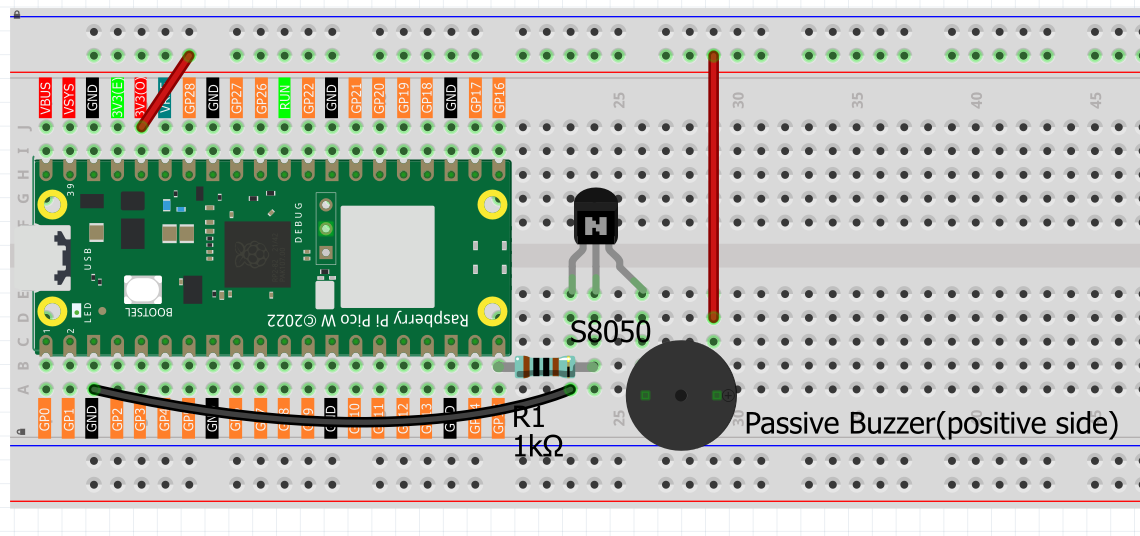
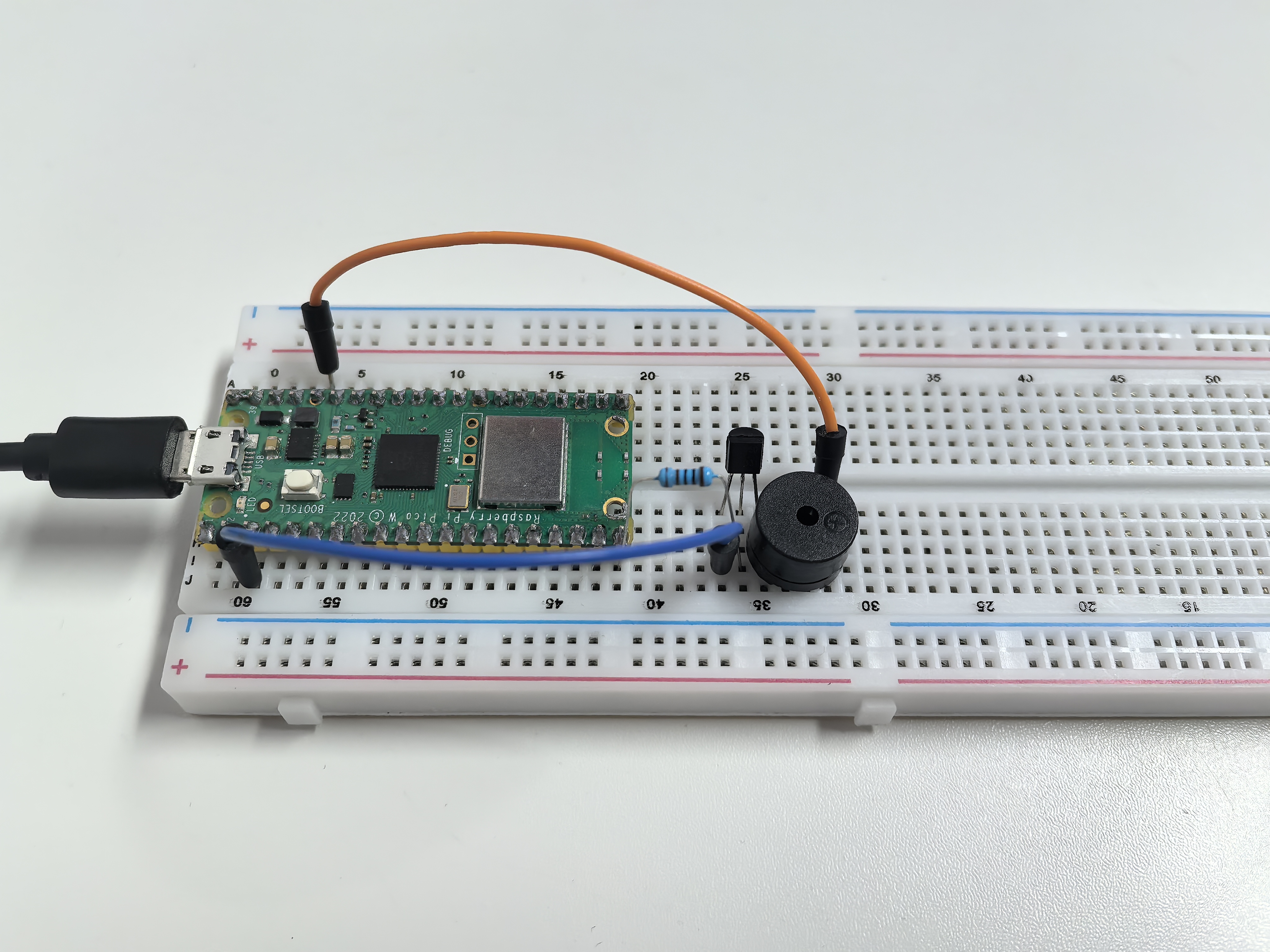
Connect
Two buzzers are included in the kit, we use a passive buzzer (one with an exposed PCB on the back).
The buzzer needs a transistor to work, here we use S8050.
Code
Note
Open the
2.2_musical_melody_player.pyfile under the path ofUltimate-Starter-Kit-for-Pico-W\Python\1.Projector copy this code into Thonny, then click “Run Current Script” or simply press F5 to run it.Don’t forget to click on the “MicroPython (Raspberry Pi Pico)” interpreter in the bottom right corner.
After running the code, enjoy the classic “Twinkle Twinkle Little Star” melody! ✨ The serial monitor shows each note being played with its frequency (Hz). The melody repeats every few seconds, and you can see the musical progression: Do-Do-Sol-Sol-La-La-Sol… It’s like having a tiny digital music box!
The following is the program code:
"""
Musical Melody Player

Plays "Twinkle Twinkle Little Star" melody using
tone generation on a buzzer or speaker.
"""

import machine
import utime

# Musical note frequencies (in Hz)
NOTE_C4 = 262       # Do
NOTE_D4 = 294       # Re
NOTE_E4 = 330       # Mi
NOTE_F4 = 349       # Fa
NOTE_G4 = 392       # Sol
NOTE_A4 = 440       # La
NOTE_B4 = 494       # Ti
NOTE_C5 = 523       # Do (high)

# Pin and timing constants
BUZZER_PIN = 15                     # buzzer connected to pin 15
MELODY_LENGTH = 14                  # number of notes in melody
REPEAT_DELAY = 2000                 # delay before repeating melody
DUTY_CYCLE = 30000                  # PWM duty cycle for buzzer

# "Twinkle Twinkle Little Star" melody
melody = [
    NOTE_C4, NOTE_C4, NOTE_G4, NOTE_G4,    # Twin-kle twin-kle
    NOTE_A4, NOTE_A4, NOTE_G4,             # lit-tle star
    NOTE_F4, NOTE_F4, NOTE_E4, NOTE_E4,    # How I won-der
    NOTE_D4, NOTE_D4, NOTE_C4              # what you are
]

# Note durations (4 = quarter note, 8 = eighth note, 2 = half note)
note_durations = [
    4, 4, 4, 4,     # quarter notes
    4, 4, 2,        # quarter, quarter, half
    4, 4, 4, 4,     # quarter notes
    4, 4, 2         # quarter, quarter, half
]

# Initialize buzzer
buzzer = machine.PWM(machine.Pin(BUZZER_PIN))

def tone(pin, frequency, duration):
    """Generate a tone for specified duration"""
    if frequency > 0:
        pin.freq(frequency)
        pin.duty_u16(DUTY_CYCLE)
    else:
        pin.duty_u16(0)

    utime.sleep_ms(duration)
    pin.duty_u16(0)

def no_tone(pin):
    """Stop tone generation"""
    pin.duty_u16(0)

def play_melody():
    """Play the complete melody"""
    print("♪ Now playing: Twinkle Twinkle Little Star ♪")

    # Play each note in the melody
    for note_index in range(MELODY_LENGTH):
        # Calculate note duration
        note_duration = 1000 // note_durations[note_index]

        # Play the note
        tone(buzzer, melody[note_index], note_duration)

        # Show current note being played
        print(f"Note {note_index + 1}/{MELODY_LENGTH}: {melody[note_index]}Hz")

        # Pause between notes (note duration + 30% for clear separation)
        pause_between_notes = int(note_duration * 1.30)
        utime.sleep_ms(pause_between_notes - note_duration)

        # Stop the tone
        no_tone(buzzer)

    print("Melody complete!")
    print()

def setup():
    """Initialize the melody player"""
    print("=== Musical Melody Player ===")
    print("Playing: Twinkle Twinkle Little Star")
    print()

    # Play the melody once on startup
    play_melody()

def main():
    """Main function"""
    setup()

    try:
        while True:
            # Wait and then repeat the melody
            print("Playing melody again...")
            utime.sleep_ms(REPEAT_DELAY)
            play_melody()

    except KeyboardInterrupt:
        print("\nMelody player stopped.")

        # Turn off buzzer safely
        no_tone(buzzer)
        buzzer.deinit()
        print("Buzzer turned off.")

if __name__ == "__main__":
    main()
Phenomenon