1.5 RGB Light Effects
Now let’s explore RGB LEDs! An RGB LED contains three tiny LEDs (Red, Green, Blue) in one package. By mixing different brightness levels of these three colors, we can create millions of different colors.
Random Color Light
In this project, we’ll make an RGB LED automatically change to random colors, creating a colorful light show!
Component List
Raspberry Pi Pico W x1
830 Tie-Points Breadboard x1
LED-RGB x1
Resistor 220Ω x3
Jumper Wire Several
We use PWM (Pulse Width Modulation) to control brightness: - GP13 controls the Red LED - GP14 controls the Green LED - GP15 controls the Blue LED
By changing the PWM values (0-255), we can mix different amounts of red, green, and blue light to create any color we want!
Component knowledge
RGB-LED
Connect
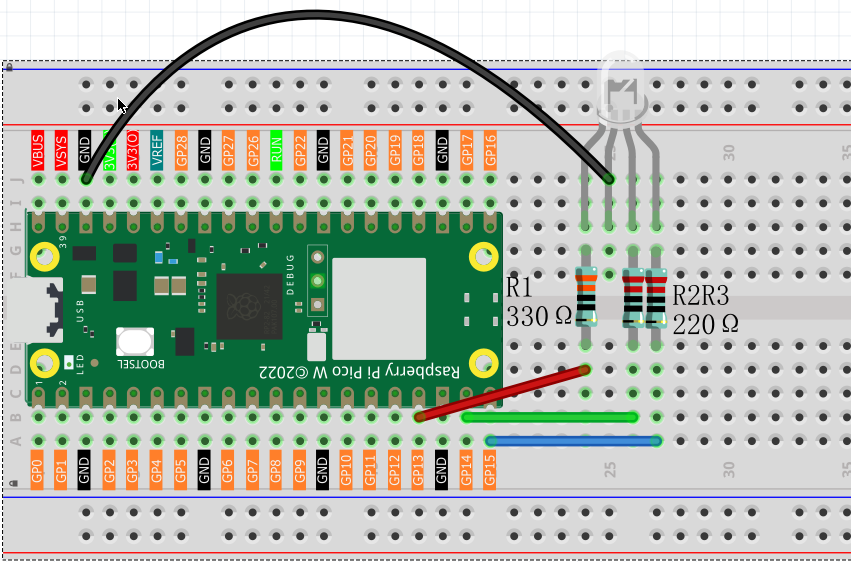
Code
Note
Open the
1.5_rgb_light_effects1.pyfile under the path ofUltimate-Starter-Kit-for-Pico-W\Python\1.Projector copy this code into Thonny, then click “Run Current Script” or simply press F5 to run it.Don’t forget to click on the “MicroPython (Raspberry Pi Pico)” interpreter in the bottom right corner.
RandomColorLight
After running the code, the RGB LED will continuously change colors randomly, creating a beautiful rainbow effect.
The following is the program code:
from machine import Pin, PWM
from random import randint
import time

pins = [13, 14, 15]

pwm0 = PWM(Pin(pins[0]), freq=10000)
pwm1 = PWM(Pin(pins[1]), freq=10000)
pwm2 = PWM(Pin(pins[2]), freq=10000)

def map_value(x, in_min, in_max, out_min, out_max):
    return int((x - in_min) * (out_max - out_min) / (in_max - in_min) + out_min)

def setColor(r, g, b):
    pwm0.duty_u16(65535 - map_value(r, 0, 1023, 0, 65535))
    pwm1.duty_u16(65535 - map_value(g, 0, 1023, 0, 65535))
    pwm2.duty_u16(65535 - map_value(b, 0, 1023, 0, 65535))

try:
    while True:
        red = randint(0, 1023)
        green = randint(0, 1023)
        blue = randint(0, 1023)
        setColor(red, green, blue)
        time.sleep_ms(200)

except KeyboardInterrupt:
    pwm0.deinit()
    pwm1.deinit()
    pwm2.deinit()
Phenomenon
Gradient Color Light
Now let’s create smooth color transitions instead of random jumps! This project uses a color wheel algorithm to create flowing rainbow effects - like a sunset that never ends.
The magic: Instead of random colors, we follow the natural color spectrum (Red → Orange → Yellow → Green → Cyan → Blue → Purple → Red). The transitions are so smooth you’ll see every color blend seamlessly into the next.
After running the code, watch the RGB LED create a mesmerizing continuous rainbow cycle! Each color flows smoothly into the next over 4 seconds (256 steps × 15ms), creating a hypnotic color-changing effect perfect for mood lighting or decoration.
Code
Note
Open the
1.5_rgb_light_effects2.pyfile under the path ofUltimate-Starter-Kit-for-Pico-W\Python\1.Projector copy this code into Thonny, then click “Run Current Script” or simply press F5 to run it.Don’t forget to click on the “MicroPython (Raspberry Pi Pico)” interpreter in the bottom right corner.
Gradient Color Light
The following is the program code:
from machine import Pin, PWM
import time

pins = [13,14,15]

pwm0 = PWM(Pin(pins[0]), freq=1000)
pwm1 = PWM(Pin(pins[1]), freq=1000)
pwm2 = PWM(Pin(pins[2]), freq=1000)

red = 0
green = 0
blue = 0

def map_value(x, in_min, in_max, out_min, out_max):
    return int((x - in_min) * (out_max - out_min) / (in_max - in_min) + out_min)

def setColor():
    pwm0.duty_u16(map_value(red, 0, 255, 0, 65535))
    pwm1.duty_u16(map_value(green, 0, 255, 0, 65535))
    pwm2.duty_u16(map_value(blue, 0, 255, 0, 65535))

def wheel(pos):
    global red, green, blue
    WheelPos = pos % 256

    if WheelPos < 85:
        red = 255 - WheelPos * 3
        green = WheelPos * 3
        blue = 0
    elif WheelPos < 170:
        WheelPos -= 85
        red = 0
        green = 255 - WheelPos * 3
        blue = WheelPos * 3
    else:
        WheelPos -= 170
        red = WheelPos * 3
        green = 0
        blue = 255 - WheelPos * 3

    red = max(0, min(255, red))
    green = max(0, min(255, green))
    blue = max(0, min(255, blue))

try:
    while True:
        for i in range(0, 256):
            wheel(i)
            setColor()
            time.sleep_ms(15)


except KeyboardInterrupt:
    pwm0.deinit()
    pwm1.deinit()
    pwm2.deinit()