1.16 Relay Module Control
Imagine controlling a lamp, fan, or motor with your Pico - that’s exactly what relay modules do! A relay is like a remote-controlled switch that lets low-voltage electronics (like our Pico) safely control high-voltage devices (like household appliances).
Think of it as a “digital hand” that can flip a physical switch. When the Pico sends a signal, the relay clicks and switches the connected device on or off. This is the foundation of home automation - smart lights, automatic fans, timed appliances, and IoT devices!
Safety first: Our relay module includes protection circuits to ensure safe operation.
Warning
Modification of electrical appliances comes with great danger, do not try it lightly, please do it under the guidance of professionals.
Here we only use a simple circuit powered by a breadboard power module as an example to show how to control it using relay.
Component List
Raspberry Pi Pico W x1
MicroUSB cable x1
830 Tie-Points Breadboard x1
Jumper Wire Several
Relay Module x1
Component knowledge
Relay Module
Connect
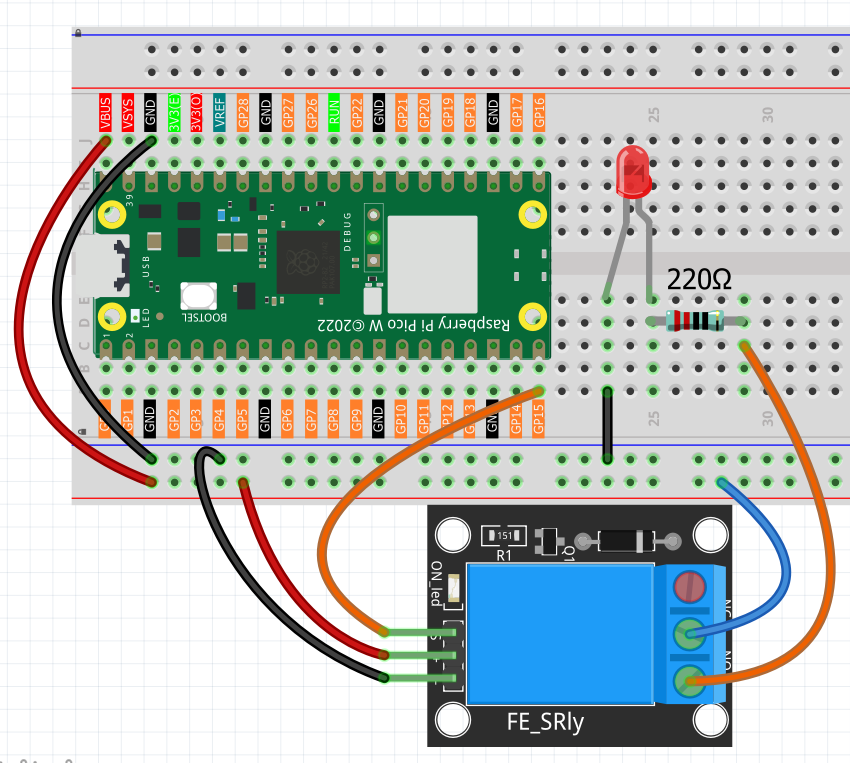
Code
Note
Open the
1.16_relay_module_control.pyfile under the path ofUltimate-Starter-Kit-for-Pico-W\Python\1.Projector copy this code into Thonny, then click “Run Current Script” or simply press F5 to run it.Don’t forget to click on the “MicroPython (Raspberry Pi Pico)” interpreter in the bottom right corner.
After running the code, you’ll hear the satisfying “click-clack” sound of the relay switching every few seconds! The serial monitor shows automatic timing cycles with countdowns - “Relay ON for 2s, turning OFF in 1s”. This demonstrates how you could control any device with precise timing: auto-shutoff lights, timed watering systems, or scheduled appliances.
The following is the program code:
  """
Automatic Relay Controller

Controls a relay to automatically switch external circuits
on and off with timing control and status monitoring.
"""

import machine
import utime

# Pin and timing constants
RELAY_PIN = 15                      # relay control pin
ON_TIME = 3000                      # relay on duration (milliseconds)
OFF_TIME = 2000                     # relay off duration (milliseconds)
STATUS_UPDATE_INTERVAL = 5000       # status update interval (milliseconds)

# Variables for timing and status
last_switch_time = 0
relay_state = False
cycle_count = 0
last_status_time = 0

# Initialize relay
relay = machine.Pin(RELAY_PIN, machine.Pin.OUT)

def setup():
    """Initialize the relay controller"""
    global last_switch_time, relay_state

    print("=== Automatic Relay Controller ===")
    print("Relay switches external circuit ON/OFF automatically")
    print("Can control lights, motors, or other AC/DC devices")
    print()

    # Start with relay OFF
    relay.value(0)
    relay_state = False
    last_switch_time = utime.ticks_ms()
    print("Starting cycle... Relay: OFF")
    print()

def check_relay_timing():
    """Handle relay timing and switching"""
    global last_switch_time, relay_state, cycle_count

    current_time = utime.ticks_ms()
    elapsed_time = utime.ticks_diff(current_time, last_switch_time)

    # Check if it's time to switch state
    should_switch = False

    if relay_state and elapsed_time >= ON_TIME:
        # Relay is ON and ON_TIME has passed - turn OFF
        should_switch = True
    elif not relay_state and elapsed_time >= OFF_TIME:
        # Relay is OFF and OFF_TIME has passed - turn ON
        should_switch = True

    # Switch relay if needed
    if should_switch:
        relay_state = not relay_state
        relay.value(1 if relay_state else 0)
        last_switch_time = current_time

        if relay_state:
            cycle_count += 1

        # Display switch event
        print(f"Cycle #{cycle_count} - Relay switched: {'ON' if relay_state else 'OFF'}")

        if relay_state:
            print("External circuit powered - Device running")
        else:
            print("External circuit off - Device stopped")
        print()

def show_periodic_status():
    """Show periodic status updates"""
    global last_status_time

    current_time = utime.ticks_ms()

    # Show status every 5 seconds
    if utime.ticks_diff(current_time, last_status_time) >= STATUS_UPDATE_INTERVAL:
        time_in_state = utime.ticks_diff(current_time, last_switch_time)

        if relay_state:
            remaining_time = ON_TIME - time_in_state
            print(f"Status: Relay ON for {time_in_state // 1000}s, turning OFF in {remaining_time // 1000}s")
        else:
            remaining_time = OFF_TIME - time_in_state
            print(f"Status: Relay OFF for {time_in_state // 1000}s, turning ON in {remaining_time // 1000}s")

        last_status_time = current_time

def main():
    """Main function"""
    setup()

    try:
        while True:
            # Check if it's time to switch relay state
            check_relay_timing()

            # Show continuous status every 5 seconds
            show_periodic_status()

            # Small delay to prevent excessive CPU usage
            utime.sleep_ms(100)

    except KeyboardInterrupt:
        print("\nRelay controller stopped.")
        print(f"Total cycles completed: {cycle_count}")

        # Turn off relay safely
        relay.value(0)
        print("Relay turned OFF - System safe.")

if __name__ == "__main__":
    main()