4.3 Digital Stopwatch
Now let’s build a digital timer using a 4-digit display! This is like having four 7-segment displays working together to show numbers from 0000 to 9999 - perfect for clocks, stopwatches, or counters.
The clever trick - Multiplexing: Instead of controlling all 4 digits simultaneously (which would need tons of wires), we use a “visual magic trick”. We rapidly flash each digit one at a time: - Display “1” on digit 1, others off - Display “2” on digit 2, others off - Display “3” on digit 3, others off - Display “4” on digit 4, others off - Repeat super fast!
Your eyes can’t see the flashing (it happens 200+ times per second), so you see “1234” continuously!
Component List
Raspberry Pi Pico W x1
MicroUSB cable x1
830 Tie-Points Breadboard x1
4-Digit 7-Segment Display x1
Resistor 220Ω x4
74HC595 x1
Jumper Wire Several
Component knowledge
4-Digit 7-Segment Display
How our timer display works:
Smart Control System: - 74HC595: Controls which segments light up (the digit pattern) - 4 digit select pins: Choose which of the 4 displays is active - Multiplexing code: Rapidly switches between digits to create the illusion
Timer Logic: The code counts elapsed seconds since startup and breaks the number into individual digits (1234 → 1, 2, 3, 4), then displays each digit in rapid succession.
Connect
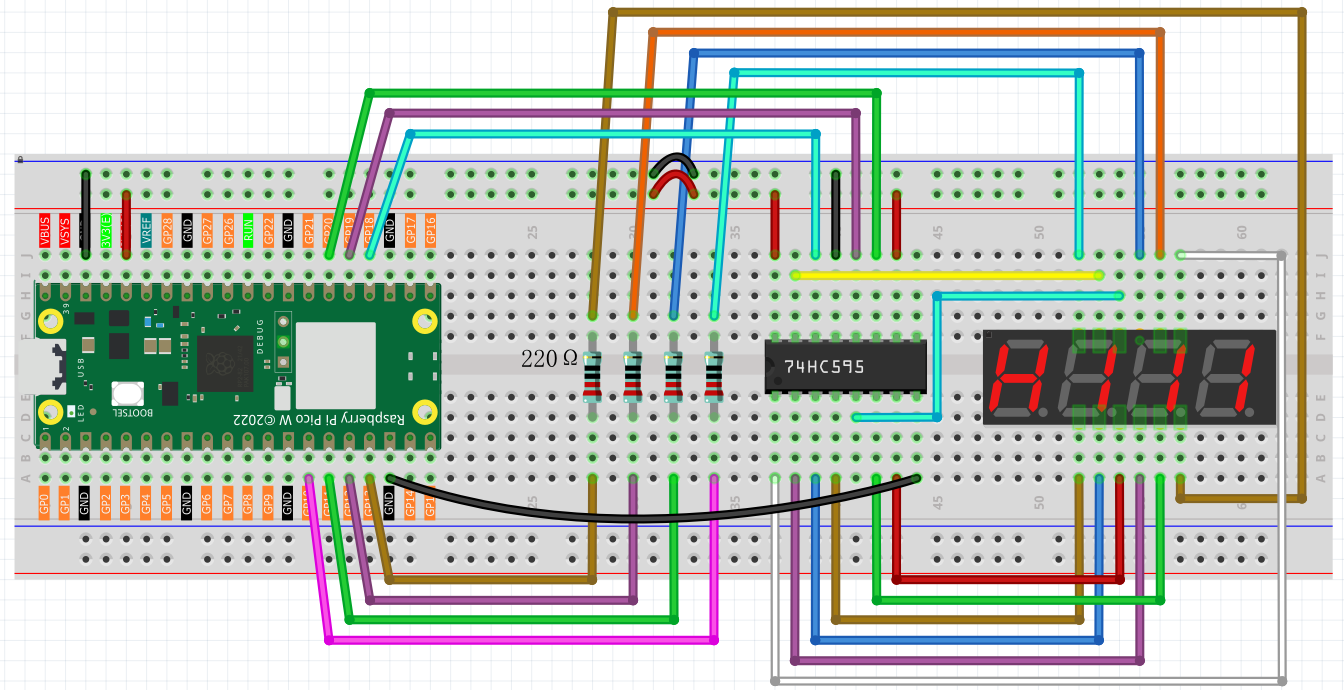
Code
Note
Open the
4.3_digital_stopwatch.inofile under the path ofUltimate-Starter-Kit-for-Pico-W\Arduino\1.Projector copy this code into Thonny, then click “Run Current Script” or simply press F5 to run it.Or copy this code into Arduino IDE.
Don’t forget to select the board(Raspberry Pi Pico) and the correct port before clicking the Upload button.
After running the code, watch your homemade digital timer come to life! The display counts up in seconds from 0000, incrementing every second: 0001, 0002, 0003… all the way to 9999, then resets. You’ve just built a functional digital stopwatch using multiplexing techniques found in real electronic devices!
The following is the program code:
/*
 * 4-Digit Timer Display Project
 *
 * Shows elapsed time in seconds on 4 seven-segment displays.
 * Counts from 0000 to 9999, then resets automatically.
 * Hardware: 74HC595 shift register + 4 seven-segment displays
 */

// Pin connections
#define LATCH_PIN             19    // 74HC595 latch pin
#define CLOCK_PIN             20    // 74HC595 clock pin
#define DATA_PIN              18    // 74HC595 data pin

// Digit control pins (which digit to show)
const int digitPins[4] = {13, 12, 11, 10};  // Ones, tens, hundreds, thousands

// Patterns for digits 0-9 on seven-segment display
byte digitCode[10] = {
  0x3F,  // 0
  0x06,  // 1
  0x5B,  // 2
  0x4F,  // 3
  0x66,  // 4
  0x6D,  // 5
  0x7D,  // 6
  0x07,  // 7
  0x7F,  // 8
  0x6F   // 9
};

unsigned long startTime = 0;


void setup() {
  // Set up 74HC595 pins
  pinMode(LATCH_PIN, OUTPUT);
  pinMode(CLOCK_PIN, OUTPUT);
  pinMode(DATA_PIN, OUTPUT);

  // Set up digit control pins
  for (int i = 0; i < 4; i++) {
    pinMode(digitPins[i], OUTPUT);
    digitalWrite(digitPins[i], HIGH);  // Turn off all digits
  }

  startTime = millis();  // Start the timer
}

void loop() {
  // Calculate how many seconds have passed
  unsigned int seconds = (millis() - startTime) / 1000;

  // Reset timer after 9999 seconds
  if (seconds > 9999) {
    startTime = millis();
    seconds = 0;
  }

  // Show the timer on display
  showNumber(seconds);
}

// Display a 4-digit number
void showNumber(int number) {
  // Break number into individual digits
  int digit1 = number % 10;        // Ones
  int digit2 = (number / 10) % 10; // Tens
  int digit3 = (number / 100) % 10;// Hundreds
  int digit4 = (number / 1000) % 10;// Thousands

  // Show each digit quickly in turn (multiplexing)
  showDigit(0, digit1);
  showDigit(1, digit2);
  showDigit(2, digit3);
  showDigit(3, digit4);
}

// Show one digit at specified position
void showDigit(int position, int digit) {
  // Turn off all digits first
  for (int i = 0; i < 4; i++) {
    digitalWrite(digitPins[i], HIGH);
  }

  // Turn on the digit we want
  digitalWrite(digitPins[position], LOW);

  // Send the digit pattern to 74HC595
  digitalWrite(LATCH_PIN, LOW);
  shiftOut(DATA_PIN, CLOCK_PIN, MSBFIRST, digitCode[digit]);
  digitalWrite(LATCH_PIN, HIGH);

  delay(1);  // Small delay for smooth display
}