4.1 74HC595
Meet the 74HC595 shift register - your GPIO pin multiplier! Instead of using 8 precious GPIO pins to control 8 LEDs, this clever chip lets you control 8 outputs using only 3 pins. It’s like having a digital assistant that takes your commands and distributes them to multiple devices.
The magic: Send an 8-bit number (like 11010011) to the chip, and it instantly sets 8 output pins to match that pattern. Need to control 16 LEDs? Chain two 74HC595s together! Need 24? Chain three! The possibilities are endless.
Perfect for LED displays, digital clocks, status indicators, or any project where you need lots of outputs but have limited GPIO pins.
Component List
Raspberry Pi Pico W x1
MicroUSB cable x1
830 Tie-Points Breadboard x1
LED x8
Resistor 220Ω x8
74HC595 x1
Jumper Wire Several
Component knowledge
74HC595
How the 74HC595 works:
Simple 3-Pin Control: - DATA pin: Send your 8-bit pattern one bit at a time - CLOCK pin: Each pulse shifts the data one position - LATCH pin: When pulsed, all 8 outputs update simultaneously
The Process: 1. Send 8 bits of data (one per clock pulse) 2. Pulse the latch pin 3. All 8 LEDs instantly show your pattern!
Connect
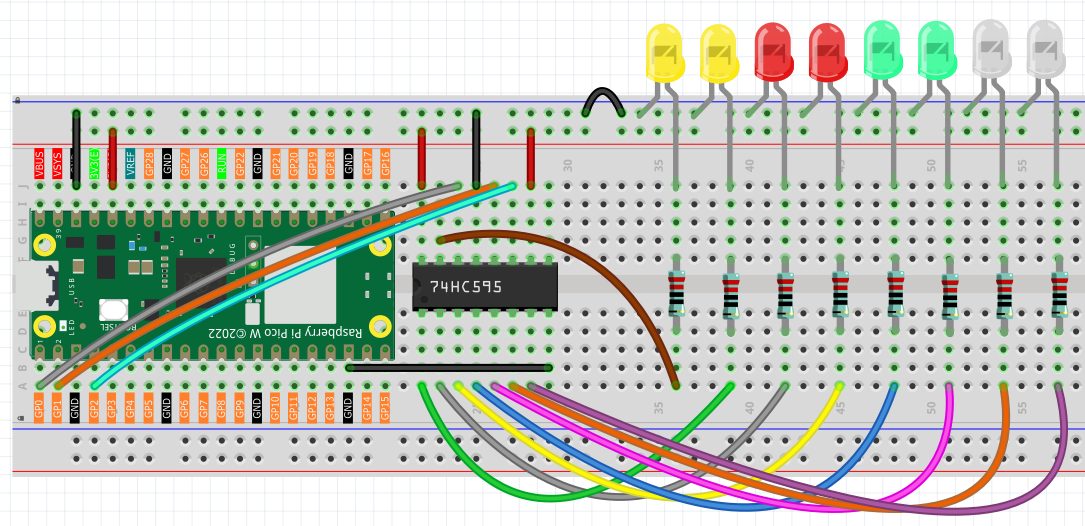
Code
Note
Open the
4.1_74hc595.inofile under the path ofUltimate-Starter-Kit-for-Pico-W\Arduino\1.Projector copy this code into Thonny, then click “Run Current Script” or simply press F5 to run it.Or copy this code into Arduino IDE.
Don’t forget to select the board(Raspberry Pi Pico) and the correct port before clicking the Upload button.
After running the code, watch the mesmerizing “flowing water” LED effect! The LEDs progressively light up from left to right, creating a smooth flowing pattern, then flow back in the opposite direction. This demonstrates how you can create complex animations with just simple binary patterns sent to the 74HC595.
The following is the program code:
/*
 * 74HC595 Smooth Flowing LED Project
 *
 * Creates a smooth flowing LED effect using a 74HC595 shift register.
 * LEDs progressively light up and then smoothly flow back, creating
 * a continuous mesmerizing water-like animation.
 *
 * Hardware: 74HC595 shift register + 8 LEDs with current limiting resistors
 */

// 74HC595 Pin Configuration Constants
#define LATCH_PIN             1     // ST_CP (Storage Register Clock) - pin 12 of 74HC595
#define CLOCK_PIN             2     // SH_CP (Shift Register Clock) - pin 11 of 74HC595
#define DATA_PIN              0     // DS (Serial Data Input) - pin 14 of 74HC595

// Animation Timing Constants
#define FLOW_DELAY_MS         150   // Delay between flow steps for smooth animation

// Smooth Flowing LED Patterns
byte flowPatterns[] = {
  0b00000000,  // All off (start)
  0b00000001,  // 1 LED
  0b00000011,  // 2 LEDs
  0b00000111,  // 3 LEDs
  0b00001111,  // 4 LEDs
  0b00011111,  // 5 LEDs
  0b00111111,  // 6 LEDs
  0b01111111,  // 7 LEDs
  0b11111111,  // All on (peak)
  0b11111110,  // Flow back: 7 LEDs
  0b11111100,  // 6 LEDs
  0b11111000,  // 5 LEDs
  0b11110000,  // 4 LEDs
  0b11100000,  // 3 LEDs
  0b11000000,  // 2 LEDs
  0b10000000,  // 1 LED
  0b00000000   // All off (end cycle)
};

/**
 * Arduino Setup Function
 * Initializes the 74HC595 control pins as outputs.
 */
void setup() {
  pinMode(LATCH_PIN, OUTPUT);
  pinMode(CLOCK_PIN, OUTPUT);
  pinMode(DATA_PIN, OUTPUT);

  // Clear all LEDs initially
  updateShiftRegister(0b00000000);
}

/**
 * Arduino Main Loop Function
 * Continuously runs the smooth flowing LED animation.
 */
void loop() {
  runSmoothFlowingAnimation();
}

/**
 * Update Shift Register
 * Sends data to 74HC595 and latches the output.
 */
void updateShiftRegister(byte pattern) {
  digitalWrite(LATCH_PIN, LOW);                    // Prepare for data
  shiftOut(DATA_PIN, CLOCK_PIN, MSBFIRST, pattern); // Send 8 bits
  digitalWrite(LATCH_PIN, HIGH);                   // Latch data to outputs
}

/**
 * Run Smooth Flowing Animation
 * Creates a mesmerizing water-like flow effect that builds up
 * all LEDs then smoothly flows back to create continuous motion.
 */
void runSmoothFlowingAnimation() {
  for (int i = 0; i < sizeof(flowPatterns); i++) {
    updateShiftRegister(flowPatterns[i]);
    delay(FLOW_DELAY_MS);
  }
}