2.1 Buzzer Alert Patterns
Time to add sound to our projects! An active buzzer is like an electronic horn that makes sound when powered. Unlike LEDs that you see, buzzers let you hear your project’s status - perfect for alarms, notifications, and alerts.
Active buzzers are “plug and play” - just send power and they beep! We’ll create different alert patterns: standard alerts, SOS emergency signals, quick warnings, and alarm sounds.
Component List
Raspberry Pi Pico W x1
830 Tie-Points Breadboard x1
Transistor S8050 x1
Resistor 1KΩ x1
Active Buzzer x1
Jumper Wire Several
Component knowledge
transistor
Buzzer
Why use a transistor with the buzzer?
Power Amplification: - Buzzer needs more current than Pico can safely provide - Transistor acts as a “current amplifier” - small signal controls big current - Result: MUCH louder sound than direct connection
Protection: The 1KΩ resistor protects both the transistor and Pico from overcurrent.
Connect
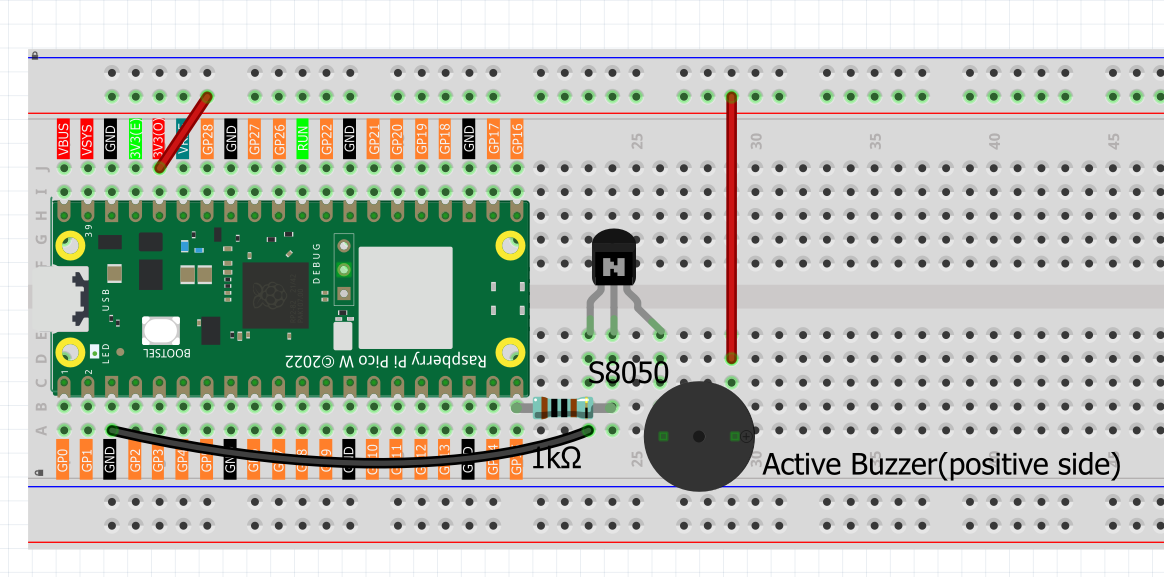
Two types of buzzers are included in the kit. We need to use active buzzer. Turn them around, the sealed back (not the exposed PCB) is the one we want.
The buzzer needs to use a transistor when working, here we use S8050 (NPN Transistor).
Code
Note
Open the
2.1_buzzer_alert_patterns.inofile under the path ofUltimate-Starter-Kit-for-Pico-W\Arduino\1.Projector copy this code into Thonny, then click “Run Current Script” or simply press F5 to run it.Or copy this code into Arduino IDE.
Don’t forget to select the board(Raspberry Pi Pico) and the correct port before clicking the Upload button.
After running the code, listen to the different alert patterns! You’ll hear 4 distinct sounds cycling every few seconds: Standard Alert (4 short beeps), SOS Signal (morse code … — …), Quick Warning (rapid beeps), and Alarm Sound (alternating tones). Perfect for learning different notification patterns!
The following is the program code:
/*
  Buzzer Alert System

  Creates different alert patterns using a buzzer.
  Demonstrates various beeping patterns for different situations.
*/

// Pin and timing constants
const int BUZZER_PIN = 15;          // buzzer connected to pin 15
const int PATTERN_DELAY = 2000;     // delay between different patterns
const int TOTAL_PATTERNS = 4;       // number of alert patterns

// Alert pattern settings
const int SHORT_BEEP = 200;         // short beep duration
const int LONG_BEEP = 600;          // long beep duration
const int QUICK_PAUSE = 100;        // short pause between beeps
const int MEDIUM_PAUSE = 400;       // medium pause between beeps

void setup() {
  // Set up buzzer pin
  pinMode(BUZZER_PIN, OUTPUT);

  // Initialize serial communication
  Serial.begin(115200);
  Serial.println("=== Buzzer Alert System ===");
  Serial.println("Demonstrating different alert patterns:");
  Serial.println("1. Standard Alert  2. SOS Signal");
  Serial.println("3. Quick Warning   4. Alarm Sound");
  Serial.println();
}

void loop() {
  // Cycle through different alert patterns

  // Pattern 1: Standard Alert (4 short beeps)
  Serial.println("Pattern 1: Standard Alert");
  standardAlert();
  delay(PATTERN_DELAY);

  // Pattern 2: SOS Signal (... --- ...)
  Serial.println("Pattern 2: SOS Emergency Signal");
  sosSignal();
  delay(PATTERN_DELAY);

  // Pattern 3: Quick Warning (rapid beeps)
  Serial.println("Pattern 3: Quick Warning");
  quickWarning();
  delay(PATTERN_DELAY);

  // Pattern 4: Alarm Sound (alternating tones)
  Serial.println("Pattern 4: Alarm Sound");
  alarmSound();
  delay(PATTERN_DELAY);

  Serial.println("--- Cycle Complete ---");
  Serial.println();
}

// Pattern 1: Standard alert - 4 short beeps
void standardAlert() {
  for (int i = 0; i < 4; i++) {
    digitalWrite(BUZZER_PIN, HIGH);
    delay(SHORT_BEEP);
    digitalWrite(BUZZER_PIN, LOW);
    delay(MEDIUM_PAUSE);
  }
}

// Pattern 2: SOS signal - 3 short, 3 long, 3 short
void sosSignal() {
  // Three short beeps (S)
  for (int i = 0; i < 3; i++) {
    digitalWrite(BUZZER_PIN, HIGH);
    delay(SHORT_BEEP);
    digitalWrite(BUZZER_PIN, LOW);
    delay(QUICK_PAUSE);
  }

  delay(MEDIUM_PAUSE);

  // Three long beeps (O)
  for (int i = 0; i < 3; i++) {
    digitalWrite(BUZZER_PIN, HIGH);
    delay(LONG_BEEP);
    digitalWrite(BUZZER_PIN, LOW);
    delay(QUICK_PAUSE);
  }

  delay(MEDIUM_PAUSE);

  // Three short beeps (S)
  for (int i = 0; i < 3; i++) {
    digitalWrite(BUZZER_PIN, HIGH);
    delay(SHORT_BEEP);
    digitalWrite(BUZZER_PIN, LOW);
    delay(QUICK_PAUSE);
  }
}

// Pattern 3: Quick warning - 6 rapid beeps
void quickWarning() {
  for (int i = 0; i < 6; i++) {
    digitalWrite(BUZZER_PIN, HIGH);
    delay(SHORT_BEEP / 2);  // very short beeps
    digitalWrite(BUZZER_PIN, LOW);
    delay(QUICK_PAUSE);
  }
}

// Pattern 4: Alarm sound - alternating short and long beeps
void alarmSound() {
  for (int i = 0; i < 3; i++) {
    // Short beep
    digitalWrite(BUZZER_PIN, HIGH);
    delay(SHORT_BEEP);
    digitalWrite(BUZZER_PIN, LOW);
    delay(QUICK_PAUSE);

    // Long beep
    digitalWrite(BUZZER_PIN, HIGH);
    delay(LONG_BEEP);
    digitalWrite(BUZZER_PIN, LOW);
    delay(QUICK_PAUSE);
  }
}