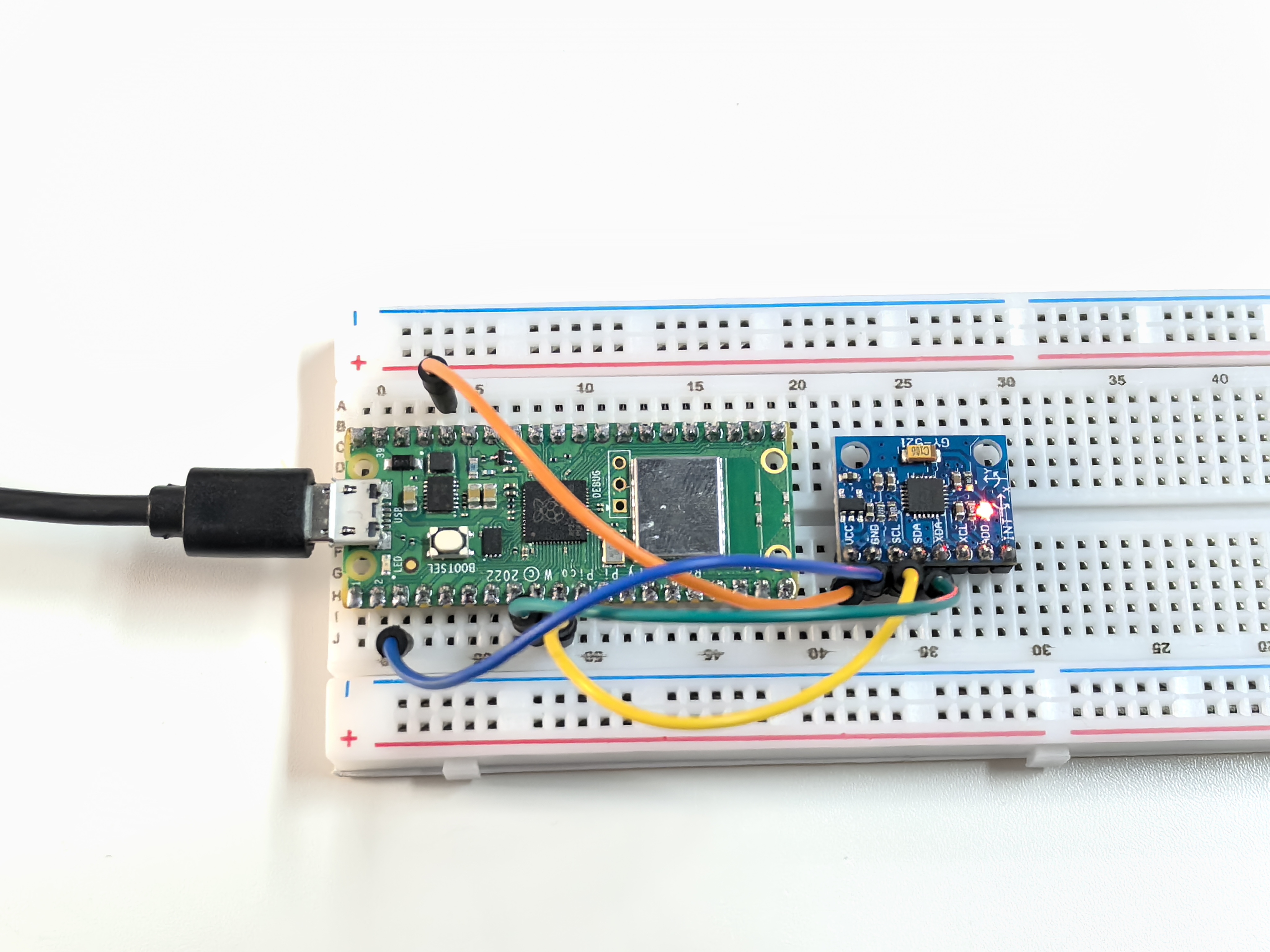
5.3 GY521 Module
Meet the GY-521 - your project’s motion detective! This tiny sensor is like having a smartphone’s motion sensing brain in your project. It combines two powerful sensors in one:
6-Axis Motion Sensing: - 3-axis Accelerometer: Detects acceleration and gravity (up/down, left/right, forward/back) - 3-axis Gyroscope: Detects rotation speed (pitch, roll, yaw) - Together: They create a complete picture of how your project is moving in 3D space!
Real-world applications: Drone stabilization, gaming controllers, fitness trackers, earthquake detectors, or self-balancing robots. It’s the same technology that makes your phone rotate the screen and helps drones stay stable!
Component List
Raspberry Pi Pico W x1
MicroUSB cable x1
830 Tie-Points Breadboard x1
MPU6050 Module
Jumper Wire Several
Component knowledge
MPU6050 Module
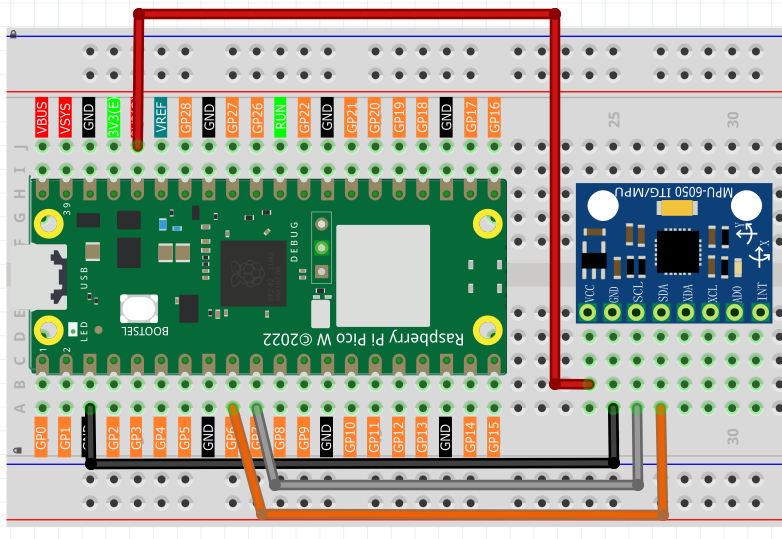
Connect
Code
Note
Open the
5.3_gy521_module.pyfile under the path ofUltimate-Starter-Kit-for-Pico-W\Python\1.Projector copy this code into Thonny, then click “Run Current Script” or simply press F5 to run it.Don’t forget to click on the “MicroPython (Raspberry Pi Pico)” interpreter in the bottom right corner.
After running the code, try rotating and moving the sensor in different directions! Watch the real-time 6-axis data streaming:
Gyroscope values (°/s): Show rotation speed - twist the sensor to see these change
Accelerometer values (g-force): Show acceleration and tilt - flip the sensor to see gravity effects
Calculated angles: The code even calculates tilt angles for you!
Try different movements: gentle tilting, fast spinning, or shaking to see how this “digital motion detector” responds to every movement.
The following is the program code:
"""
MPU6050 accelerometer and gyroscope reader (MicroPython)

Refactor goals:
- English comments and prints
- Replace magic numbers with named constants
- Keep original functionality (periodic reading and printing)
- Beginner-friendly, minimal OOP wrapper
"""

from imu import MPU6050
from machine import I2C, Pin
import time
import math


# =========================
# Constants (I2C and timing)
# =========================
I2C_ID = 1
I2C_SDA_PIN = 6
I2C_SCL_PIN = 7
I2C_FREQ_HZ = 400_000

READING_INTERVAL_MS = 500
SAMPLE_INTERVAL_S = READING_INTERVAL_MS / 1000.0

# Complementary filter parameters
RAD_TO_DEG = 57.2957795

# Sensor configuration to mirror Arduino example
MPU6050_I2C_ADDR = 0x68
REG_GYRO_CONFIG = 0x1B
REG_ACCEL_CONFIG = 0x1C
REG_CONFIG = 0x1A

ACCEL_RANGE_G = 8       # ±8g
GYRO_RANGE_DPS = 500    # ±500 °/s
FILTER_BANDWIDTH_HZ = 21


class MPU6050Sensor:
    """Small helper to read MPU6050 over I2C."""

    def __init__(self, i2c_id: int, sda_pin: int, scl_pin: int, freq_hz: int) -> None:
        self.i2c = I2C(i2c_id, sda=Pin(sda_pin), scl=Pin(scl_pin), freq=freq_hz)
        self.mpu = MPU6050(self.i2c)

    def configure(self, accel_range_g: int, gyro_range_dps: int, dlpf_hz: int) -> None:
        """Configure accel/gyro ranges and low-pass filter to match Arduino settings."""
        # Map accel range (g) to AFS_SEL bits
        accel_sel_map = {2: 0, 4: 1, 8: 2, 16: 3}
        accel_sel = accel_sel_map.get(accel_range_g, 2)  # default ±8g
        self.i2c.writeto_mem(MPU6050_I2C_ADDR, REG_ACCEL_CONFIG, bytes([accel_sel << 3]))

        # Map gyro range (°/s) to FS_SEL bits
        gyro_sel_map = {250: 0, 500: 1, 1000: 2, 2000: 3}
        gyro_sel = gyro_sel_map.get(gyro_range_dps, 1)  # default ±500 dps
        self.i2c.writeto_mem(MPU6050_I2C_ADDR, REG_GYRO_CONFIG, bytes([gyro_sel << 3]))

        # Map DLPF bandwidth (Hz) to CONFIG.DLPF_CFG
        dlpf_map = {260: 0, 184: 1, 94: 2, 44: 3, 21: 4, 10: 5, 5: 6}
        dlpf = dlpf_map.get(dlpf_hz, 4)  # default 21 Hz
        self.i2c.writeto_mem(MPU6050_I2C_ADDR, REG_CONFIG, bytes([dlpf]))

    def read_acceleration(self):
        """Return accelerometer vector as a tuple (x, y, z)."""
        a = self.mpu.accel
        return (a.x, a.y, a.z)

    def read_gyroscope(self):
        """Return gyroscope vector as a tuple (x, y, z)."""
        g = self.mpu.gyro
        return (g.x, g.y, g.z)

def calculate_x_rotation_deg(ax: float, ay: float, az: float) -> float:
    """Calculate X-rotation (roll) from accelerometer data, degrees."""
    return math.atan2(ay, math.sqrt(ax * ax + az * az)) * RAD_TO_DEG


def calculate_y_rotation_deg(ax: float, ay: float, az: float) -> float:
    """Calculate Y-rotation (pitch) from accelerometer data, degrees (negative sign to match convention)."""
    return -math.atan2(ax, math.sqrt(ay * ay + az * az)) * RAD_TO_DEG


def main() -> None:
    sensor = MPU6050Sensor(I2C_ID, I2C_SDA_PIN, I2C_SCL_PIN, I2C_FREQ_HZ)
    print("MPU6050 sensor reading started.")
    print("MPU6050 sensor is ready.\n")
    try:
        # Configure sensor ranges and filter to mirror Arduino example
        sensor.configure(ACCEL_RANGE_G, GYRO_RANGE_DPS, FILTER_BANDWIDTH_HZ)
        while True:
            ax, ay, az = sensor.read_acceleration()
            gx, gy, gz = sensor.read_gyroscope()
            x_rot_deg = calculate_x_rotation_deg(ax, ay, az)
            y_rot_deg = calculate_y_rotation_deg(ax, ay, az)

            # Match Arduino-like formatted output
            print("--- Gyroscope (°/s) ---")
            print("X: %.2f | Y: %.2f | Z: %.2f" % (gx, gy, gz))

            print("--- Accelerometer (g) ---")
            print("X: %.2f | Y: %.2f | Z: %.2f" % (ax, ay, az))

            print("--- Calculated Rotation (°) ---")
            print("X-Rotation: %.1f | Y-Rotation: %.1f" % (x_rot_deg, y_rot_deg))

            print("\n----------------------------------\n")
            time.sleep(SAMPLE_INTERVAL_S)
    except KeyboardInterrupt:
        print("Measurement stopped by user.")


if __name__ == "__main__":
    main()
Phenomenon