4.2 7-Segment Display
Welcome to the world of 7-segment displays - those classic digital digits you see everywhere! From digital clocks to calculators, microwave timers to elevator floors, these displays create numbers in that familiar “digital font” we all recognize.
What’s inside: It’s actually 8 individual LEDs cleverly arranged: - 7 segments (labeled a, b, c, d, e, f, g) form the “8” shape - 1 decimal point (dp) for numbers like “3.14”
The pin layout is illustrated in the figure below.
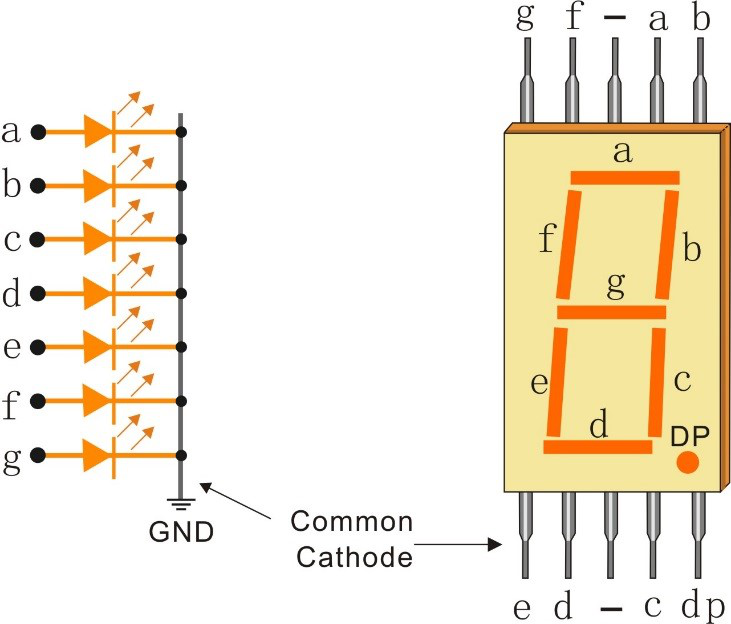
The challenge: Controlling 8 LEDs normally needs 8 GPIO pins! But with our 74HC595 from the previous lesson, we can control all segments using just 3 pins. Smart engineering!
Component List
Raspberry Pi Pico W x1
MicroUSB cable x1
830 Tie-Points Breadboard x1
7-segment Display x1
Resistor 220Ω x1
74HC595 x1
Jumper Wire Several
Component knowledge
7-segment Display
How we create numbers:
Pattern Magic: - Each digit (0-9, A-F) has a unique LED segment pattern - Example: “8” = all 7 segments ON, “1” = only segments b+c ON - We store these patterns as binary codes and send them to the 74HC595
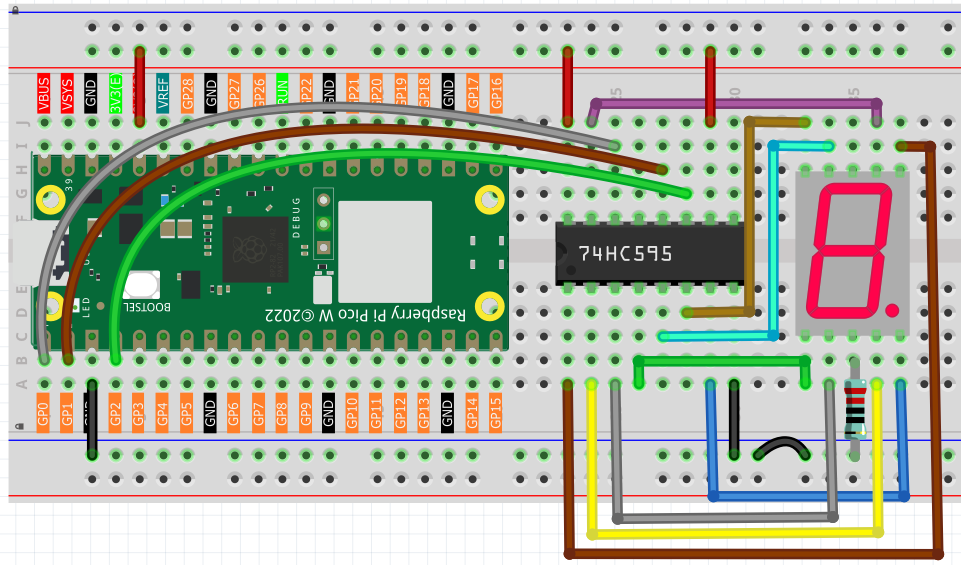
Same 74HC595 setup as before, but now the 8 outputs connect to the display segments instead of individual LEDs.
Connect
Code
Note
Open the
4.2_7_segment_display.pyfile under the path ofUltimate-Starter-Kit-for-Pico-W\Python\1.Projector copy this code into Thonny, then click “Run Current Script” or simply press F5 to run it.Don’t forget to click on the “MicroPython (Raspberry Pi Pico)” interpreter in the bottom right corner.
After running the code, watch your 7-segment display count through all hexadecimal digits (0-9, A-F)! Each digit appears for about 0.8 seconds, showing how different segment combinations create recognizable numbers and letters. It’s like watching a tiny digital counter in action!
The following is the program code:
"""
7-Segment Hexadecimal Display Project

Displays hexadecimal digits 0-F on a 7-segment display using
a 74HC595 shift register. Cycles through all 16 hex digits
continuously for educational and debugging purposes.

Hardware: 74HC595 shift register + Common Cathode 7-segment display
"""

import machine
import time

# 74HC595 Pin Configuration Constants
DATA_PIN = 0        # DS (Serial Data Input) - pin 14 of 74HC595
LATCH_PIN = 1       # ST_CP (Storage Register Clock) - pin 12 of 74HC595
CLOCK_PIN = 2       # SH_CP (Shift Register Clock) - pin 11 of 74HC595

# Display Timing Constants
DIGIT_DISPLAY_MS = 800  # Time to display each digit (milliseconds)

class SevenSegmentHexDisplay:
    """7-Segment Hexadecimal Display Controller"""

    def __init__(self):
        """Initialize 74HC595 control pins and display patterns"""
        self.data_pin = machine.Pin(DATA_PIN, machine.Pin.OUT)
        self.latch_pin = machine.Pin(LATCH_PIN, machine.Pin.OUT)
        self.clock_pin = machine.Pin(CLOCK_PIN, machine.Pin.OUT)

        # 7-Segment Display Patterns for Hexadecimal Digits (0-F)
        # Pattern format: gfedcba (bit 7 unused, bits 6-0 control segments)
        self.hex_digit_patterns = [
            0x3F,  # 0: segments a,b,c,d,e,f
            0x06,  # 1: segments b,c
            0x5B,  # 2: segments a,b,d,e,g
            0x4F,  # 3: segments a,b,c,d,g
            0x66,  # 4: segments b,c,f,g
            0x6D,  # 5: segments a,c,d,f,g
            0x7D,  # 6: segments a,c,d,e,f,g
            0x07,  # 7: segments a,b,c
            0x7F,  # 8: segments a,b,c,d,e,f,g
            0x6F,  # 9: segments a,b,c,d,f,g
            0x77,  # A: segments a,b,c,e,f,g
            0x7C,  # b: segments c,d,e,f,g
            0x39,  # C: segments a,d,e,f
            0x5E,  # d: segments b,c,d,e,g
            0x79,  # E: segments a,d,e,f,g
            0x71   # F: segments a,e,f,g
        ]

        # Hex character labels for display
        self.hex_labels = ['0', '1', '2', '3', '4', '5', '6', '7',
                          '8', '9', 'A', 'b', 'C', 'd', 'E', 'F']

        # Clear display initially
        self.update_display(0x00)
        print("7-Segment Hexadecimal Display initialized")

    def update_display(self, pattern):
        """
        Update Display
        Sends pattern data to 74HC595 and updates the 7-segment display.
        """
        self.latch_pin.low()                           # Prepare for data transmission
        self.shift_out_msb_first(pattern)              # Send 8-bit pattern
        self.latch_pin.high()                          # Latch data to display

    def shift_out_msb_first(self, data):
        """
        Shift out data MSB first (Most Significant Bit first)
        Equivalent to Arduino's shiftOut() function
        """
        for bit in range(7, -1, -1):  # Start from bit 7 down to bit 0
            self.clock_pin.low()
            time.sleep_ms(1)

            # Extract the bit value
            bit_value = (data >> bit) & 1
            self.data_pin.value(bit_value)
            time.sleep_ms(1)

            self.clock_pin.high()
            time.sleep_ms(1)

    def display_hexadecimal_sequence(self):
        """
        Display Hexadecimal Sequence
        Cycles through all hexadecimal digits 0-F with appropriate timing.
        """
        for digit_index in range(16):
            pattern = self.hex_digit_patterns[digit_index]
            label = self.hex_labels[digit_index]

            self.update_display(pattern)
            print(f"Displaying: {label} (0x{pattern:02X} = 0b{pattern:08b})")
            time.sleep_ms(DIGIT_DISPLAY_MS)

    def display_single_digit(self, hex_digit):
        """
        Display a single hexadecimal digit
        hex_digit: integer 0-15 or string '0'-'F'
        """
        if isinstance(hex_digit, str):
            hex_digit = int(hex_digit, 16)

        if 0 <= hex_digit <= 15:
            pattern = self.hex_digit_patterns[hex_digit]
            label = self.hex_labels[hex_digit]
            self.update_display(pattern)
            print(f"Displaying: {label}")
        else:
            print(f"Error: Invalid hex digit {hex_digit}. Must be 0-15 or '0'-'F'")

    def display_custom_pattern(self, pattern):
        """Display a custom 7-segment pattern"""
        self.update_display(pattern)
        print(f"Custom pattern: 0x{pattern:02X} = 0b{pattern:08b}")

    def clear_display(self):
        """Clear the display (turn off all segments)"""
        self.update_display(0x00)
        print("Display cleared")

    def test_all_segments(self):
        """Test all segments individually"""
        print("Testing all segments individually...")

        segment_names = ['a', 'b', 'c', 'd', 'e', 'f', 'g']

        for i in range(7):
            pattern = 1 << i  # Light up segment i
            self.update_display(pattern)
            print(f"Segment {segment_names[i]}: 0b{pattern:08b}")
            time.sleep_ms(500)

        # Test all segments on
        self.update_display(0x7F)
        print("All segments: 0b01111111")
        time.sleep_ms(1000)

        self.clear_display()
        print("Segment test complete")

    def run_continuous_display(self):
        """Run continuous hexadecimal display"""
        print("Starting hexadecimal display sequence...")
        print("Displaying digits 0-F continuously")
        print("Press Ctrl+C to stop")

        try:
            while True:
                self.display_hexadecimal_sequence()
                print("--- Sequence complete, restarting ---")
        except KeyboardInterrupt:
            print("\nDisplay stopped")
            self.clear_display()

# Create and run the 7-segment display controller
if __name__ == "__main__":
    try:
        display = SevenSegmentHexDisplay()

        # Optional: Test all segments first
        # display.test_all_segments()
        # time.sleep_ms(1000)

        # Run continuous hexadecimal display
        display.run_continuous_display()

    except Exception as e:
        print(f"Error: {e}")